
Send iMessage from your business through a Mac you own.
The SMS8 iMessage API sends iMessage from a Mac you own with the SMS8 Gateway app. Send from GoHighLevel, Zapier, your code or a webhook. Every reply comes back to the same inbox as your SMS.
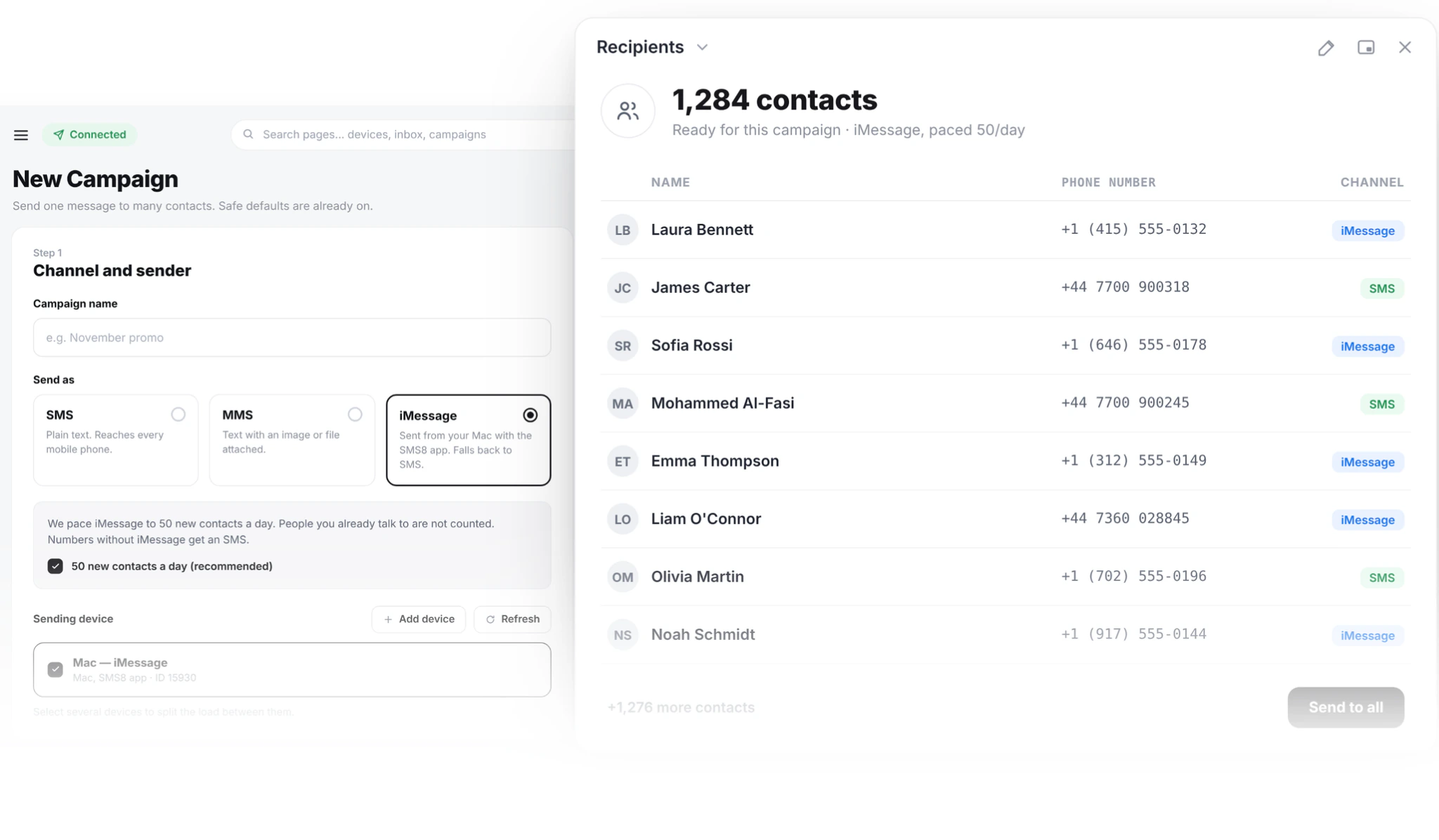
Your Mac becomes a sending device
Apple has no server API for iMessage. A Mac signed into an Apple ID always has to do the sending. Most iMessage services run that Mac for you and charge per line. With SMS8 the Mac is yours.
SMS8 Gateway is the Apple side of SMS8, the same way the Android app is the SIM side. Both report to one account, so you manage them from the same Devices page.
Install SMS8 Gateway on the Mac and pair it to your account. It shows up next to your Android phones as one more device. Anything that sends through SMS8 can now send as iMessage.
Numbers without iMessage get a regular SMS instead, through a paired iPhone or an Android phone. You do not have to check first.
Your code and your workflows send the same way in both cases. Replies come back to the same inbox and the same webhook, so nothing downstream needs to know which channel carried the message.
Set up in a few minutes
One Mac, one pairing code, and you are sending.
Create your account
Sign up at app.sms8.io. One dashboard, one API and one inbox for iMessage and SMS.
Install SMS8 Gateway
Download the Mac app from your Devices page. It runs on macOS 14 Sonoma and newer.
Enter the code
Type the 6 character pairing code, allow the two macOS permissions it asks for, and send a test.
Send from anywhere
Your workflows, your API calls and your team can now reach Apple contacts on iMessage.
Send iMessage from the tools you already use
The Mac is just another SMS8 device, so nothing about your setup has to change.
GoHighLevel
Workflow steps, drips, Conversations and manual sends go out through the Mac. Replies thread back into the GHL inbox.
Zapier
A form, a new order or a spreadsheet row can send an iMessage. An incoming iMessage can start a Zap.
REST API
The same send request you use for SMS. Pick the Mac as the device and send.
Webhooks
Every incoming iMessage is posted to your URL, threaded by contact, like any other SMS8 message.
One inbox
iMessage and SMS conversations sit side by side. Your team answers from a browser, not from the Mac.
What the Mac needs
A short checklist before you pair.
macOS 14 or newer
SMS8 Gateway runs on macOS 14 Sonoma and later. Any Mac that runs it will do, from a laptop to a small desktop.
Signed into Messages
The Mac must be signed into Messages with the Apple ID you want to send from. Send one message by hand first to check iMessage is active.
Always on and online
The Mac sends only while it is awake and connected. Set it to stay awake on power, and SMS8 Gateway starts by itself after a restart. A small second-hand Mac mini on a shelf is the usual choice, since it is quiet, cheap to run and easy to leave on.
Two permissions to send
During setup, macOS asks for two permissions for SMS8 Gateway. Allow both, then send a test to confirm the Mac is ready.
Full Disk Access to receive
To bring incoming messages into SMS8, allow Full Disk Access in System Settings. Without it the Mac still sends, but replies stay on the Mac.
How much one Mac can send
SMS8 paces iMessage to 50 new contacts a day per Mac. People you already talk to are not counted.
This keeps your Apple ID looking like a person, not a broadcast tool. Apple can slow down an Apple ID that sends like spam. Need to reach more new people each day? Add another Mac.
Use iMessage for replies, notifications and one-to-one conversations. For large lists, send SMS from your Android phones in the same account.
Keep the tone conversational. Short, expected messages to people who know you are the safest way to use an Apple ID for business.
Good jobs for iMessage
iMessage shines in conversations and messages people expect.
Booking confirmations
A confirmation and a reminder from the Apple ID your clients already message, with a reply that comes straight back to your team.
Order and pickup updates
Ready for pickup, out for delivery, a question about an order. Customers answer in the same thread.
Lead follow-up
A first reply to a new enquiry from GoHighLevel or a web form, sent while the lead is still on their phone. Leads on Android get the same text as an SMS.
Zapier automations
A new form entry, a CRM update or a spreadsheet row sends an iMessage through your Mac. An incoming iMessage can start a Zap of its own, through the SMS8 new message trigger.
Support conversations
Customers write in, your team answers from the SMS8 inbox in a browser, and the whole history stays on one contact.
What works on any paired Mac
The basics need nothing more than the Gateway app.
One-to-one iMessage
Text, links and attachments to any Apple contact, from the Apple ID you choose.
Incoming messages
Turn on receiving and allow Full Disk Access. Incoming iMessage and SMS on the Mac flow into your SMS8 inbox and webhooks, threaded by contact. Your team replies from a browser, from GoHighLevel or from the SMS8 app.
Existing group threads
Send into a group chat that already exists. Starting brand-new groups needs a special setup, so ask us.
Audio files
Send a playable audio file as an attachment. Native voice notes need a special setup too.
A dedicated Apple ID
Many businesses sign the Mac into a separate Apple ID so work messages stay apart from personal ones.
SMS8 and other iMessage API providers
iMessage APIs differ on who owns the Mac and the number, how they bill and what they send. Here is how the common ones line up, from their own sites in November 2026.
| Sendblue | LoopMessage | SMS8 | |
|---|---|---|---|
| Starting price | About USD 100 per line, as listed on their site | About USD 60 a month, as listed on their site | USD 29 a month, or USD 14.50 a month billed yearly |
| Billing model | Per line | Per sender, monthly | Flat monthly |
| Messages included | No fee per message | Set by plan | No fee per message |
| What it sends | iMessage, SMS and RCS | iMessage, SMS as a paid add-on | iMessage and SMS |
| SMS fallback | Paid add-on | ||
| Android SMS on the same account | – | – | |
| Who runs the Mac | They do | Not stated | You do |
| GoHighLevel SMS provider | Integration listed | Integration listed | |
| Zapier, API and webhooks |
Figures for other companies are as listed on their website in November 2026.
Yes. Every iMessage service needs a Mac signed into an Apple ID somewhere. With SMS8 it is a Mac you own, running the SMS8 Gateway app. A small second-hand Mac mini left on is a common choice.
iMessage never reaches Android. That is an Apple rule. SMS8 sends a regular SMS instead, through a paired iPhone or an Android phone, so the message still arrives.
No. You pay your flat SMS8 plan: USD 29, 89 or 229 a month for one, five or twenty devices, or half that per month billed yearly, after a 3-day trial. iMessage itself travels over the internet at no cost.
Yes. Pair a Mac for Apple contacts and one or more Android phones for SMS. One inbox, one API, one set of webhooks. SMS8 sends each message through the right device.
Yes. Use the normal SMS8 send request and choose the paired Mac as the device. Apple contacts get an iMessage. Other numbers get an SMS through a paired iPhone or an Android phone. Replies reach your webhook the same way, whichever channel they came over.
Yes. SMS8 is a GoHighLevel SMS provider, so when the paired device is a Mac running SMS8 Gateway, workflow steps, Conversations, drips and manual sends can go out as iMessage. A contact's answer lands in their GHL thread, next to the earlier SMS history.
Sendblue charges per line and LoopMessage per sender, each month, as listed on their sites. With SMS8 you run SMS8 Gateway on your own Mac, pay one flat plan with no fee per iMessage, and get Android SMS, one inbox and one API on the same account.
Yes. Conversations live on Apple, not on the provider, so there is nothing to move. Pair your Mac, point your workflows at SMS8, and keep the old service running until you are ready to switch.
Treat it like any messaging channel. Get consent first, honour STOP and opt-out requests, and respect quiet hours. Keep volumes conversational rather than sending blasts, because Apple can slow down an Apple ID that looks like a broadcast tool.
Guides and comparisons
Go deeper on this topic.
iMessage API for Business: Send iMessage From Code
How to send iMessage programmatically in 2026: a Mac you own, one API call, webhooks for replies, 50 new contacts a day and SMS fallback for Android.
Nov 2026iMessage in GoHighLevel: Send From Your Own Mac
Send iMessage from GoHighLevel workflows and Conversations through a Mac you own, with SMS fallback for Android, 50 new contacts a day and one flat plan.
Nov 2026Sendblue Alternative in 2026: iMessage API Options
Looking for a Sendblue alternative? Sendblue, LoopMessage and SMS8 compared on price, who runs the Mac, SMS fallback and outbound limits in November 2026.
Nov 2026iMessage Marketing: Blue vs Green Bubbles in 2026
iMessage marketing in 2026: when blue bubbles beat SMS, consent, pacing at 50 new contacts a day, read receipts, campaign setup and mistakes to avoid.
CompareSendblue vs SMS8: iMessage API Compared for 2026
Sendblue vs SMS8 for iMessage. A managed line per month, or your own Mac and Apple ID on a flat plan with SMS fallback and Android SMS. How SMS8 compares.
Nov 2026Bulk iMessage Sender: Campaigns From Your Mac
Send iMessage campaigns to your list from a Mac you own in 2026: safe pacing, automatic SMS fallback for Android, and every reply in one shared inbox.
Nov 2026iMessage API Pricing in 2026: What It Really Costs
What an iMessage API costs in 2026: per-line plans, add-ons and daily caps, and how SMS8 sends iMessage from your own Mac for a flat USD 29 a month.
Nov 2026iMessage for Real Estate: Text Leads in Blue
iMessage for real estate in 2026: text buyers and sellers in blue bubbles from a Mac you own, with SMS fallback for Android leads and one flat plan.
Nov 2026iMessage Marketing Ideas: 12 Campaigns That Work
12 iMessage marketing campaign ideas for 2026 with example messages, and how to run each one from a Mac you own with SMS8: pacing, SMS fallback, one inbox.
Reach Apple contacts on iMessage
Create your account, install SMS8 Gateway on your Mac, and send your first iMessage today.