
Part of the guide Send iMessage via API: iMessage for GoHighLevel, Zapier, API and Webhooks
On this page
- Key takeaways
- Is there an official iMessage API?
- How does sending iMessage through your own Mac work?
- How do you set it up?
- What does the API call look like?
- How do you receive iMessage replies with a webhook?
- How many iMessages can one Mac send a day?
- What happens when the number is on Android?
- Can you send iMessage from a CRM without code?
- What are Apple's rules, in plain words?
- What does it cost?
- A checklist before you go live
- Why choose SMS8 for iMessage
Key takeaways
- Apple has no server API for iMessage. To send iMessage from code, a Mac signed into an Apple ID has to do the sending.
- With SMS8, that Mac is yours. You run the SMS8 Gateway app on it, and your code calls the same REST endpoint used for SMS:
POST https://app.sms8.io/api/v1/messages. - Replies come back through signed webhooks, retried for up to 30 days, and into a shared inbox.
- Pace new conversations to 50 new contacts a day per Mac. People you already talk to do not count.
- Numbers without iMessage get an SMS instead, through a paired iPhone or Android phone, so your code does not need to check which phone the contact has.
To send iMessage programmatically in 2026, you pair a Mac that is signed into Messages with a gateway service, then call that service's API. Apple does not sell or publish a way to send iMessage from a server, so every working iMessage API, whether managed or self-run, puts a real Mac in the middle. This tutorial shows how that works with SMS8, where the Mac and the Apple ID belong to you, and covers the parts people usually get wrong: pacing, replies and Android contacts. For the product overview, see the SMS8 iMessage API page.
Is there an official iMessage API?
Not for sending from your own systems. Apple has a separate product called Apple Messages for Business, which lets customers start a chat with a registered business from places like Maps or Safari, handled through approved customer service platforms. It is built for conversations the customer starts. It does not let you send a message from your CRM to a phone number.
So when people search "iMessage API", they mean a service that drives the Messages app on a Mac. There are two ways to get one:
- Managed providers, such as Sendblue or LoopMessage, run the Macs and give you a number. You pay per line or per sender. Our Sendblue alternative guide shows how SMS8 compares on price and on who owns the sender.
- A gateway on your own Mac, which is how SMS8 works. You keep the Apple ID, the Mac and the conversations. You pay a flat plan.
How does sending iMessage through your own Mac work?
The flow has four parts:
- Your code or tool sends a request to the SMS8 API with a phone number and a message.
- SMS8 routes the message to the device you chose. If that device is a Mac running SMS8 Gateway, the message is queued for iMessage.
- The Mac sends it through the Messages app, from the Apple ID it is signed into, exactly as if you had typed it.
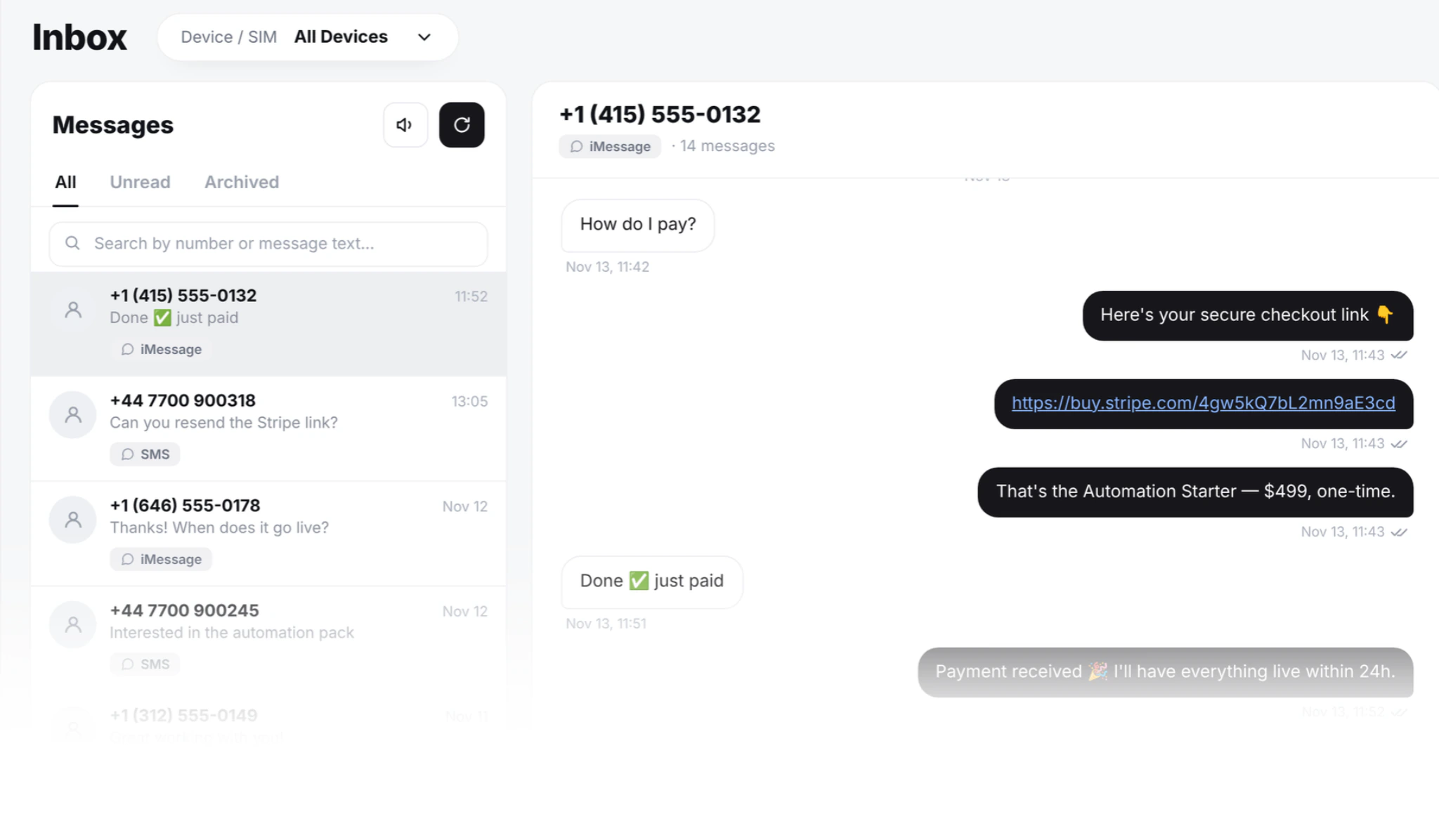
- Replies arrive in Messages on the Mac. With Full Disk Access allowed, SMS8 Gateway reads them and forwards them to your SMS8 inbox and your webhooks, threaded by contact.
The Mac is one device on your account, listed on the same Devices page as any Android phones. A Mac counts as one device on your plan, the same as a phone.
What the Mac needs
- macOS 14 Sonoma or newer. Any Mac that runs it works, from a laptop to a small desktop.
- Signed into Messages with the Apple ID you want to send from. Send one message by hand first to make sure iMessage is active.
- Always on. The Mac sends only while it is awake and online. Set it to stay awake on power. SMS8 Gateway starts by itself after a restart. A second-hand Mac mini is the usual choice.
- Two permissions to send, which macOS asks for during setup.
- Full Disk Access to receive. Without it the Mac still sends, but replies stay on the Mac.
Many businesses sign the Mac into a separate Apple ID used only for work, so business threads stay apart from personal ones.
How do you set it up?
- Create an account at app.sms8.io. The 3-day trial includes 30 messages and needs no card.
- Download SMS8 Gateway from your Devices page and install it on the Mac.
- Enter the 6-character pairing code, allow the two permissions and send a test.
- Copy your API key from the API page in the dashboard.
- Optionally pair an Android phone too, so non-Apple numbers can get SMS from your own SIM.
What does the API call look like?
The send request is the same one SMS8 uses for SMS. Only the number and the text are required. To send through the Mac, name its device ID. You can list your devices and their IDs with GET https://app.sms8.io/api/v1/devices.
cURL
curl -X POST https://app.sms8.io/api/v1/messages \
  -H "X-Api-Key: YOUR_KEY" \
  -H "Content-Type: application/json" \
  -d '{"number":"+14155550100","message":"Hi Sam, your table for 4 is confirmed for 7pm tonight. Reply here if anything changes.","devices":"YOUR_MAC_DEVICE_ID"}'
Node
const res = await fetch('https://app.sms8.io/api/v1/messages', {
  method: 'POST',
  headers: {
    'X-Api-Key': process.env.SMS8_KEY,
    'Content-Type': 'application/json',
  },
  body: JSON.stringify({
    number: '+14155550100',
    message: 'Hi Sam, your table for 4 is confirmed for 7pm tonight.',
    devices: process.env.SMS8_MAC_ID,
  }),
});
const json = await res.json();
Python
import os, requests

r = requests.post(
    'https://app.sms8.io/api/v1/messages',
    headers={'X-Api-Key': os.environ['SMS8_KEY']},
    json={
        'number': '+14155550100',
        'message': 'Hi Sam, your table for 4 is confirmed for 7pm tonight.',
        'devices': os.environ['SMS8_MAC_ID'],
    },
    timeout=10,
)
print(r.json())
The response is JSON with a success flag. On success you get a message ID for later lookups, the device that took it and the time it was queued. The status then moves through queued, sending, sent, delivered or failed. Numbers go in international format, and the text can be up to 1,000 characters with merge tags such as {first_name}. The full field list is in the SMS8 API documentation.
If you prefer a package, npm install sms8-sdk gives you the Node SDK and the sms8 CLI. If an AI agent does the sending, the MCP server at https://mcp.sms8.io exposes the same send tool, and in Claude Code you add it with claude mcp add --transport http sms8 https://mcp.sms8.io.
How do you receive iMessage replies with a webhook?
Polling for replies works, but webhooks are cleaner. In the dashboard, add a webhook URL and subscribe it to received messages. Each webhook gets its own signing secret. Every request carries an X-Signature header, an HMAC-SHA256 hash of the raw body made with that secret. Check it before you trust the payload.
// Express example
import crypto from 'node:crypto';
import express from 'express';

const app = express();
app.post('/sms8/webhook', express.raw({ type: '*/*' }), (req, res) => {
  const expected = crypto
    .createHmac('sha256', process.env.SMS8_WEBHOOK_SECRET)
    .update(req.body)
    .digest('hex');
  const given = req.get('X-Signature') || '';
  const ok = given.length === expected.length &&
    crypto.timingSafeEqual(Buffer.from(given), Buffer.from(expected));
  if (!ok) return res.sendStatus(401);

  const event = JSON.parse(req.body.toString());
  // Store the reply on the contact, notify the owner, or hand it to your agent.
  res.sendStatus(200);
});
Answer quickly with a 2xx status and do the heavy work in a queue. If your endpoint is down, SMS8 retries delivery for up to 30 days. iMessage and SMS replies arrive on the same webhook, so your handler does not need a separate path for each channel. The exact payload fields are in the API documentation. For the trade-offs between the two approaches, read webhook vs polling for incoming messages.
How many iMessages can one Mac send a day?
SMS8 paces iMessage to 50 new contacts a day per Mac. People you already have a conversation with are not counted, so replies, reminders to existing customers and follow-ups in an open thread go out normally. If you queue more than 50 new contacts, the rest continue the next day.
This limit protects your Apple ID. Apple can slow down or block an Apple ID that sends like a broadcast tool, and recipients can report a message from an unknown sender as junk. A steady trickle of expected messages looks like a person. A burst of hundreds of cold first messages does not.
If you need to reach more new people each day, add another Mac. Each one is a device on your plan with its own Apple ID and its own 50 a day. For large lists, send SMS from your Android phones in the same account instead, where SMS8 paces at one message every 10 to 30 seconds per SIM.
What happens when the number is on Android?
iMessage only works between Apple devices. That is Apple's rule, and no provider can change it. When a number is not on iMessage, SMS8 sends a regular SMS instead, through a paired iPhone or an Android phone. You do not have to check the number first, and your code sends the same request either way.
The practical advice: pair at least one Android phone with a SIM next to your Mac. Then every number gets the message, Apple contacts as iMessage and everyone else as SMS from your own number. Replies from both come back to the same webhook and the same contact thread.
Can you send iMessage from a CRM without code?
Yes. The Mac is just another SMS8 device, so anything that sends through SMS8 can send iMessage:
- GoHighLevel. SMS8 is a GoHighLevel SMS provider through its marketplace app. Workflow steps, drips, Conversations and manual sends can go out through the Mac, and replies thread back into the GHL contact. See the GoHighLevel SMS integration.
- Zapier. The SMS8.io app has a Send SMS action and a New Incoming SMS trigger. A form entry can send an iMessage, and an incoming iMessage can start a Zap.
- Make and n8n. Make has an SMS8 app. In n8n, use the HTTP Request node with the API call above.
What are Apple's rules, in plain words?
Apple does not publish a rulebook for business use of iMessage, but the way it treats senders is consistent. In practice:
- Send to people who expect you. Customers, leads who asked to be contacted, people who opted in. Never bought lists.
- Start slowly with a new Apple ID. A brand-new Apple ID sending many first messages on day one is the fastest way to get it limited.
- Keep it conversational. Short messages that invite a reply. iMessage rewards conversation, not broadcast.
- Make it easy to stop. Honour STOP and opt-out requests right away, and respect quiet hours. The laws that cover SMS in your country, such as consent and identification rules, apply to iMessage too.
- Expect junk reports to matter. When people report your messages as junk, your Apple ID's standing suffers. Low complaint rates come from sending only what people want.
Our guide to iMessage marketing and blue bubble texting goes deeper on consent, pacing and what not to do.
What does it cost?
SMS8 plans are flat: USD 29 a month for 1 connected phone or Mac, USD 89 for 5 and USD 229 for 20, with yearly billing at half the monthly price. There is no fee per message from SMS8, and iMessage itself travels over the internet. A typical small setup, one Mac for iMessage and one Android phone for SMS fallback, fits Five Devices. See SMS8 pricing for the full plan comparison.
A checklist before you go live
- Mac on macOS 14 or newer, set to stay awake, signed into the right Apple ID.
- SMS8 Gateway paired, both permissions allowed, Full Disk Access on.
- An Android phone or iPhone paired for SMS fallback.
- Webhook registered for received messages, with signature checks.
- Sending logic that stays within 50 new contacts a day per Mac, or a second Mac for more.
- An opt-out path: a STOP handler, and a check against your opt-out list before every send.
Why choose SMS8 for iMessage
SMS8 is the iMessage API where the Mac, the Apple ID and the conversations stay yours.
- iMessage from your own Apple ID. SMS8 Gateway runs on a Mac you own, paced to 50 new contacts a day per Mac, with SMS fallback for Android numbers.
- A flat price with unlimited messages. USD 29 a month for one phone or Mac, USD 89 for five and USD 229 for twenty, with unlimited SMS and MMS and no per-message fee. Yearly billing is half the price.
- SMS, MMS and iMessage in one inbox. Pair Android phones for SMS and MMS and a Mac for iMessage with SMS fallback, then answer everything from one shared inbox.
- Built into GoHighLevel. The official marketplace app makes your phone or Mac the SMS provider for a sub-account, so workflows and Conversations keep working.
- A developer-friendly API.
POST https://app.sms8.io/api/v1/messageswith anX-Api-Keyheader, signed webhooks retried for up to 30 days, andnpm install sms8-sdkfor the SDK and thesms8CLI.
Start the 3-day trial with 30 messages and no card, or compare plans on the SMS8 pricing page.