
Part of the guide Send iMessage via API: iMessage for GoHighLevel, Zapier, API and Webhooks
On this page
- Key takeaways
- Why send iMessage from GoHighLevel at all?
- What do you need before you start?
- How to set up iMessage in GoHighLevel, step by step
- How does SMS fallback work for Android contacts?
- Why is iMessage paced to 50 new contacts a day?
- Which GoHighLevel workflows benefit most from iMessage?
- What does it cost compared with LC Phone?
- How does SMS8 compare with other iMessage options for GHL?
- Running the Mac day to day
- When a GHL iMessage does not go out
- Staying compliant with iMessage in a CRM
- Why agencies choose SMS8 for iMessage in GoHighLevel
Key takeaways
- Apple has no server API for iMessage, so a Mac signed into an Apple ID always does the sending. With SMS8 that Mac is yours, running the SMS8 Gateway app on macOS 14 Sonoma or newer.
- SMS8 is a GoHighLevel SMS provider through its marketplace app. When the device is a Mac, workflow steps, drips, Conversations and manual sends can go out as iMessage.
- Contacts without iMessage get a regular SMS instead, through a paired iPhone or Android phone. You do not have to check which contacts use an iPhone.
- SMS8 paces iMessage to 50 new contacts a day per Mac. People you already talk to do not count, and anything over 50 continues the next day.
- A Mac counts as one device on your plan. One Mac plus one Android phone for fallback fits the Five Devices plan at USD 89 a month, or half that billed yearly, with no fee per message.
You can send iMessage from GoHighLevel by making SMS8 the SMS provider for your sub-account and pairing a Mac that runs the SMS8 Gateway app. Your GHL workflows and Conversations then send through that Mac. Apple contacts get a blue-bubble iMessage from your Apple ID, everyone else gets an SMS from a paired phone, and every reply threads back into the contact's GHL conversation. This guide walks through the setup, the pacing rule that keeps your Apple ID healthy, and the workflows where iMessage makes the most difference.
If you are new to sending iMessage from a business account, start with our overview of the SMS8 iMessage API. For the GoHighLevel side, the GoHighLevel SMS integration page covers how SMS8 takes over the SMS provider slot.
Why send iMessage from GoHighLevel at all?
Most GHL texting is conversational: a first reply to a new lead, a booking confirmation, a reminder the day before, a follow-up after a quote. Those are exactly the messages that iMessage handles well. A message from an Apple ID looks like a text from a person in the Messages app. It supports links, photos and attachments in the same thread, and the conversation continues there when the contact replies.
There is a second reason. Through LC Phone or Twilio, a GoHighLevel text comes from a rented number, which is a number the contact has never seen. iMessage from your own Apple ID, or SMS from your own SIM, comes from a sender you control and your customers can save. For the broader case for blue bubbles, read iMessage marketing: blue vs green bubbles.
What do you need before you start?
- A GoHighLevel sub-account where you can install marketplace apps.
- An SMS8 account. Every account starts with a 3-day trial with 30 messages, no card needed.
- A Mac on macOS 14 Sonoma or newer. Any Mac that runs it will do. A small second-hand Mac mini on a shelf is the usual choice, since it is quiet, cheap to run and easy to leave on.
- An Apple ID signed into Messages on that Mac. Many businesses use a separate Apple ID so work messages stay apart from personal ones. Send one message by hand first to check iMessage is active.
- A phone for SMS fallback. An Android phone with Android 7 or newer and a SIM, or a paired iPhone, so contacts without iMessage still get your message.
How to set up iMessage in GoHighLevel, step by step
- Create your SMS8 account. Sign up at app.sms8.io. One dashboard, one inbox and one API cover iMessage and SMS.
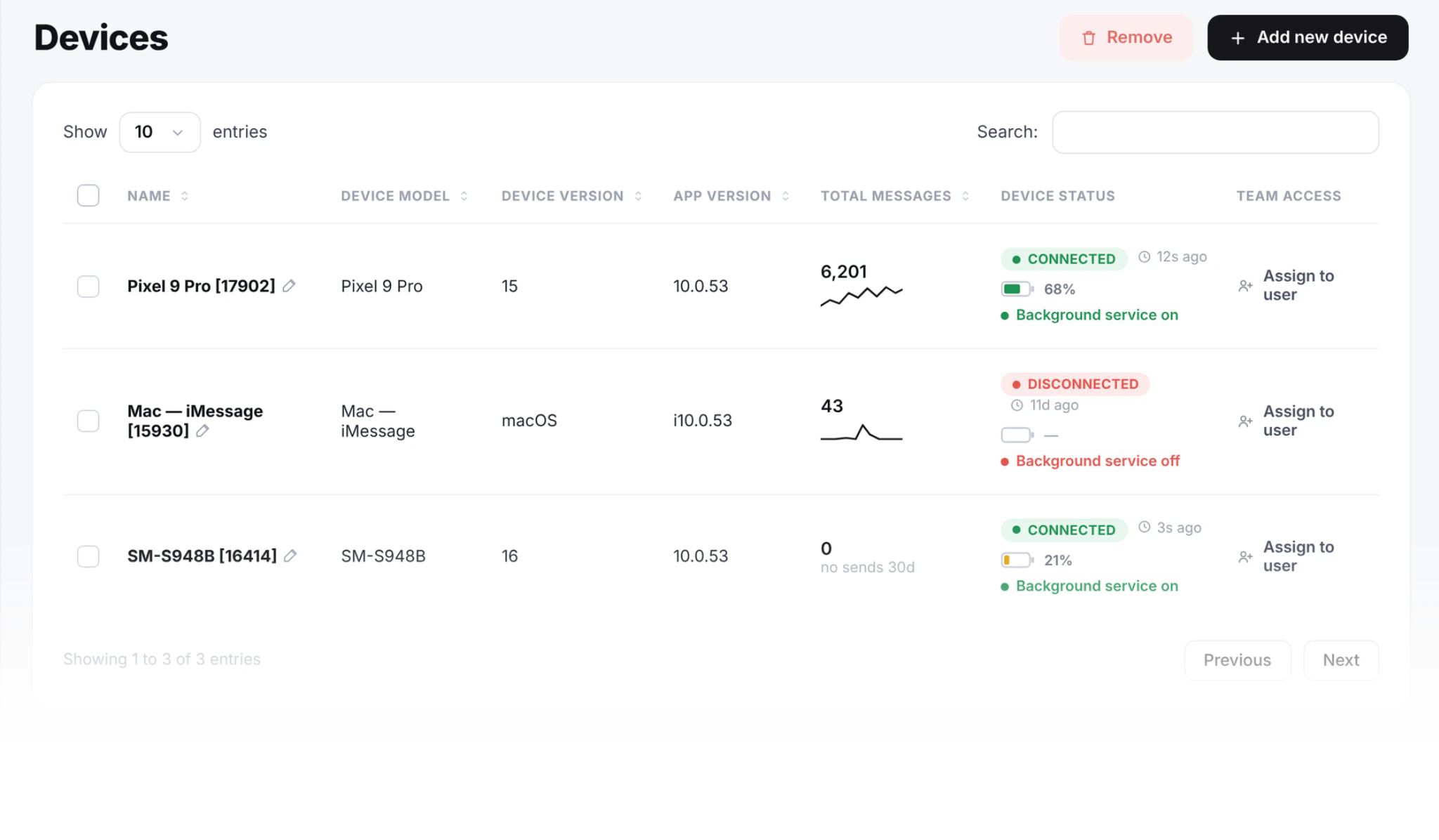
- Install SMS8 Gateway on the Mac. Download the Mac app from your Devices page in SMS8.
- Pair the Mac. Type the 6 character pairing code into SMS8 Gateway. macOS asks for two permissions so the app can send. Allow both, then send a test.
- Turn on receiving. To bring incoming iMessages into SMS8 and GoHighLevel, allow Full Disk Access for SMS8 Gateway in System Settings. Without it the Mac still sends, but replies stay on the Mac.
- Pair a fallback phone. Install the SMS8 Android app on a phone with a SIM and scan the code on your dashboard, so numbers without iMessage get an SMS.
- Install the SMS8 app in GoHighLevel. Open the SMS8 listing in the GoHighLevel marketplace, click Install and pick the sub-account. SMS8 becomes that sub-account's SMS provider.
- Send a test from GHL. Send a message from Conversations to an iPhone and to an Android phone. The iPhone should get a blue bubble, the Android phone an SMS. Reply from both and check the replies appear in the GHL thread.
The setup takes a few minutes once the Mac is signed into Messages. You do not edit any workflow to make this work.
How does SMS fallback work for Android contacts?
iMessage never reaches Android. That is an Apple rule, and no provider gets around it. SMS8 handles this for you: when a number cannot get iMessage, the message goes out as a regular SMS through a paired iPhone or Android phone on the same account. Your workflow does not branch on the contact's phone type, and you do not have to keep a list of who has an iPhone.
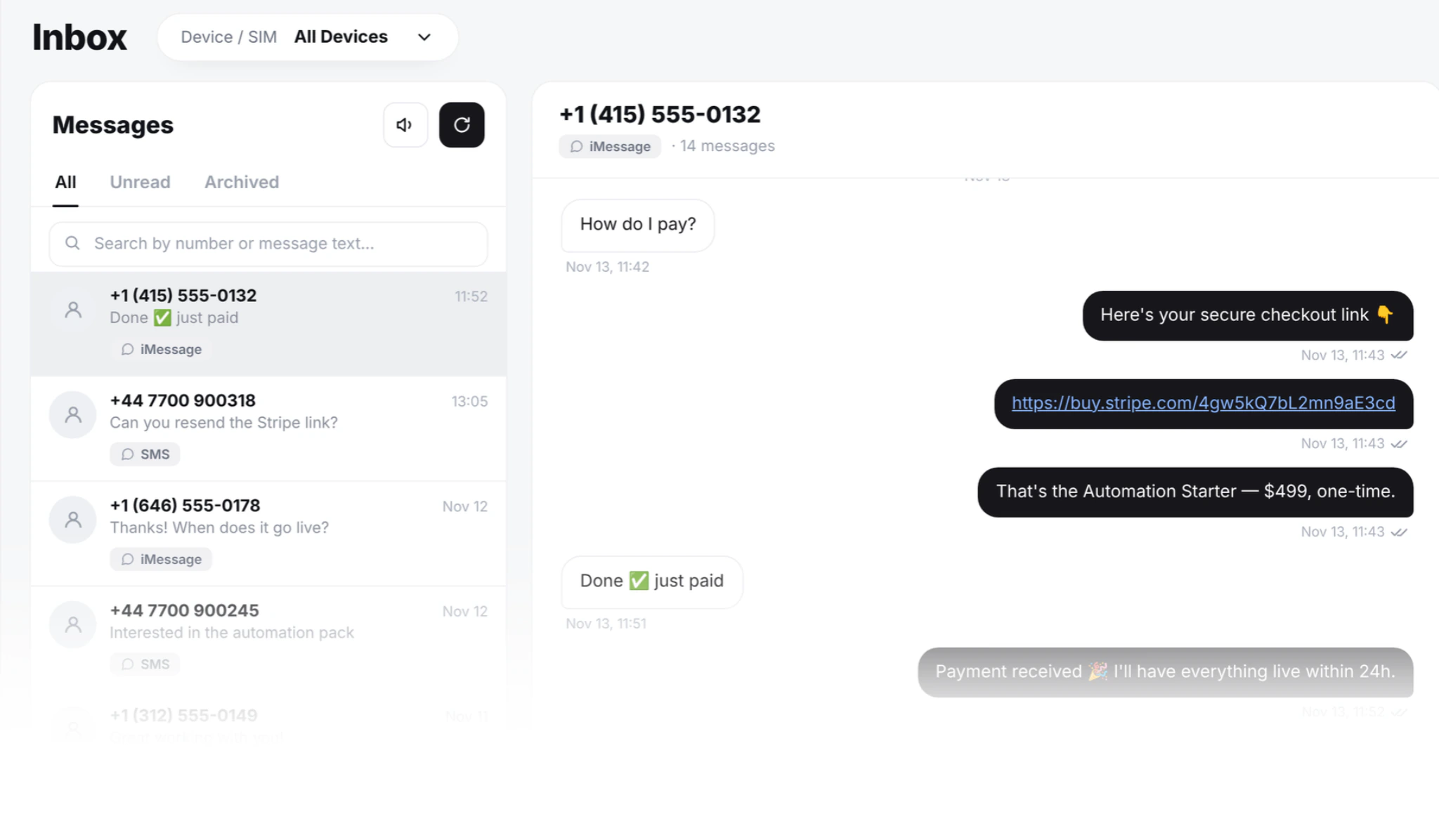
From the GoHighLevel side, nothing looks different. The Send SMS step runs, the message is delivered over whichever channel reaches the contact, and the reply lands in the same conversation. Inside SMS8 you can see which channel carried each message, which is useful if you want to know how much of a list is on iMessage.
Why is iMessage paced to 50 new contacts a day?
SMS8 paces iMessage to 50 new contacts a day per Mac. People you already have a conversation with are not counted, so replies, reminders to existing customers and follow-ups in an open thread go out normally. If a workflow queues more than 50 new contacts in a day, the rest continue the next day.
The reason is your Apple ID. Apple can slow down an Apple ID that sends like a broadcast tool. Keeping the number of brand-new conversations per day close to what a busy person might start keeps the account looking like a person. If you need to reach more new people each day, add another Mac.
For GoHighLevel, this has a few practical effects:
- Lead follow-up fits well. A sub-account that gets fewer than 50 new leads a day can give every one of them a first reply on iMessage as soon as the form comes in.
- Reminders to existing clients are not limited by the pacing. A client you have texted before is not a new contact.
- Large cold lists are the wrong job. A broadcast to 2,000 imported contacts would take weeks at 50 a day, and it is not what iMessage is for. Send those as SMS from your Android phones instead, and keep iMessage for conversations.
Which GoHighLevel workflows benefit most from iMessage?
| Workflow | Why iMessage helps | Note |
|---|---|---|
| New lead first reply | Reads like a person answering, while the lead is still on their phone | New contacts count toward 50 a day |
| Booking confirmation and day-before reminder | Lands in the thread the client already uses with you | Existing contacts do not count |
| Missed-call text-back | A quick, personal reply from the same business identity | Fallback to SMS for Android callers |
| Quote or proposal follow-up | Links and attachments sit in one conversation | Keep it short and specific |
| Review request after a visit | Comes from someone the client just met | Ask once, do not repeat |
| Large promotional broadcast | Not a good fit | Send as SMS from Android phones |
What does it cost compared with LC Phone?
SMS8 adds no fee per message, and iMessage itself travels over the internet. You pay one flat plan by connected devices, as on our pricing page: USD 29 a month for one device, USD 89 for five and USD 229 for twenty, with yearly billing at half the monthly price. A Mac counts as one device, the same as an Android phone. The usual GoHighLevel setup, one Mac for iMessage and one Android phone for SMS fallback, needs two devices and fits Five Devices at USD 89 a month, or USD 44.50 a month billed yearly. SMS fallback texts run on the mobile plan of the SIM in the phone.
LC Phone, the built-in HighLevel option, bills per message instead: $0.00747 per SMS segment out and in for the US and Canada, plus carrier fees, $1.15 a month per local number and A2P 10DLC fees, as listed on HighLevel's LC Phone pricing guide in November 2026. LC Phone sends SMS and MMS from a rented number. SMS8 replaces that with one flat plan, your own number and no A2P filing. We compare the two in detail, with worked monthly bills, in GoHighLevel SMS without LC Phone.
How does SMS8 compare with other iMessage options for GHL?
Several iMessage providers list a GoHighLevel connection. The main differences are who runs the Mac, how they bill, and whether SMS fallback is included. Most hosted services run the Mac for you and charge per line or per sender each month. With SMS8 you run SMS8 Gateway on a Mac you own, pay a flat plan, and get Android SMS, one inbox and one API on the same account. Our Sendblue alternatives comparison covers the hosted options with prices from their own sites.
Running the Mac day to day
- Keep it awake on power. The Mac sends only while it is awake and connected. Set it to stay awake on power. SMS8 Gateway starts by itself after a restart.
- Leave Messages signed in. If the Apple ID signs out, iMessage stops. Check the Devices page in SMS8 if messages stop going out.
- Nobody needs to sit at it. Your team replies from GoHighLevel Conversations, the GHL mobile app, or the SMS8 web inbox. The Mac stays on a shelf.
- One Apple ID per Mac. If two locations need their own iMessage identity, use two Macs, each with its own Apple ID, and pair each to the right sub-account.
When a GHL iMessage does not go out
- The message stays pending. The Mac is asleep, offline or SMS8 Gateway is not running. Wake it, check the network and confirm the app shows as connected.
- It went out as SMS instead of iMessage. The contact's number is not on iMessage, so fallback did its job. That is expected for Android contacts.
- Replies do not reach GHL. Full Disk Access is probably off for SMS8 Gateway. Turn it on in System Settings so incoming messages flow into SMS8 and GoHighLevel.
- New contacts arrive a day late. The workflow queued more than 50 new contacts that day. The rest continue the next day. Add a second Mac if this is routine.
- GHL shows the message but SMS8 does not. The sub-account is still on its old provider. Check that the SMS8 app is installed on that sub-account.
Staying compliant with iMessage in a CRM
Treat iMessage like any business messaging channel. Get consent in your GHL forms and booking pages and keep it on the contact record. Honour STOP and opt-out requests. Respect quiet hours in the contact's time zone with workflow wait steps. Keep the tone conversational and the volume close to what a person would send, because Apple can slow down an Apple ID that looks like a broadcast tool.
Developers who want to trigger the same Mac from their own code, outside GoHighLevel, can use the same send request as for SMS. Our iMessage API for business tutorial shows the request and the webhook for replies.
Why agencies choose SMS8 for iMessage in GoHighLevel
SMS8 is the way to send blue bubbles from GoHighLevel on your own Apple ID.
- Built into GoHighLevel. The official marketplace app makes your phone or Mac the SMS provider for a sub-account, so workflows and Conversations keep working.
- iMessage from your own Apple ID. SMS8 Gateway runs on a Mac you own, paced to 50 new contacts a day per Mac, with SMS fallback for Android numbers.
- A flat price with unlimited messages. USD 29 a month for one phone or Mac, USD 89 for five and USD 229 for twenty, with unlimited SMS and MMS and no per-message fee. Yearly billing is half the price.
- No A2P 10DLC filing. Texts go person-to-person from your SIM, so there is no brand, campaign or monthly campaign fee to manage.
- SMS, MMS and iMessage in one inbox. Pair Android phones for SMS and MMS and a Mac for iMessage with SMS fallback, then answer everything from one shared inbox.
Start the 3-day trial with 30 messages and no card, or compare plans on the SMS8 pricing page.