
SMS marketing from the number customers already saved.
Send bulk SMS campaigns through an Android phone you own. Upload a list, write one message, and every person gets it from your real number. Customers recognise who is texting, so the campaign reads as a message from you, not from a stranger.
Why a known number gets read
A text from a number people saved is a text from you. A text from a short code or a rented number is a text from a stranger, and it often gets ignored.
With SMS8 the campaign leaves your own SIM. When someone replies, the answer comes back to you, in the same thread, ready for a real conversation.
SMS, MMS or iMessage, one campaign
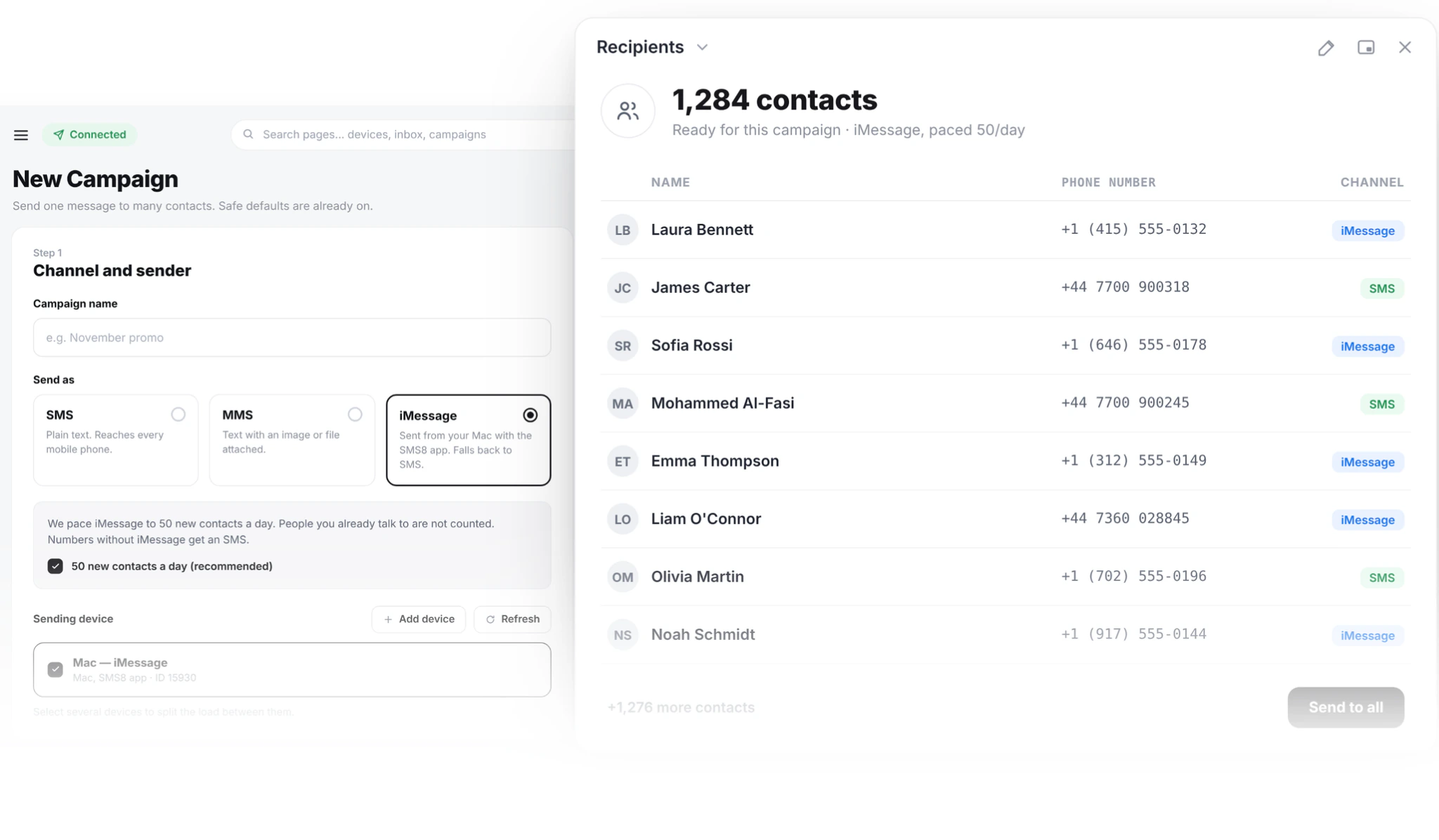
Pick the channel when you create the campaign. SMS reaches every phone. MMS adds an image or a file from an Android phone. iMessage goes out from a Mac you own, the way your customers already text you.
iMessage is paced to 50 new contacts a day per Mac, and people you already talk to are not counted. Numbers that are not on iMessage get the same message as an SMS.
Everything a campaign needs
Built into the campaign screen, with nothing extra to buy.
One message, every name
Merge tags fill in each row of your list. Write "Hi {first_name}" once and every person reads their own name.
Send now or later
Pick a time, or set a recurring send every Friday at 10am.
Quiet hours
Messages outside your window wait until morning.
STOP works on its own
Anyone who replies STOP is opted out of every future campaign on your account.
Clean lists
Numbers are checked on import. Duplicates are sent once and blacklisted numbers are skipped.
Paced sending
Messages go out at a steady pace your carrier accepts. Pause any time.
More phones, faster sends
Pair a second phone or a dual-SIM phone and SMS8 shares the campaign across every SIM.
How to run your first campaign
About twenty minutes if your list is already in a spreadsheet.
Pair a phone
Install the SMS8 app on an Android 7 or newer phone and scan the code on your dashboard. Turn off battery optimisation for the app so it keeps running.
Import your list
Upload a CSV or Excel file with a phone column. Extra columns like first_name or city become merge tags. Only import people who opted in.
Write the message
Lead with the offer, add a name, end with one clear action. Say who you are and add "Reply STOP to opt out". Stay under 160 characters to keep it to one SMS.
Test, then schedule
Send to a small test group first and check the names and links. Then pick a time outside your quiet hours.
Send and read replies
Watch queued, sent and failed counts update live. Replies land in your shared inbox, and you can pause mid-send if something looks wrong.
How fast a campaign goes out
SMS8 spaces campaign messages 10 to 30 seconds apart on each SIM. That steady pace keeps your number in good standing with your carrier.
Need it faster? Add phones or use a dual-SIM phone. SMS8 splits the campaign across every SIM you select, and the summary shows how long it will take before you send.
You do not pick the phone for each message. SMS8 rotates through every SIM you paired.
Campaigns that work on SMS
Send when something happens, not every week. Two messages a month per person is plenty for most lists.
Appointment reminders
A text the day before cuts no-shows. People reply to confirm or move the slot.
Flash sales and restocks
A short offer with a code and a deadline. Save these for moments that matter.
Review requests
A few days after a purchase, ask for a review with a single link.
Win-back
A quiet note to customers who have not ordered in a while, at most once a quarter.
Schools, clubs and gyms
Closures, room changes and event times, sent from the office number parents and members already know.
Staff alerts
Shift cover, office closures and payroll reminders that land on every phone without a new app.
The rules, in plain words
Laws differ by country, but three rules cover most of them. Get consent before you send and keep a record of it. Say who you are in the message. Honour STOP right away.
SMS8 handles the STOP part for you across every campaign. Consent and content stay your responsibility, so never send to a bought list.
Yes. SMS8 spaces messages 10 to 30 seconds apart on each SIM, so a large list goes out over several hours. For bigger lists, add a second SIM or another paired phone and SMS8 shares the work.
Your flat SMS8 plan, plus whatever your mobile plan charges for SMS. On many unlimited plans that is nothing extra. SMS8 adds no fee per message.
No. Messages leave from your own SIM, person to person, so there is no brand or campaign registration to wait for.
Yes. Replies come back to your shared inbox, threaded by contact, and to your webhook if you set one.
Anyone who replies STOP is added to your blacklist and skipped in every later campaign. You still need to include the opt-out line in your message.
Yes. GoHighLevel, Zapier, Make, n8n and the API can all send through your phones. The campaign screen is there when you want to send to a list by hand.
Guides and comparisons
Go deeper on this topic.
Send Unlimited Bulk SMS From Your Own Number
Send unlimited bulk SMS from your own Android phone number. Flat plan from USD 29 a month, no per-message fee, no A2P 10DLC. Upload a CSV and send.
Sep 2026Bulk SMS Marketing 2026: The Complete Guide
Bulk SMS marketing in 2026 from your own number: list hygiene, throughput, deliverability, consent, real costs and six campaigns that keep opt-outs low.
May 2026SMS Marketing Playbook 2026: 12 Plays That Convert
12 SMS marketing plays for 2026 with copy templates, send-time rules and segments: cart recovery, back in stock, VIP access, win-back and two-way replies.
May 2026SMS Marketing ROI: How to Calculate It, With Examples
How to calculate SMS marketing ROI: the formula, real 2026 send costs, flat plan vs per-message APIs, worked examples and the mistakes that sink returns.
May 2026WhatsApp Business API vs SMS: 2026 Cost, Delivery
WhatsApp Business API vs SMS in 2026: per-message pricing since 2025, paid service messages from October 2026, delivery, and which channel to use for OTP.
Nov 2026SMS Templates by Industry: Ready to Copy
Ready-to-copy SMS templates for retail, restaurants, clinics, salons, schools, real estate, logistics and OTP, with merge tags, counts and STOP wording.
Nov 2026iMessage Marketing: Blue vs Green Bubbles in 2026
iMessage marketing in 2026: when blue bubbles beat SMS, consent, pacing at 50 new contacts a day, read receipts, campaign setup and mistakes to avoid.
Nov 2026Customers Don't Answer Your Texts? Fix It in 2026
Texts from short codes and random numbers get ignored. Send from the business number customers saved, with SMS8 on your own phone and SIM, at a flat price.
Nov 2026SMS Marketing Automation From Your Own Number
Automate SMS marketing in 2026 from GoHighLevel, Zapier, Make or the API, sent from your own number with quiet hours, STOP handling and no per-message fee.
Nov 2026SMS Marketing for Agencies: Run Every Client
SMS marketing for agencies in 2026: run every client on its own phone and number, through GoHighLevel or campaigns, with one flat plan and no A2P filing.
Nov 2026Stop Paying Per SMS: Flat-Price Texting in 2026
Every text costs money and the bill grows with your list. How to stop paying per SMS in 2026: send unlimited texts from your own SIM on one flat SMS8 plan.
Send your first campaign this week
Pair a phone, upload your opted-in list, and send from the number your customers already know.