
Part of the guide SMS Marketing Campaigns From Your Own Phone
On this page
- Key takeaways
- Why do customers ignore texts from unknown numbers?
- What does an ignored text cost your business?
- Which number do customers actually answer?
- How does SMS8 send from your own number?
- How do you set it up, step by step?
- What else makes customers reply?
- How many texts can you send from your own number?
- What does it cost?
- Why choose SMS8
- Send from the number your customers trust
Key takeaways
- People decide in a second whether a text is worth opening. A short code or a number they have never seen looks like spam, and the message is ignored, deleted or reported.
- The fix is to text from a number customers recognise: the business mobile they have already called, saved or texted.
- SMS8 sends from the SIM in your own Android phone, so every reminder, campaign and reply shows your real number. Apple users can get iMessage from a Mac you own.
- Replies come back to the same number and land in a shared inbox your team answers from a browser.
- Plans are flat from USD 29 a month with unlimited SMS and MMS and no fee per message. The 3-day trial has 30 messages and needs no card.
If customers do not answer your texts, the first thing to look at is the number they arrive from. A message from a short code or a random 10-digit number the customer has never seen looks like every other marketing or scam text on their phone, so it gets skipped. A text from the number they saved as your business, the one they called to book, gets read and answered. SMS8 lets you send all your business texts, one-to-one and in bulk, from that number: the SIM in your own Android phone. This guide explains why unknown numbers get ignored, what it costs you, and how to switch step by step. For the full feature set, see SMS marketing with SMS8.
Why do customers ignore texts from unknown numbers?
Everyone has learned the same habit. Phones fill up with delivery scams, fake bank alerts and promotions from brands nobody remembers signing up for. So people judge a text by who sent it before they read it:
- A short code looks like a broadcast. A 5 or 6-digit sender tells the customer this is a mass message from a system, not a person they can talk to.
- A new number looks like a stranger. If the number is not in their contacts and they have never seen it, the safe choice is to ignore it.
- The phone helps them ignore it. Many phones can filter messages from unknown senders into a separate list, out of the main conversation view. Customers who turn that on may never see your text at all.
- Spam reports pile up. When people do not recognise a sender, they are more likely to report it as junk, which hurts future delivery.
- A rotating sender breaks the thread. If reminders come from one number and campaigns from another, the customer sees a jumble of strangers instead of one conversation with your business.
What does an ignored text cost your business?
Every text you send has a job. When it is ignored, the job does not get done:
- No-shows. A reminder nobody reads does not prevent a missed appointment. The empty slot costs you the booking and the time.
- Cold leads. A lead who asked for a quote and gets a text from an unknown number may not realise it is you, and buys elsewhere.
- Unpaid invoices and unconfirmed orders. Payment reminders and delivery questions sit unanswered, and your team ends up phoning people instead.
- Wasted campaigns. You pay for the message, write the offer and pick the timing, and the customer never opens it.
- Confused customers. When a customer finally replies to the number they know, the context is on another system, and your team has to piece it together.
The cheapest message is not the one with the lowest price per text. It is the one the customer actually reads. Our look at SMS marketing ROI shows how to measure what your texts bring back.
Which number do customers actually answer?
The one they already know. For most small and mid-sized businesses, that is the business mobile: the number printed on the van, on the website, on the receipt, the one customers call to book. It may already be saved in their contacts with your business name. A text from that number appears in the same conversation as everything you have said before, under your name, and it looks like what it is: a message from you.
That is exactly the number cloud SMS tools usually cannot send from, because they send from numbers they rent you. SMS8 works the other way round. You put that SIM in an Android phone, pair it, and SMS8 sends through it.
It also means one number for everything. The appointment reminder, the monthly offer, the payment nudge and the reply from your front desk all arrive in the same thread on the customer's phone, under the same name. The customer never has to wonder whether a text is really from you, and your team never has to explain why the business suddenly has a new number.
How does SMS8 send from your own number?
SMS8 turns an Android phone with your business SIM into a sending gateway:
- You send from the SMS8 dashboard, a bulk campaign, the shared inbox, your CRM through an integration, or the API.
- SMS8 passes the job to your paired phone over a connection the app keeps open in the background.
- The phone sends it from its SIM through your carrier, so the customer sees your business number.
- The customer replies to that same number, and the reply appears in your SMS8 inbox, threaded with the rest of the conversation.
Because the texts go person to person from your own SIM, there is no A2P 10DLC filing and no rented number in the middle.
The video shows how to send bulk SMS from your own iPhone and Android numbers with SMS8.
How do you set it up, step by step?
- Choose the phone. Any Android phone on Android 7 or newer. A spare handset that stays plugged in at the office keeps business texts apart from personal ones.
- Insert the SIM customers know. Move your business number's SIM into it, or use a dual-SIM or eSIM phone to carry two business lines in one device.
- Create your SMS8 account at app.sms8.io. The 3-day trial includes 30 messages and does not ask for a card.
- Install the SMS8 app and pair it by scanning the short code in your dashboard. Turn off battery optimisation for SMS8 so the phone stays connected.
- Send yourself a test and check that it arrives from your business number. Reply and watch the reply reach the inbox.
- Move your reminders and campaigns to SMS8: import your list, connect GoHighLevel, Zapier, Make, WordPress, WooCommerce or Google Sheets, or send through the API.
- Optional: add a Mac for iMessage. Install SMS8 Gateway on a Mac you own, and Apple users get blue-bubble iMessages, with SMS as fallback for everyone else.
What else makes customers reply?
The right number gets your text read. The message itself gets it answered. SMS8 gives you the tools for both:
Say who you are and use their name
Start with your business name, even from a saved number, so a customer who has not saved you yet knows who is texting. Extra columns in your list, like first_name, become merge tags, so "Hi Maria, it's Riverside Dental" goes to each person with their own name. Our SMS templates by industry give ready-made wording.
Ask one clear question
"Reply YES to confirm your 10am on Thursday" gets more replies than a paragraph. Keep it short, keep it to one action.
Send at the right time
Schedule messages so they arrive when people can answer, and use quiet hours so nobody gets a text in the middle of the night.
Answer fast when they reply
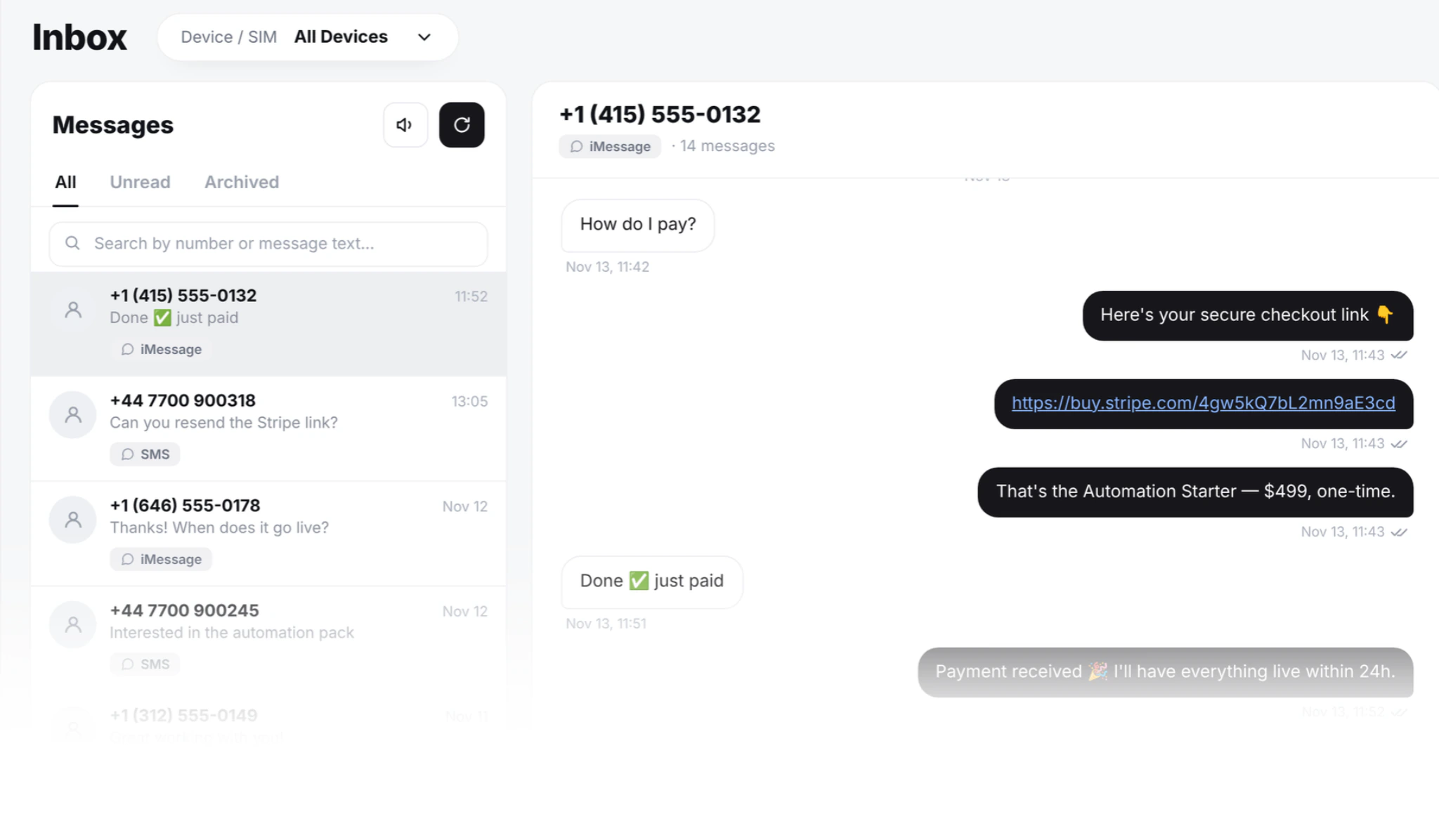
Replies land in a shared inbox in your browser. Teammates sign in with their own login and answer from the same business number, so the customer gets a quick reply from the number they wrote to. Each reply leaves the SIM the conversation came in on.
Follow up, then stop when they answer
Space follow-ups over several days and pause them as soon as the contact replies, so nobody gets a reminder after they have already answered.
Make it easy to opt out
Include "Reply STOP to opt out" in campaigns. Anyone who replies STOP is opted out of every later campaign on your account automatically. Respecting that keeps your number healthy and your customers comfortable.
Reach iPhone users in iMessage
With a Mac running SMS8 Gateway, Apple contacts see a blue-bubble iMessage from your Apple ID. iMessage is paced to 50 new contacts a day per Mac; people you already talk to do not count. Our guide to iMessage marketing and blue bubble texting covers how to use it well.
How many texts can you send from your own number?
SMS8 puts no cap on your messages. To keep your number healthy, campaigns go out at one message every 10 to 30 seconds per SIM, which looks like a person sending, not a blast. One-to-one replies and texts from your code do not wait for a campaign to finish. When your list is large, add a second SIM or another phone and SMS8 rotates the campaign across your SIMs, so each number carries only its share. Your mobile plan's fair use rules still apply on the SIM side.
What does it cost?
SMS8 plans are flat, with the same features on every plan:
- One Device: USD 29 a month for 1 connected phone or Mac and 1 team seat.
- Five Devices: USD 89 a month for 5 phones or Macs and 10 team seats.
- Twenty Devices: USD 229 a month for 20 phones or Macs and 40 team seats.
Billed yearly, every plan costs half the monthly price. SMS and MMS are unlimited, and SMS8 charges no fee per message, so a second reminder or a follow-up costs nothing extra. Your own mobile plan covers the SIM. See the full comparison on SMS8 pricing.
Why choose SMS8
- Your own number on every text. Customers see the business number they saved, not a short code or a stranger, so your messages get read.
- One conversation per customer. Reminders, campaigns and replies all live in one thread on one number, in a shared inbox your team answers from a browser.
- SMS, MMS and iMessage together. Android phones for SMS and MMS, a Mac for iMessage, all in one inbox.
- Flat price, unlimited messages. From USD 29 a month with no fee per message, so you never ration follow-ups.
- No A2P 10DLC filing. Texts go person to person from your SIM, with no registration wait.
- Ready in minutes. Pair a phone and send the same day, with integrations for GoHighLevel, Zapier, Make, WordPress, WooCommerce, Google Sheets, n8n and the REST API.
Send from the number your customers trust
If your texts are going unanswered, change the sender before you rewrite the message. With SMS8, every text leaves the business number your customers already know, replies come back to the same place, and the price stays flat however much you send. Start the 3-day trial with 30 messages, pair your phone, and send your next reminder from your own number.