
Send unlimited bulk SMS from your own number.
SMS8 sends your bulk SMS through an Android phone you own, so every message leaves your real number. Upload a list, write one message and send. One flat plan from USD 29 a month, with no fee per message and no A2P 10DLC filing.
What unlimited bulk SMS means here
SMS8 puts no cap on the messages you send or receive and charges nothing per message. Every plan includes unlimited SMS and MMS. You pay for the number of connected phones, not for texts.
The texts go out through the SIM in your phone, so they count against your own mobile plan. Many plans include unlimited texting under a fair use policy. Check what yours allows for business sending before a big broadcast.
Because each message goes person to person from your SIM, there is no brand or campaign registration to wait for.
Who sends bulk SMS from their own number
Three kinds of teams broadcast every week. None of them need a Twilio account.
Shops and online stores
Promos, restocks and order updates sent from the store mobile customers already have saved. Replies come back to one inbox, so questions get answered in the same thread.
Schools, clubs and community groups
Closures, room changes and event reminders sent to parents and members from the office number they know.
Operations teams
Shift cover, office closures and on-call alerts that land on every phone as a normal text, with no extra app to install.
Six bulk SMS broadcasts teams send every week
None of these need a developer. A list goes in, a message goes out.
A big sale to your full customer list
Upload last year's buyer list the night before, write one message with each customer's first name, and schedule it for the morning. SMS8 paces it out across your phones while you run the shop.
A weekly flash sale
A recurring send every Friday at 10am to your opted-in list. Same template, a new code each week. Anyone who replied STOP is skipped automatically.
School event reminders
One text to every parent with the room and the start time, sent from the office mobile parents already saved. Replies come back to the office inbox.
Gym class changes
A class moves rooms early in the morning. The front desk texts that day's booked members from the gym's known number.
A restaurant lunch special
Today's dish sent at 11am to the opted-in list. One template, one field that changes each day.
Staff announcements
Snow days, fire drills and payroll cut-off reminders. Upload the staff list once and send to the group you need.
CSV in, broadcast out, replies in your inbox
Four steps from a spreadsheet to a sent campaign. SMS8 handles the queue, the pacing and the opt-outs.
Pair a phone
Install the SMS8 app on an Android 7 or newer phone and scan the code on your dashboard. Turn off battery optimisation for the app so it keeps running.
Upload your list
Import a CSV or Excel file with a phone column. Numbers are checked on import, duplicates are sent once, and extra columns like first_name become merge tags.
Create the campaign
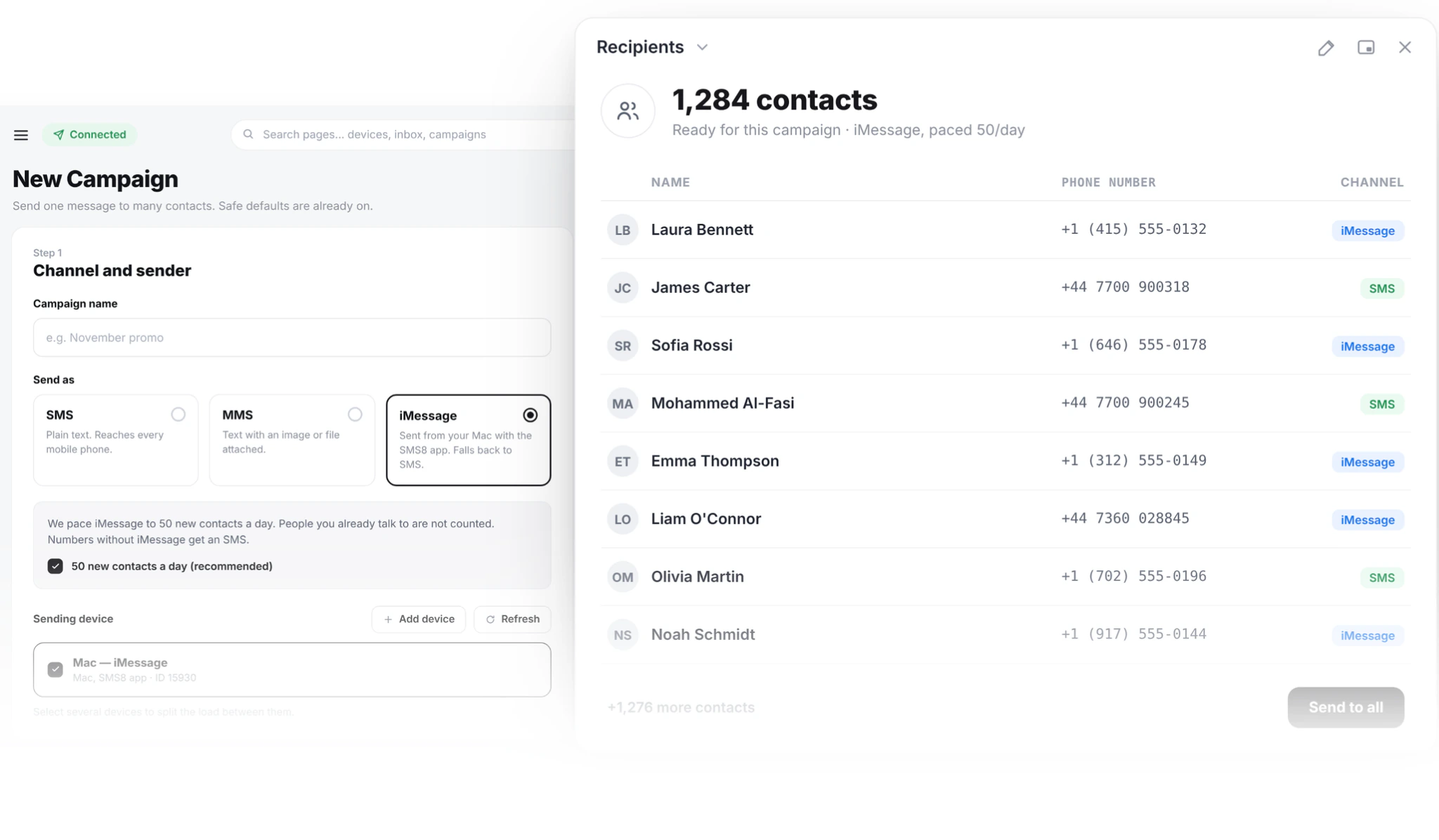
Choose SMS, MMS or iMessage, write the message, and pick the phones that send it. Send now or schedule a time outside your quiet hours.
Watch it go out
Queued, sent and failed counts update live. Pause at any point. Replies land in your inbox, threaded by contact.
How many SMS can I send in a day?
Campaigns go out at one message every 10 to 30 seconds per SIM. That steady pace keeps your number in good standing with your carrier, and it is the main thing that sets how long a broadcast takes.
Each device also has a daily limit, set to 2,000 messages by default. When a campaign reaches it, the rest waits for the next day instead of pushing one SIM too hard.
Quiet hours hold messages that would land outside your sending window until the window opens again. The campaign summary shows how long the send will take before you start it.
Add phones to send more
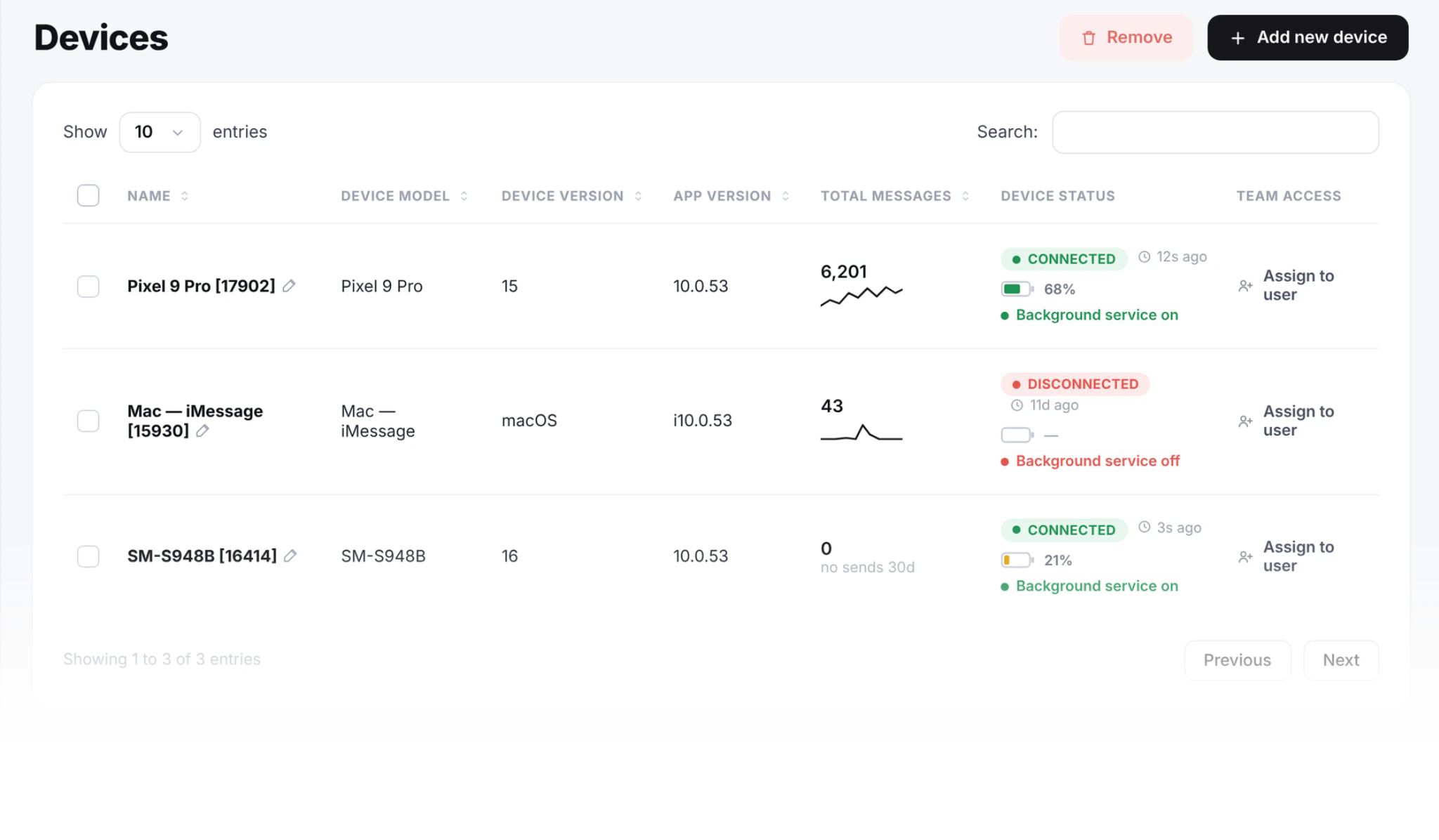
One phone covers most small lists. For bigger ones, pair a second phone or use a dual-SIM phone. SMS8 shares the campaign across every SIM you select, so each number carries only its part.
You do not pick the phone for each message. SMS8 rotates through the SIMs you chose, and every reply comes back to the number that sent the message.
- Dual-SIM and eSIM phones count as two senders
- Each SIM keeps its own steady pace
- Android phones and Macs side by side in one dashboard
Built into every bulk send
On every plan, with nothing extra to buy.
SMS, MMS or iMessage
Pick the channel per campaign. iMessage goes out from a Mac you own, paced to 50 new contacts a day per Mac, with SMS fallback for numbers not on iMessage.
Merge tags
Write "Hi {first_name}" once and every person reads their own name.
Schedule or repeat
Send later, or set a recurring weekly broadcast.
STOP handled for you
Anyone who replies STOP is opted out of every later campaign on your account.
Quiet hours
Nothing lands in the middle of the night.
Two-way replies
Every answer comes back to one shared inbox your team can reply from.
Why teams move bulk SMS off Twilio
Both send texts. They suit different jobs. For the full breakdown, read Twilio vs SMS8.
| Cloud SMS provider like Twilio | SMS8 from your own number | |
|---|---|---|
| Cost per message | Charged on every text, plus carrier fees | No fee from SMS8, your mobile plan applies |
| Sender number | A rented virtual number or short code | Your real mobile number |
| US registration | A2P 10DLC brand and campaign filing | Not needed, texts are person to person |
| Time to first message | Account checks and approval, often days | Pair a phone, a few minutes |
| Scheduling and recurring sends | Build it in your own code | Built into the campaign screen |
| Replies | Handled by your own code or another tool | Threaded in a shared inbox |
| Speed per sender | The throughput tier you pay for | 10 to 30 seconds per message per SIM, add SIMs to send more |
For teams that text their own customers, a phone they own is simpler and costs less, and adding phones adds volume.
How much does unlimited bulk SMS cost?
USD 29 a month for 1 connected phone or Mac, USD 89 for 5, and USD 229 for 20. Every plan includes unlimited SMS and MMS, the API, webhooks and every integration.
Pay yearly and the monthly price is cut in half. Every account starts with a 3-day trial with 30 messages and no card.
Read before your first big send
SMS marketing with SMS8
Campaign strategy, merge tags, scheduling and what to send.
02Bulk SMS marketing: the complete guide for 2026
Throughput, deliverability, consent and cost in one place.
03How to send bulk SMS from your own phone legally
Consent, opt-out and carrier rules before you send.
04Android SMS gateway
How the phone app works, what it needs and how to install it.
Yes on the SMS8 side. There is no cap on messages and no fee per message. Your own mobile plan still applies, so check its fair use rules for business sending.
Yes. Pair an Android phone with the SMS8 app and every message in the campaign leaves that phone's SIM, so people see your real number and reply to you.
Campaigns are paced at one message every 10 to 30 seconds per SIM, and each device has a daily limit of 2,000 by default. Add a second SIM or another phone to send more.
No. Messages go person to person from your own SIM, so there is no brand or campaign filing to wait for.
Anyone who replies STOP is added to your blacklist and skipped in every later campaign. You still need to say who you are and include the opt-out line in your message.
SMS8 sends SMS and MMS from an Android phone. To reach iPhone users over iMessage, campaigns go out from a Mac you own through the SMS8 Gateway Mac app, with SMS fallback for numbers not on iMessage.
Send your first bulk SMS today
Pair a phone, upload your opted-in list and send from the number your customers already know. 3-day trial, no card needed.