
Part of the guide Send iMessage via API: iMessage for GoHighLevel, Zapier, API and Webhooks
On this page
- Key takeaways
- What is the difference between blue and green bubbles?
- Why does blue bubble texting matter for business?
- When does iMessage beat SMS?
- How many iMessages can you send a day?
- How do you get consent for iMessage marketing?
- What about read receipts and typing indicators?
- How do you set up an iMessage campaign in SMS8?
- What should an iMessage marketing message look like?
- How do you measure an iMessage campaign?
- What should you not do?
- What does iMessage marketing cost with SMS8?
- Will iMessage marketing change in 2027?
- Why choose SMS8 for iMessage marketing
Key takeaways
- A blue bubble is an iMessage, sent between Apple devices over the internet. A green bubble is SMS, MMS or RCS. On an iPhone, a blue bubble from a sender people know reads like a message from a person, not a brand.
- iMessage marketing works for conversations and expected messages: confirmations, follow-ups, VIP offers, re-engaging people who already know you. It does not work for cold blasts.
- Pace an Apple ID to 50 new contacts a day per Mac. People you already talk to do not count.
- Consent, a clear sender and an easy way to stop apply to iMessage just as they do to SMS.
- Plan every campaign for both colours: Apple contacts get iMessage, everyone else gets SMS from your own number.
iMessage marketing means sending business messages as blue bubbles to iPhone users, usually from a Mac signed into your business Apple ID. It beats SMS when the message is personal, expected and invites a reply, and it loses when you need to reach a big list fast. The right setup sends iMessage to Apple contacts within a daily pace and SMS to everyone else, from one campaign. This guide shows how, and how SMS8 handles it through a Mac you own. For the product overview, see sending iMessage from your business with SMS8.
What is the difference between blue and green bubbles?
On an iPhone, the colour of the bubble tells you how the message travelled:
- Blue is iMessage. Both sides use Apple devices, and the message goes over the internet through Apple's service. It supports high-quality photos and video, reactions, replies in a thread, and, when the recipient allows them, read receipts.
- Green is anything else: SMS, MMS, or RCS between an iPhone and an Android phone. It goes through the mobile carrier.
You do not choose the colour by hand. If the number is registered with iMessage, a message sent from Messages on an Apple device goes blue. If not, it goes green. That is why any iMessage campaign also needs an SMS path, because Android users will never see a blue bubble from anyone.
Why does blue bubble texting matter for business?
It comes down to how the message feels when it lands. A blue bubble from a known sender looks exactly like a text from a friend. There is no short code and no unfamiliar five-digit sender. Photos arrive sharp instead of compressed, and the customer can react or reply in the same thread they would use with anyone else.
We are not going to quote open-rate statistics here, because most numbers floating around have no published method behind them. What we can say is the reasoning: people answer conversations, and iMessage looks like a conversation. Test it on your own list and measure replies, not opens.
When does iMessage beat SMS?
| Situation | Better channel | Why |
|---|---|---|
| Booking confirmations and reminders | iMessage, SMS fallback | Expected, personal, often answered |
| Lead follow-up after a form or call | iMessage, SMS fallback | Reads like a person replying, invites a conversation |
| VIP offers to a small group of regulars | iMessage | Sharp images, feels one-to-one |
| Order, pickup and delivery updates | iMessage, SMS fallback | Customers answer questions in the same thread |
| A sale announcement to 5,000 people | SMS from your own SIMs | Too many new contacts for iMessage pacing |
| A list with many Android users | SMS | iMessage cannot reach Android |
| Login and verification codes | SMS | Codes need to reach every phone, fast |
The pattern: iMessage for depth, SMS for reach. Most businesses end up using both, and that is easiest when both run on one account. If your main channel is a broad list, start with our SMS marketing campaigns page and add iMessage for the high-value segment.
How many iMessages can you send a day?
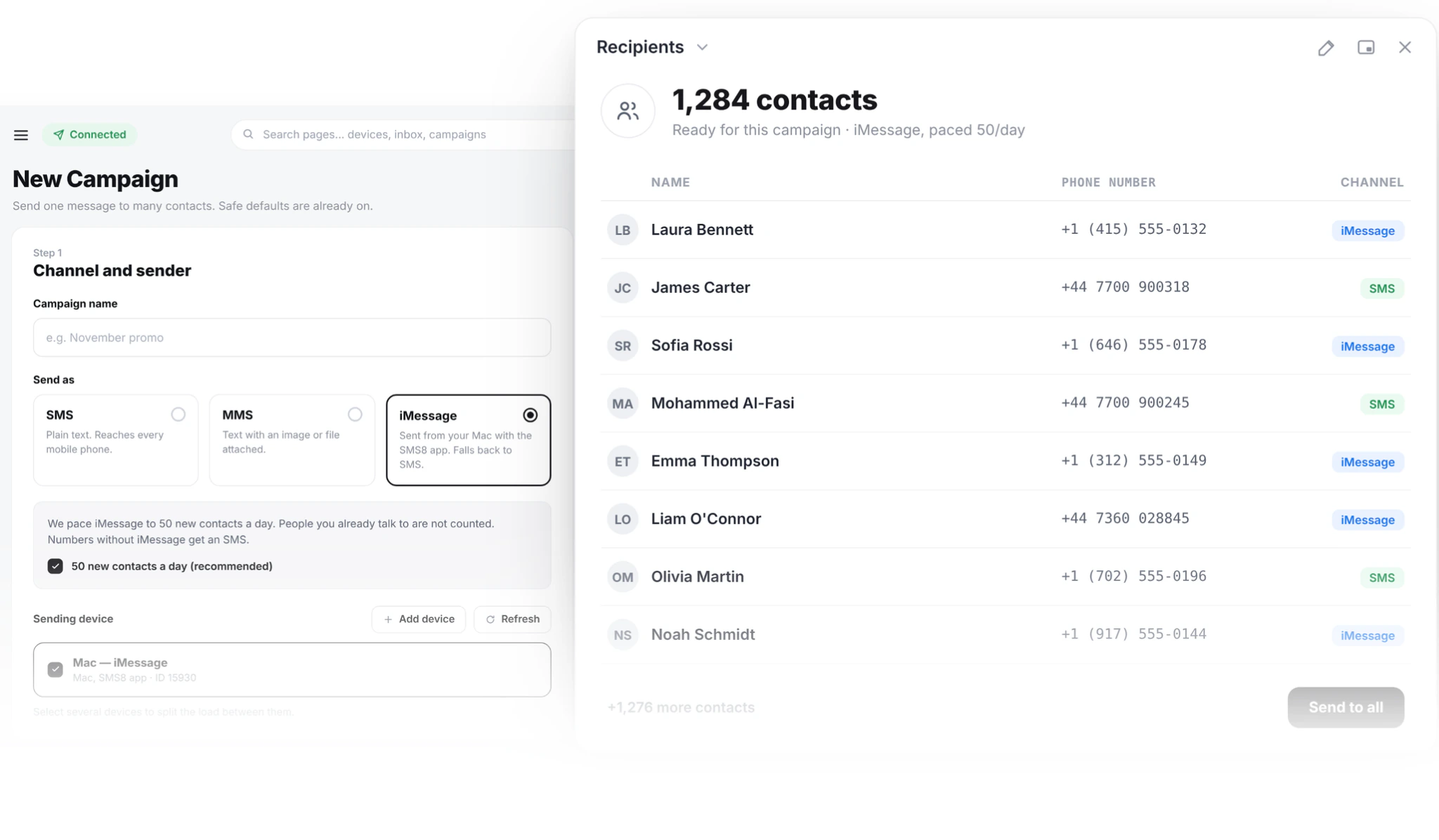
SMS8 paces iMessage to 50 new contacts a day per Mac. People you already have a thread with are not counted, so a reminder to an existing customer goes out normally. If a campaign has more than 50 new contacts, the rest continue the next day.
This is not an arbitrary SMS8 limit. Apple can slow down or block an Apple ID that sends like a broadcast tool, and every managed iMessage provider has a similar cap. As listed on their sites in November 2026, Sendblue says "We do not support message blasts" and LoopMessage says it does not support outbound-only messaging. Our Sendblue alternative comparison covers how each provider handles this.
What that means for planning:
- A list of 200 new contacts on one Mac takes four days. Plan launches with that in mind.
- Two Macs, each with its own Apple ID, double the daily reach.
- Large lists should go out as SMS from your Android phones, paced at one message every 10 to 30 seconds per SIM.
How do you get consent for iMessage marketing?
Treat iMessage like SMS. The channel is different, but the rules that protect people from unwanted texts generally apply to the message, not the colour of the bubble. Laws differ by country, so check yours, but three habits cover most of them:
- Get consent before you send, and keep a record. A checkbox on a form, a keyword the customer texted you, a signed booking form. Note when and how.
- Say who you are. Your business name in the first message, even if the customer knows your number.
- Honour STOP right away. Include "Reply STOP to opt out" in marketing messages. In SMS8, anyone who replies STOP is opted out of every future campaign on your account.
Never send iMessage to a bought list. Beyond the legal risk, strangers report unknown senders as junk, and junk reports are what get an Apple ID limited.
What about read receipts and typing indicators?
These are Apple features, and Apple controls them:
- Read receipts show only when the recipient has turned on Send Read Receipts in their own settings, either for everyone or for your conversation. Many people leave it off. So a missing "Read" does not mean the message was not seen, and you cannot force it on.
- Typing indicators show the other side that someone is writing. When your team replies by hand, the customer sees normal iMessage behaviour.
- Delivered appears when the message reached the recipient's device.
Do not build your reporting around read receipts. Measure what you can count reliably: replies, bookings, orders and opt-outs. SMS8 tracks message status from queued through sent, delivered or failed, and every reply lands in your inbox and webhook.
How do you set up an iMessage campaign in SMS8?
First, pair a Mac. Install SMS8 Gateway on a Mac running macOS 14 or newer, signed into Messages with your business Apple ID, enter the pairing code and allow the permissions. Allow Full Disk Access so replies come back into SMS8. Then:
- Import your list. Upload a CSV or Excel file with a phone column. Extra columns such as first_name become merge tags. Numbers are checked on import, duplicates are sent once and blacklisted numbers are skipped. Only import people who opted in.
- Pick iMessage as the channel. When you create the campaign, choose iMessage. Numbers that are not on iMessage get the same message as an SMS.
- Write the message. Short, personal, one clear action. Use the customer's name and sign it like a person would.
- Schedule it. Send now, pick a time or set a recurring send. Quiet hours hold messages outside your window until morning.
- Watch and reply. Counts for queued, sent and failed update live, and you can pause mid-send. Replies thread into the shared inbox, where your team answers from a browser.
The video below walks through bulk sending from an iPhone and an Android phone, which is the same idea behind pairing both an Apple device and a SIM.
Sending from GoHighLevel or code instead
The campaign screen is for lists you send by hand. If your marketing runs from a CRM, SMS8 is a GoHighLevel SMS provider through its marketplace app, so workflow steps and drips can go out as iMessage through your Mac, with replies in the GHL contact. See the GoHighLevel SMS integration. Developers can do the same with one API call, covered in our iMessage API tutorial.
What should an iMessage marketing message look like?
Write it like you would text a customer you know. Some examples:
Hi Maria, it is Leo from the bike shop. Your service is done and the bike is ready for pickup today until 6pm. Want me to hold it until tomorrow?
Hi James, thanks for asking about the kitchen quote. I can come by Thursday morning or Friday afternoon to measure. Which works better?
Hi Ana, regulars get first pick of the new autumn menu this Friday. Want me to save you a table for two? Reply STOP to opt out.
Each one names the sender, is about something the person cares about, and ends with a question that is easy to answer. That is what blue bubble texting is good at.
How do you measure an iMessage campaign?
Because read receipts are optional for the recipient, opens are not a number you can trust. Count the things that happen after the message instead:
- Reply rate. The share of contacts who answered. On iMessage this is the clearest signal that the message felt personal.
- Outcome rate. Bookings, orders or calls that came from the thread. Tag the contacts in your list so you can match them later.
- Opt-out rate. STOP replies per campaign. A rising number means the message, the timing or the list needs work.
- Failed and fallback counts. How many numbers went to SMS instead of iMessage. If most of a segment falls back, that segment is mostly Android, and SMS should be the main plan for it.
Compare an iMessage segment with an SMS segment of similar customers before you decide where to spend your daily iMessage pace. Small tests on your own list beat any general rule.
What should you not do?
- Do not blast cold lists. It is the fastest way to get an Apple ID limited, and it breaks consent rules in most countries.
- Do not use a brand-new Apple ID for a big launch. Start with existing customers and grow the daily volume slowly.
- Do not get around pacing with tricks. Rotating many fresh Apple IDs to send cold messages is the behaviour Apple looks for.
- Do not send link-only messages. A message that is nothing but a URL looks like spam in any colour. Add context and a question.
- Do not forget Android. Plan the SMS version of every campaign, because part of your list will always get green bubbles.
- Do not send at night. Use quiet hours. A buzz at 11pm earns opt-outs.
- Do not over-message. Send when something happens. For most lists, a couple of marketing messages a month per person is plenty.
What does iMessage marketing cost with SMS8?
A Mac counts as one device on your plan, the same as an Android phone. Plans are USD 29 a month for 1 device, USD 89 for 5 and USD 229 for 20, with yearly billing at half the monthly price and no fee per message. A common setup, one Mac for iMessage and one or two Android phones for SMS reach and fallback, fits Five Devices. The 3-day trial includes 30 messages and needs no card. See SMS8 pricing.
Will iMessage marketing change in 2027?
We would rather not predict Apple's plans. What is already true: RCS between iPhone and Android gives green-bubble conversations more features than plain SMS had, and Apple keeps iMessage closed to server-side sending. Plan for both channels, keep consent records, and you will be ready whatever Apple changes.
Why choose SMS8 for iMessage marketing
SMS8 sends blue bubbles to Apple contacts and SMS to everyone else from one campaign.
- iMessage from your own Apple ID. SMS8 Gateway runs on a Mac you own, paced to 50 new contacts a day per Mac, with SMS fallback for Android numbers.
- SMS, MMS and iMessage in one inbox. Pair Android phones for SMS and MMS and a Mac for iMessage with SMS fallback, then answer everything from one shared inbox.
- A flat price with unlimited messages. USD 29 a month for one phone or Mac, USD 89 for five and USD 229 for twenty, with unlimited SMS and MMS and no per-message fee. Yearly billing is half the price.
- Your own number. Texts leave from the SIM in your own Android phone, so customers see a number they know and can reply to.
- Setup in minutes. Install the app, pair the phone and copy your API key. The 3-day trial includes 30 messages and needs no card.
Start the 3-day trial with 30 messages and no card, or compare plans on the SMS8 pricing page.