
Part of the guide SMS Marketing Campaigns From Your Own Phone
On this page
- Key takeaways
- Why do businesses automate SMS marketing?
- What SMS marketing can you automate?
- How do you automate SMS from GoHighLevel?
- How do you automate SMS with Zapier or Make?
- How do you automate SMS with the API?
- What does the SMS8 campaign screen automate for you?
- How fast do automated campaigns go out?
- How do you keep automated SMS compliant?
- What does SMS marketing automation cost on SMS8?
- Why choose SMS8
- Automate your first campaign this week
Key takeaways
- SMS marketing automation means texts go out on their own when something happens: a form is filled, an order ships, a booking is made, a customer goes quiet, or a date comes round.
- SMS8 runs those texts from an Android phone you own, so every automated message comes from a real number your customers can save and reply to.
- You can automate from the tools you already use: the GoHighLevel marketplace app, Zapier, Make, n8n, the WordPress and WooCommerce plugin, the Google Sheets add-on or the REST API.
- The SMS8 campaign screen adds scheduled and recurring sends, merge tags, quiet hours, clean lists and automatic STOP handling.
- Plans are flat at USD 29, 89 or 229 a month with unlimited SMS and MMS and no fee per message, so automating more texts never raises your bill. The 3-day trial has 30 messages and needs no card.
SMS marketing automation lets your business send the right text at the right moment without anyone pressing send: a welcome message after a sign-up, a reminder the day before an appointment, a review request after a purchase, a win-back note to a customer who has not ordered in a while. With SMS8, those automations run from your CRM, your store, Zapier, Make or your own code, and every text leaves the SIM in your own phone, from the number your customers already know. You pay one flat monthly price with unlimited messages, so a busy month costs the same as a quiet one. For the campaign features themselves, see SMS marketing with SMS8.
Why do businesses automate SMS marketing?
Most small and mid-sized businesses already know texting works. The problem is doing it consistently. Reminders are sent when someone remembers. Follow-ups depend on who is in the office. Review requests stop when the person who sent them goes on holiday. Automation fixes the consistency problem, but on many platforms it creates a new one: cost.
- Every automated text is billed. On a per-message platform, a good automation is one that sends more, and the bill grows with it. Teams end up switching off useful steps to save money. Our guide on why many teams stop paying per SMS walks through that trap.
- Registration before automation. Sending marketing texts from rented US numbers usually means filing for A2P 10DLC and waiting for approval before the first workflow can run.
- Texts from strangers. Automated texts from short codes and rented numbers look like spam to many customers, so the automation runs but nobody reads it.
SMS8 removes all three: a flat price, no A2P filing because texts go person to person from your own SIM, and a sender your customers recognise.
The video shows how to send unlimited bulk SMS from your own number with SMS8, the same sending setup your automations run on.
What SMS marketing can you automate?
Good automations are triggered by something the customer did or something they expect. These are the ones that pay off for most businesses:
| Automation | Trigger | Example message |
|---|---|---|
| Welcome | New sign-up or form opt-in | Thanks for joining, here is your 10% code for your first visit. |
| Appointment reminder | Booking made, sent the day before | See you tomorrow at 10:00. Reply C to confirm or R to reschedule. |
| Lead follow-up | Quote or contact form submitted | Hi Sam, thanks for your request. When is a good time to call? |
| Order and pickup updates | Order shipped or ready | Your order is ready for pickup until 6pm today. |
| Review request | A few days after a purchase or visit | How did we do? A quick review helps us a lot: link. |
| Failed payment | Card declined | Your payment did not go through. Update your card here: link. |
| Win-back | No order for a set period | We miss you. Here is something for your next visit. |
| Recurring announcement | A fixed day and time | This week's specials are in. Reply STOP to opt out. |
For more ideas by trade, see our SMS templates by industry and the SMS marketing playbook with 12 plays.
How do you automate SMS from GoHighLevel?
If you run your marketing in GoHighLevel, install the SMS8 app from the GoHighLevel marketplace and it becomes the SMS provider for your sub-account. You do not edit a single workflow. Every Send SMS step, drip, calendar reminder, missed-call text-back and Conversations reply then sends from the Android phone you paired, and replies thread back into the GHL conversation.
Agencies pair one phone per sub-account so each client texts from its own number, and new clients can send as soon as their phone is paired, without a brand filing. Setup details are on the GoHighLevel SMS integration page.
How do you automate SMS with Zapier or Make?
Zapier
The official SMS8.io app in Zapier has a Send SMS action and a New Incoming SMS trigger. Put Send SMS after any trigger: a new form entry, a CRM stage change, a calendar booking, a spreadsheet row or a store order. Map the number and the message, and the text goes out from your phone a moment later. Add a Delay by Zapier step for reminders before a meeting. The Zapier SMS integration page lists every field.
Make
The SMS8 app for Make gives you Send a Message, Send OTP Code, List Messages and an instant Watch Incoming Messages trigger. Typical scenarios are a Shopify abandoned checkout followed by a short wait and a recovery text, a Stripe failed charge followed by a short reminder sequence, or a Calendly booking followed by a reminder 24 hours before. See Make SMS automation with SMS8.
Other routes
- n8n: call the SMS8 API from an HTTP Request node.
- WordPress and WooCommerce: the SMS8 plugin sends order and status texts without Zapier.
- Google Sheets: the add-on sends a text to each row, using the other columns in the message.
How do you automate SMS with the API?
If the trigger lives in your own software, call the API directly. One POST sends a text, and schedule with a Unix timestamp queues it for later, so a reminder can be queued the moment a booking is made:
import os
import time
import requests
API = "https://app.sms8.io/api/v1"
HEADERS = {"X-Api-Key": os.environ["SMS8_API_KEY"]}
appointment = int(time.time()) + 3 * 86400        # your booking time
r = requests.post(f"{API}/messages", headers=HEADERS, data={
    "number": "+14155550100",
    "message": "Hi Ana, see you tomorrow at 10:00. Reply C to confirm or R to reschedule.",
    "schedule": appointment - 86400,               # 24 hours before
    "idempotencyKey": "booking-5521-reminder",
}, timeout=30)
print(r.json())
The idempotencyKey stops a retried job from sending the same reminder twice. To catch the replies, register a webhook on the Webhooks page and tick both the received and messages events, since an incoming text arrives with "event": "messages". Your code can then mark the booking confirmed when the customer answers C. The full reference is in the SMS8 API documentation.
What does the SMS8 campaign screen automate for you?
Not every automation needs a trigger in another tool. For list-based marketing, the campaign screen in SMS8 does the work:
- Send now, later or on repeat. Pick a time, or set a recurring send such as every Friday at 10am.
- Merge tags. Write "Hi {first_name}" once and every person reads their own name. Extra columns in your CSV or Excel file become tags.
- Quiet hours. Messages outside your window wait until morning.
- Automatic STOP. Anyone who replies STOP is added to your blacklist and skipped in every later campaign on your account.
- Clean lists. Numbers are checked on import, duplicates are sent once and blacklisted numbers are skipped.
- Paced sending. Messages go out 10 to 30 seconds apart on each SIM, and you can pause at any time.
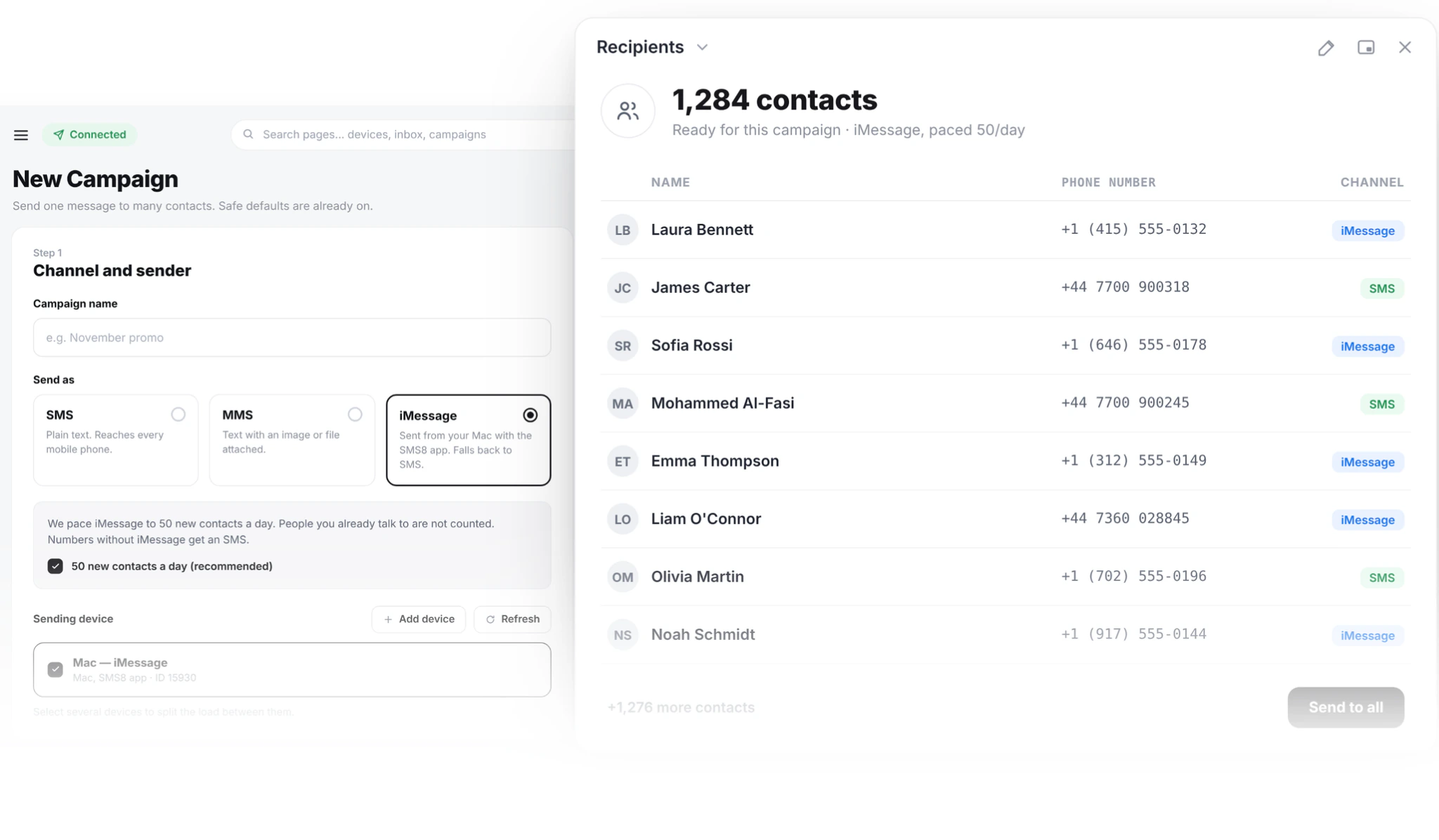
- One campaign, three channels. SMS reaches every phone, MMS adds an image, and iMessage goes out from a Mac you own, with SMS for contacts not on iMessage.
How fast do automated campaigns go out?
Because texts leave a real SIM, SMS8 spaces bulk messages 10 to 30 seconds apart on each SIM. That steady pace keeps your number in good standing with your carrier. A single triggered text, like a reminder or a lead reply, is sent on its own and does not wait for a campaign to finish, and you can mark urgent texts as priority.
To send more at once, add SIMs: a dual-SIM phone doubles one handset, and more paired phones share the campaign, with SMS8 rotating across every SIM you select. The campaign summary shows how long a send will take before you start it. iMessage is paced to 50 new contacts a day per Mac, and people you already talk to do not count.
How do you keep automated SMS compliant?
Automation makes it easy to send a lot, so the basics matter more, not less:
- Consent first. Only text people who opted in, keep a record of it, and never send to a bought list.
- Say who you are in every message, and add "Reply STOP to opt out".
- Honour opt-outs at once. SMS8 does this for campaigns. If your CRM sends through SMS8, keep its own opt-out list in sync.
- Respect quiet hours and keep frequency sensible. For most lists, two messages a month per person is plenty.
What does SMS marketing automation cost on SMS8?
| Plan | Monthly | Billed yearly (per month) | Connected phones or Macs | Team seats |
|---|---|---|---|---|
| One Device | USD 29 | USD 14.50 | 1 | 1 |
| Five Devices | USD 89 | USD 44.50 | 5 | 10 |
| Twenty Devices | USD 229 | USD 114.50 | 20 | 40 |
Every plan has unlimited SMS and MMS, the campaign screen, scheduled messages and auto-replies, the API, webhooks and every integration. SMS8 charges no fee per message, no number rental and no A2P registration fee. Your mobile plan covers the texts themselves, and many plans include unlimited texting under a fair use policy. Zapier and Make bill their own plans separately. Because the price is flat, you can add a second reminder or a review request without doing the maths first. To see what your current volume would cost elsewhere, try the SMS cost calculator.
Why choose SMS8
- Unlimited messages at a flat price. USD 29 a month for one phone or Mac, with no fee per message, so automating more never costs more.
- Your own number. Automated texts come from the number customers saved, so they get read and answered.
- No A2P 10DLC wait. Texts go person to person from your own SIM, so your automations can go live the same day.
- Automate from the tools you use. GoHighLevel, Zapier, Make, n8n, WordPress, WooCommerce, Google Sheets and the REST API.
- Campaigns with the safety built in. Scheduling, recurring sends, quiet hours, clean lists and automatic STOP handling.
- SMS, MMS and iMessage with replies in one inbox. Every answer to an automated text lands in the shared inbox, threaded by contact.
Automate your first campaign this week
Pick one automation that matters, such as appointment reminders or lead follow-up, connect it to SMS8 from your CRM, Zapier, Make or the API, and let it run from your own number. When it works, add the next one. Start the 3-day trial with 30 messages, pair a phone and send your first automated text today, then choose your plan on the SMS8 pricing page.