
Part of the guide SMS Marketing Campaigns From Your Own Phone
On this page
- Key takeaways
- Why do agencies struggle to run SMS for clients?
- How does the one-phone-per-client model work?
- How do you run SMS marketing for GoHighLevel clients?
- How do you run campaigns for clients outside GoHighLevel?
- Which SMS campaigns should agencies sell first?
- How much sending can each client do?
- How do you keep clients separate and your team in control?
- What does SMS marketing for agencies cost on SMS8?
- Why choose SMS8
- Start your first client this week
Key takeaways
- The simplest way to run SMS marketing for agency clients is one paired Android phone per client, so each client texts from its own real number and its replies stay separate.
- GoHighLevel agencies install the SMS8 marketplace app at agency level or per sub-account. Workflows, Conversations, drips and reminders then send from the client's phone with no workflow edits.
- Clients outside GoHighLevel get campaigns from the SMS8 dashboard, or automations through Zapier, Make, n8n or the API.
- There is no A2P 10DLC filing per client, because texts go person to person from a real SIM, so a new client can send the day its phone is paired.
- Plans are flat: USD 29, 89 or 229 a month for 1, 5 or 20 connected phones or Macs, with unlimited SMS and MMS. Yearly billing is half. Beyond 20 phones, enterprise adds white label and volume pricing.
SMS marketing for agencies works best when every client sends from its own number and the agency pays one predictable bill. With SMS8, you pair one Android phone per client, each with the client's SIM, and run all of them from one dashboard. GoHighLevel sub-accounts use the SMS8 marketplace app as their SMS provider. Other clients get campaigns, scheduled sends and automations from the same account. Texts leave the client's SIM, so there is no fee per message from SMS8, no number rental and no carrier registration per client. Everything SMS8 offers for campaigns is described on the SMS marketing campaigns page.
Why do agencies struggle to run SMS for clients?
Most agencies add SMS because clients ask for it. Then the operational side shows up:
- A filing for every client. On a rented-number provider, US traffic needs a brand and an approved campaign before anything sends. Each new client means another form and another wait, and a rejection can stall onboarding for weeks.
- Bills that grow with client volume. A fee per message, number rental and carrier pass-through charges make your cost move every month. Passing them through to clients means invoices nobody can predict.
- Numbers nobody recognises. A rented long code is a stranger to the client's customers. Replies drop, and some people report the text as spam.
- Replies in the wrong place. When one shared number serves several clients, replies get mixed up and nobody knows who should answer.
SMS8 removes those problems at the source: each client sends from its own SIM, in its own phone, on one flat agency plan.
The video shows how a GoHighLevel sub-account sends SMS from a real phone number through SMS8.
How does the one-phone-per-client model work?
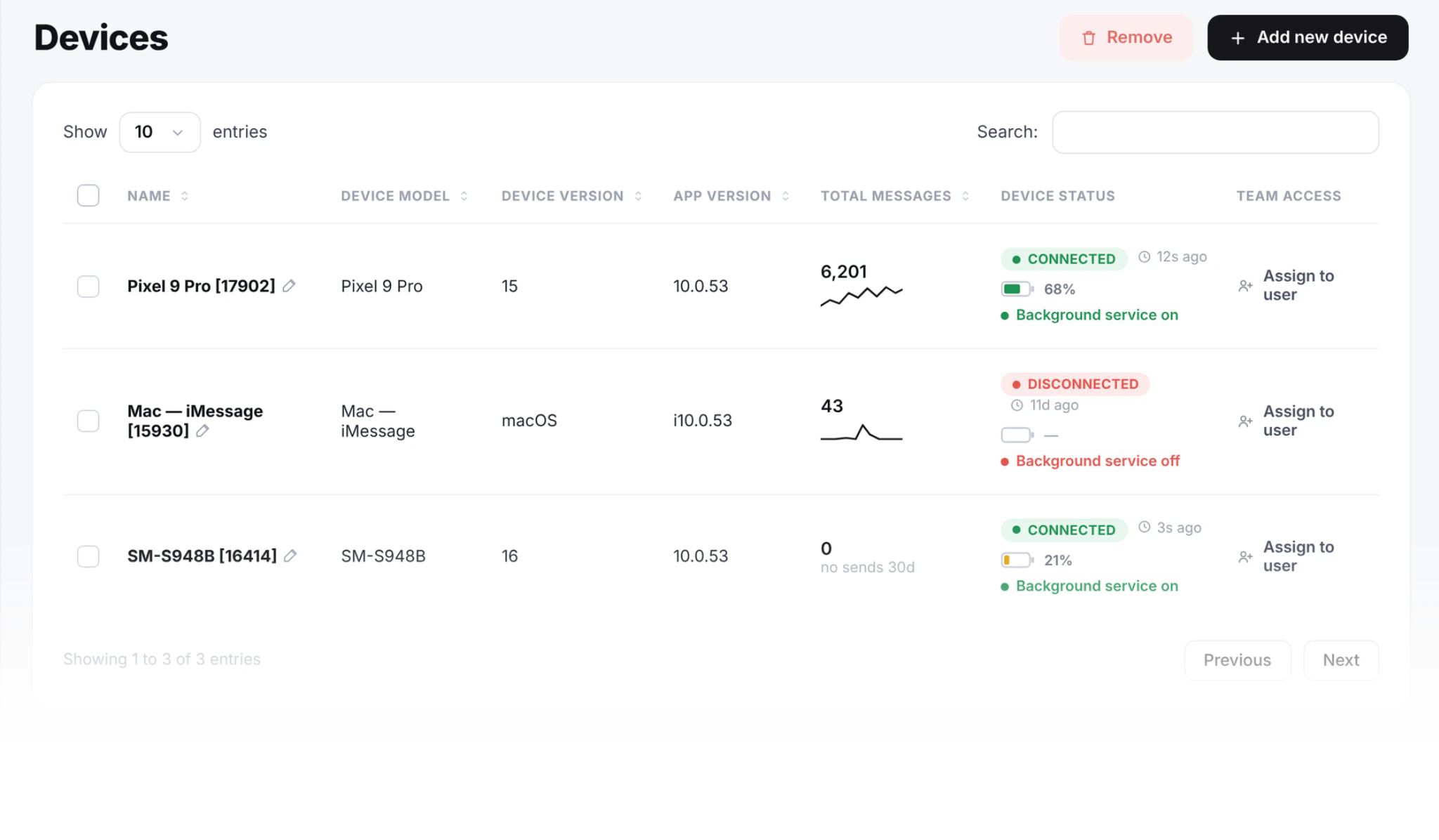
Each client gets a plain Android phone with Android 7 or newer and a SIM. It can be a second-hand handset. You pair it with your SMS8 account by scanning a code, and it shows up on your Devices page next to every other client's phone.
- Pick the SIM. Use the client's existing business SIM, or a new SIM in the client's name. When the client pays its own mobile plan, the texting runs on that plan and your agency bill does not move with their volume.
- Pair the phone. Install the SMS8 Android app, scan the pairing code on your dashboard, and turn off battery optimisation for the app so Android does not pause it.
- Park it. Keep the phone on a charger and on Wi-Fi, at your office or at the client's. Nobody needs to carry it or type on it.
- Connect the client's tools. GoHighLevel, campaigns, Zapier, Make, n8n or the API all send through that phone.
On a dual-SIM or eSIM phone you can give two small clients a number each from one handset, or double the sending of one client. If a phone drops offline for a moment, messages wait in the queue and go out in order when it reconnects.
How do you run SMS marketing for GoHighLevel clients?
Most agencies that sell SMS already run GoHighLevel. SMS8 has an app in the GoHighLevel marketplace that takes the SMS provider slot of a sub-account, so your snapshots and workflows keep working as built.
- Install once. Install the app at agency level to cover every client, or on single sub-accounts when only some clients text. You can add the rest later from the same screen.
- Map phones to sub-accounts. Sub-account A sends through phone A, sub-account B through phone B. Each client stays separate.
- Keep the workflows. Workflow SMS steps, drips, calendar reminders, missed-call text-back and the Send button in Conversations go out from the client's SIM. Replies thread back into the GHL conversation, and the customer replied trigger still fires.
- Move clients one at a time. Because the provider is set per sub-account, you can switch one client and leave another where it is while you compare.
Our guide to GoHighLevel SMS without LC Phone covers the switch in detail, and the GoHighLevel SMS integration page lists every surface that sends through the phone. If a client wants blue bubbles, add a Mac running SMS8 Gateway and the same workflows can go out as iMessage; see iMessage in GoHighLevel.
How do you run campaigns for clients outside GoHighLevel?
Not every client lives in GHL. For the rest, the SMS8 dashboard has a campaign screen built for lists:
- Import the client's opted-in list from a CSV or Excel file. Extra columns such as first_name or city become merge tags. Numbers are checked on import, duplicates are sent once and blacklisted numbers are skipped.
- Pick the client's phone as the sender, so the campaign leaves that client's number.
- Schedule it for a set time or a recurring send, with quiet hours so nothing goes out at night.
- Let STOP work on its own. Anyone who replies STOP is added to the blacklist and skipped in every later campaign on the account.
- Watch it live. Queued, sent and failed counts update as the campaign runs, and you can pause mid-send.
For event-driven texts, connect the client's stack. The official Zapier and Make apps send from any trigger, n8n calls the API through an HTTP Request node, and the WordPress plugin covers WooCommerce order texts. Our guide to SMS marketing automation from your own number walks through the most useful flows, and sending SMS from your CRM covers HubSpot, Pipedrive and custom CRMs.
Which SMS campaigns should agencies sell first?
Clients pay for outcomes they can see. These are the plays that are easiest to set up and easiest to report on:
| Client type | First campaign | What to report |
|---|---|---|
| Clinics, salons, studios | Booking confirmation and a reminder the day before | Confirmations by reply, rebooked no-shows |
| Home services and trades | Instant text-back on a quote request, plus an alert to the estimator | Leads answered, jobs booked from the thread |
| Real estate teams | Open-house reminders and a follow-up from the agent's number | Replies and viewings booked |
| Online stores | Failed payment sequence and order updates | Payments recovered, fewer support emails |
| Gyms, schools, clubs | Class changes, closures and event reminders | Replies and attendance |
| Any local business | A quiet win-back note to lapsed customers, at most once a quarter | Replies and returning customers |
Keep the rhythm light. Two messages a month per person is plenty for most lists, and a text from a known number that answers a real need gets replies. For ready-to-copy wording by trade, see SMS templates by industry.
How much sending can each client do?
Single texts, such as a reminder or a lead reply, go out as soon as the phone picks them up. Campaigns are paced at one message every 10 to 30 seconds per SIM, which keeps the client's number in good standing with its carrier. A list of a few thousand goes out over several hours on one SIM. For bigger clients, add a second SIM or another phone to that client and SMS8 shares the campaign across them. Plan large broadcasts early in the day or spread them over a window, and the pacing stops being an issue.
How do you keep clients separate and your team in control?
An agency handles many brands at once, so separation matters as much as sending.
- Separate numbers, separate threads. Each client's replies come back on the SIM that sent the message, so conversations never mix.
- Phone access per person. You choose which phones and SIMs each teammate can use, so an account manager only sees the clients they run. Every outgoing message is stamped with the person who sent it.
- Team seats on every plan. One Device includes 1 seat, Five Devices 10 and Twenty Devices 40.
- Workspaces and white label. For larger agencies, the SMS8 enterprise offer adds workspaces per client, white label under your own brand and domain, a private environment and volume pricing beyond 20 phones.
Compliance stays part of the service you sell. Collect consent in the client's forms and booking pages, keep it on the contact record, say who is texting, respect quiet hours and honour STOP. A text from a real SIM sits outside A2P 10DLC, not outside the rules on consent.
What does SMS marketing for agencies cost on SMS8?
| Plan | Monthly | Billed yearly (per month) | Client phones or Macs | Team seats |
|---|---|---|---|---|
| One Device | USD 29 | USD 14.50 | 1 | 1 |
| Five Devices | USD 89 | USD 44.50 | 5 | 10 |
| Twenty Devices | USD 229 | USD 114.50 | 20 | 40 |
On Twenty Devices, each connected client phone works out at about USD 11.45 a month, or about USD 5.73 billed yearly. Every plan includes unlimited SMS and MMS, the GoHighLevel app, Zapier, Make, the API, webhooks and the shared inbox. SMS8 adds no fee per message, no number rental and no A2P registration fee. When clients pay their own SIM plans, your SMS cost is the flat plan and nothing else, and you set your own price for the service. Need more phones mid-month? Move up a plan from the dashboard and pay the pro-rated difference. All the details are on the SMS8 pricing page.
Why choose SMS8
- Every client on its own number. Each client texts from its own SIM, so its customers see a number they can save, call and reply to.
- One flat agency bill. USD 29, 89 or 229 a month for 1, 5 or 20 phones or Macs, with unlimited SMS and MMS and no fee per message.
- No A2P 10DLC filing per client. Texts go person to person from a real SIM, so a new client sends the day its phone is paired.
- Built into GoHighLevel. A marketplace app that takes the SMS provider slot, at agency level or per sub-account, with no workflow edits.
- SMS, MMS and iMessage in one inbox. Android phones for SMS and MMS, a Mac for iMessage, with team seats and per-phone access.
- Room to grow. Campaigns, Zapier, Make, n8n, the API and MCP on every plan, and enterprise white label when you outgrow twenty phones.
Start your first client this week
Agencies win SMS retainers by delivering texts that get replies and a bill that never surprises anyone. SMS8 gives each client its own number and gives you one flat plan to run them all. Start the 3-day trial with 30 messages, no card needed, pair your first client phone, install the GoHighLevel app or run a test campaign, and see the replies come back. Then pick the plan that fits your client count.