
Part of the guide Send iMessage via API: iMessage for GoHighLevel, Zapier, API and Webhooks
On this page
- Key takeaways
- Why is iMessage API pricing so different from SMS pricing?
- How much do iMessage APIs cost in 2026?
- What does a real iMessage setup cost per month?
- What costs come with running your own Mac?
- How does SMS8 send iMessage through an API?
- How many iMessages does the price cover?
- How does iMessage pricing compare with per-message SMS APIs?
- How do you move to SMS8 without downtime?
- Why choose SMS8
- Get iMessage on a flat plan
Key takeaways
- Managed iMessage APIs are usually billed per line or per sender, every month, and the price climbs with each extra number and each add-on such as SMS fallback or the right to start conversations.
- As listed on their website in November 2026, Sendblue's self-serve paid plan is $100 a month per dedicated line, and LoopMessage plans start from $59.99 a month per sender, with paid add-ons.
- SMS8 sends iMessage from a Mac you own, signed into your own Apple ID, through the SMS8 Gateway app. One Mac on the One Device plan is USD 29 a month, or USD 14.50 a month billed yearly.
- SMS8 adds no fee per message, includes SMS fallback through your own phones, and lets Android phones and Macs share one account, one inbox and one API.
- You can test the whole setup on the 3-day trial with 30 messages, no card needed.
iMessage API pricing in 2026 comes down to one question: are you renting a line from a provider, or sending from a Mac you own? Managed providers charge per line or per sender each month and sell extras on top. With SMS8 you run the SMS8 Gateway app on your own Mac, pay one flat plan from USD 29 a month, and send iMessage with no fee per message, with SMS fallback for contacts who are not on iMessage. This guide breaks down how iMessage APIs charge, what a real setup costs, and why SMS8 is the cheaper way to reach iPhone users. For how the product works end to end, see the SMS8 iMessage API overview.
Why is iMessage API pricing so different from SMS pricing?
SMS APIs are usually billed per message. iMessage is different because Apple offers no server API for it. Every iMessage has to be sent by an Apple device signed into an Apple ID. Every iMessage service, managed or not, has a Mac doing the sending somewhere. The question is whose Mac it is, whose Apple ID it uses and who pays for it.
That shapes the price. A managed provider runs Macs and Apple IDs for you, so it bills for each line it runs, often with a daily cap on how many contacts that line can reach. It then sells the parts around it, such as a phone number, SMS fallback for Android contacts and permission to send the first message, as separate add-ons. The bill you get is the line price multiplied by the number of lines, plus the add-ons for each line.
With SMS8 the Mac is yours. You pay SMS8 for a connected device on a flat plan, exactly as you would for an Android phone, and the iMessage itself travels over the internet at no cost. If you want the background on why iPhone users see a blue bubble and what iMessage is compared with SMS, the glossary covers both.
How much do iMessage APIs cost in 2026?
Here are the figures for two managed providers, Sendblue and LoopMessage, as listed on their website in November 2026, next to SMS8:
| Provider | Entry paid plan, as listed | How it bills | Extras, as listed |
|---|---|---|---|
| Sendblue | $100 a month per dedicated line (AI Agent plan) | Per line, monthly | Self-serve plan is inbound-first, with 1,000 inbound contacts a day; full outbound messaging is on the custom-priced Enterprise plan |
| LoopMessage | From $59.99 a month per sender (Light plan, up to 300 unique active contacts a day) | Per sender, monthly | Phone number $15 a month, SMS and RCS fallback $15 a month, starting conversations $30 a month, WhatsApp $10 a month |
| SMS8 | USD 29 a month for 1 Mac or phone, USD 14.50 a month billed yearly | Flat plan per connected device | None. Outbound, SMS fallback through your own phones, API, webhooks, inbox and integrations are included |
Both managed providers also list a free sandbox for testing: Sendblue with a shared number and up to 10 verified contacts, LoopMessage with messages to 5 contacts. Neither sandbox is meant for production sending.
The detail that changes most budgets is outbound. If your use case is starting conversations, for example following up with leads who filled in a form, the listed self-serve Sendblue plan is inbound-first, and on LoopMessage starting conversations is a paid add-on that also requires the phone number add-on. On SMS8, sending first to people who opted in is part of every plan.
What does a real iMessage setup cost per month?
List prices are easier to judge with a few common setups. The figures for other providers below are computed from their list prices as listed on their website in November 2026, before any setup fees or taxes.
One sender that can start conversations and fall back to SMS
- LoopMessage: the Light plan at $59.99, plus the phone number at $15, SMS fallback at $15 and starting conversations at $30. That is $119.99 a month for one sender.
- SMS8: iMessage from one Mac on One Device is USD 29 a month, or USD 14.50 a month billed yearly, and starting conversations is included. SMS fallback goes out through a paired iPhone or Android phone, which counts as a second device, so a Mac plus a fallback phone fits in Five Devices at USD 89 a month, or USD 44.50 billed yearly, with room for three more devices and 10 team seats.
Three lines for a small sales team
- Sendblue: three AI Agent lines at $100 each, so $300 a month, on a plan that is inbound-first.
- SMS8: three Macs plus two Android phones for SMS fit in Five Devices at USD 89 a month, or USD 44.50 a month billed yearly, with 10 team seats in the shared inbox.
An agency with many clients
- Per-line providers: each client line is another monthly line fee, plus add-ons per line.
- SMS8: Twenty Devices is USD 229 a month, or USD 114.50 billed yearly, for any mix of up to 20 Macs and Android phones, with 40 team seats.
The pattern is the same at every size: on SMS8 the cost per device is lower and does not change with the number of messages, and there is nothing extra to buy for fallback or outbound.
What costs come with running your own Mac?
A fair comparison includes what you provide yourself. With SMS8 you need:
- A Mac on macOS 14 Sonoma or newer. Any Mac that runs SMS8 Gateway will do. A small second-hand Mac mini left on a shelf is the usual choice, since it is quiet, cheap to run and easy to leave on. It is a one-time purchase, and many businesses already have a spare one.
- An Apple ID signed into Messages. Many businesses use a dedicated Apple ID so work messages stay apart from personal ones.
- Power and internet. The Mac sends only while it is awake and online. Set it to stay awake on power, and SMS8 Gateway starts by itself after a restart.
- A phone for SMS fallback, if you want it. Numbers without iMessage get an SMS through a paired iPhone or Android phone, sent on that SIM's mobile plan. Many mobile plans include unlimited texting under a fair use policy.
In return you get something no rented line gives you: customers see your own Apple ID, the one they may already have saved, and the conversation history stays with you if you ever change provider.
How does SMS8 send iMessage through an API?
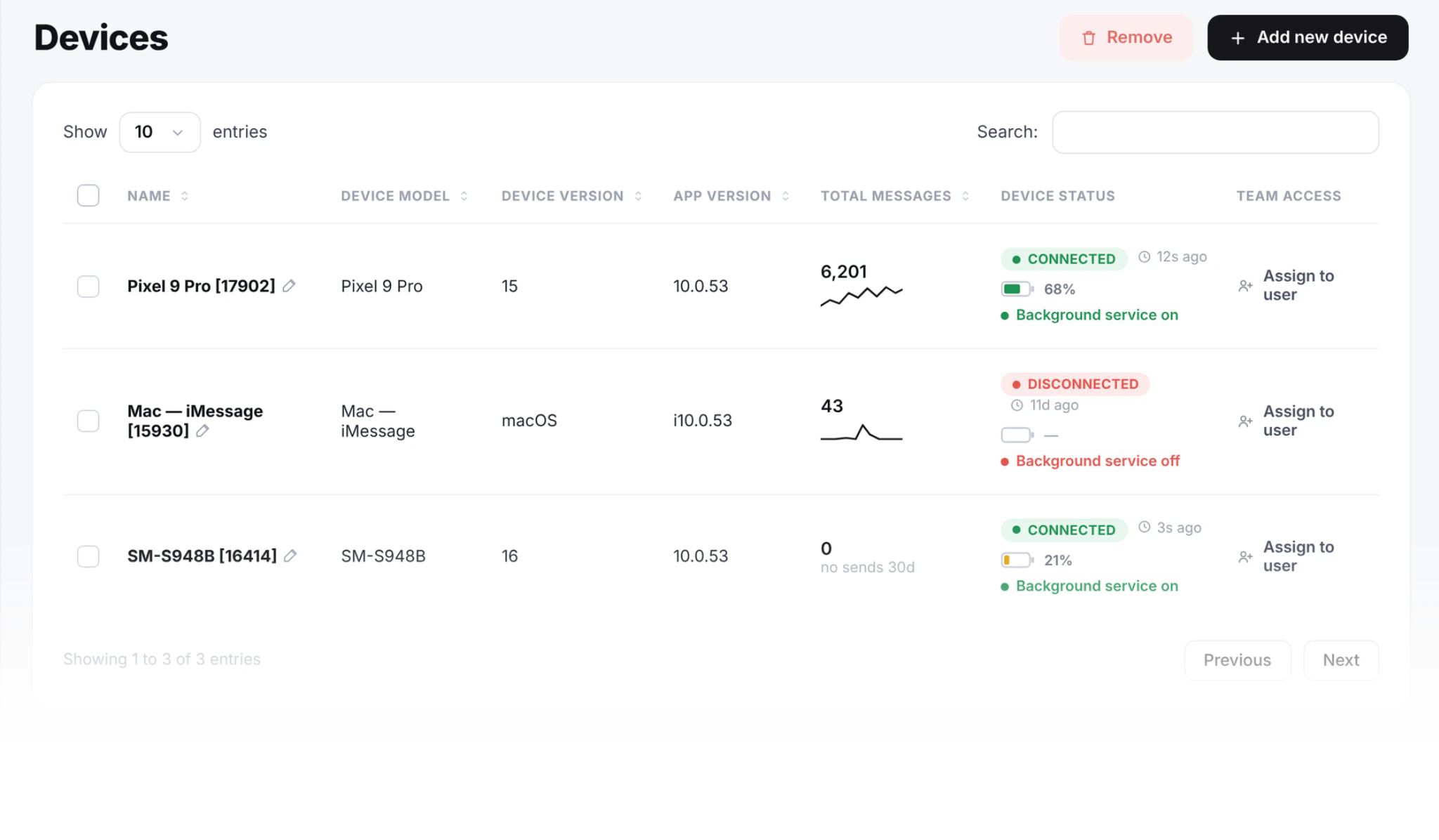
The send request is the same one SMS8 uses for SMS: POST https://app.sms8.io/api/v1/messages with your key in the X-Api-Key header. To send through the Mac, name its device ID in devices. You find the ID on the Devices page or with GET https://app.sms8.io/api/v1/devices.
curl -X POST https://app.sms8.io/api/v1/messages \
  -H "X-Api-Key: YOUR_KEY" \
  -H "Content-Type: application/json" \
  -d '{"number":"+14155550100","message":"Hi Sam, your table for 4 is confirmed for 7pm. Reply here if anything changes.","devices":"YOUR_MAC_DEVICE_ID"}'
The response is JSON with a success flag and a message ID. Replies come back to the shared inbox and to your webhook. When you register a webhook on the Webhooks page, tick both the received and messages events for incoming texts, because the payload of an incoming message carries "event": "messages". iMessage and SMS replies arrive on the same webhook, so your code does not need a separate path per channel.
You do not have to write code to use it. GoHighLevel workflows, Zapier, Make and the SMS8 campaign screen all send through the Mac the same way. Our guide to iMessage in GoHighLevel shows the CRM route, and the bulk iMessage sender guide covers campaigns to a list.
How many iMessages does the price cover?
SMS8 puts no cap on messages and charges nothing per message. What is paced is new contacts: SMS8 sends iMessage to 50 new contacts a day per Mac, and people you already talk to do not count. If a send goes over 50 new people, the rest continues the next day.
That pacing protects your Apple ID. Apple can slow down an Apple ID that sends like a broadcast tool, and the safest pattern is short, expected messages to people who know you. Managed providers list daily contact caps per line too, as their sites show. On SMS8, when you need to reach more new people each day, you add another Mac, which is one more device on a flat plan rather than another line fee with its own add-ons.
For large lists, the usual mix is iMessage for conversations and replies, and SMS from your Android phones for broadcasts. Both run on the same account. Bulk SMS goes out at about one message every 10 to 30 seconds per SIM.
How does iMessage pricing compare with per-message SMS APIs?
Some teams compare iMessage APIs with metered SMS APIs, where every text and every number rental is billed. Our breakdown of SMS API pricing in 2026 shows how those bills grow with volume. SMS8 avoids both meters: SMS goes out from your own SIMs with no A2P 10DLC filing, because texts travel person to person, and iMessage goes out from your own Mac. One plan covers both channels.
If you are already paying a managed iMessage provider, our Sendblue alternative guide walks through switching to your own Mac without losing conversations, since threads live on Apple rather than on the provider.
How do you move to SMS8 without downtime?
- Start the trial. Create your account at app.sms8.io. The 3-day trial includes 30 messages and needs no card.
- Prepare the Mac. Sign it into Messages with the Apple ID you want to send from and send one message by hand to check iMessage is active.
- Install SMS8 Gateway. Download it from your Devices page, type the 6-character pairing code and allow the two macOS permissions it asks for. Allow Full Disk Access so incoming messages reach SMS8.
- Add fallback. Pair an Android phone or an iPhone for contacts who are not on iMessage.
- Point your tools at SMS8. Swap the API call, or install the GoHighLevel app, Zapier or Make integration.
- Run both for a short while. Keep the old service until conversations flow through your Mac, then cancel it.
Why choose SMS8
- A flat price with no fee per message. USD 29 a month for one Mac or phone, USD 89 for five, USD 229 for twenty, and half that per month billed yearly. No line fees, no add-ons.
- Your own Apple ID as the sender. Customers see the sender they already know, not a number a provider assigned to you.
- Outbound and fallback included. Starting conversations with opted-in contacts and SMS fallback through your own phones are part of every plan.
- SMS, MMS and iMessage in one inbox. Android phones and Macs on one account, one API, one set of webhooks and one shared inbox with team seats.
- Works with your stack. REST API, webhooks, the MCP server for AI agents, and official apps for GoHighLevel, Zapier and Make.
- Set up in minutes. One Mac, one pairing code, and the 3-day trial to prove it before you pay.
Get iMessage on a flat plan
If you are comparing iMessage API pricing, compare the whole bill: line fees, add-ons, outbound limits and what happens when you need a second line. With SMS8 the answer is one flat plan for the devices you connect and no fee per message, on a Mac and an Apple ID that stay yours. Start the 3-day trial, pair your Mac and send your first iMessage today, then choose the plan that fits on the SMS8 pricing page.
Prices and features of other companies change. Everything about Sendblue and LoopMessage here is as listed on their website in November 2026.