
Part of the guide Send iMessage via API: iMessage for GoHighLevel, Zapier, API and Webhooks
On this page
- Key takeaways
- Why does iMessage matter for real estate agents?
- How does iMessage for real estate work with SMS8?
- What do you need to set it up?
- Which real estate texts work best on iMessage?
- How do you send iMessage from GoHighLevel or your CRM?
- How many leads can one Mac reach a day?
- How do teams and brokerages share iMessage?
- What does iMessage for real estate cost?
- Why choose SMS8
- Text your next lead in blue
Key takeaways
- Real estate is a conversation business, and iMessage is where many buyers and sellers already have their conversations. A blue bubble reads like a text from a person, not a marketing blast.
- With SMS8, iMessage goes out from a Mac you own running the SMS8 Gateway app, signed into the Apple ID you choose. Leads who are not on iMessage get the same text as an SMS through a paired phone.
- That fallback means two devices: one Mac for iMessage and one Android phone (or iPhone) for SMS. Two devices fit the Five Devices plan at USD 89 a month, or USD 44.50 billed yearly.
- SMS8 paces iMessage to 50 new contacts a day per Mac. People you already talk to do not count, and anything over 50 continues the next day.
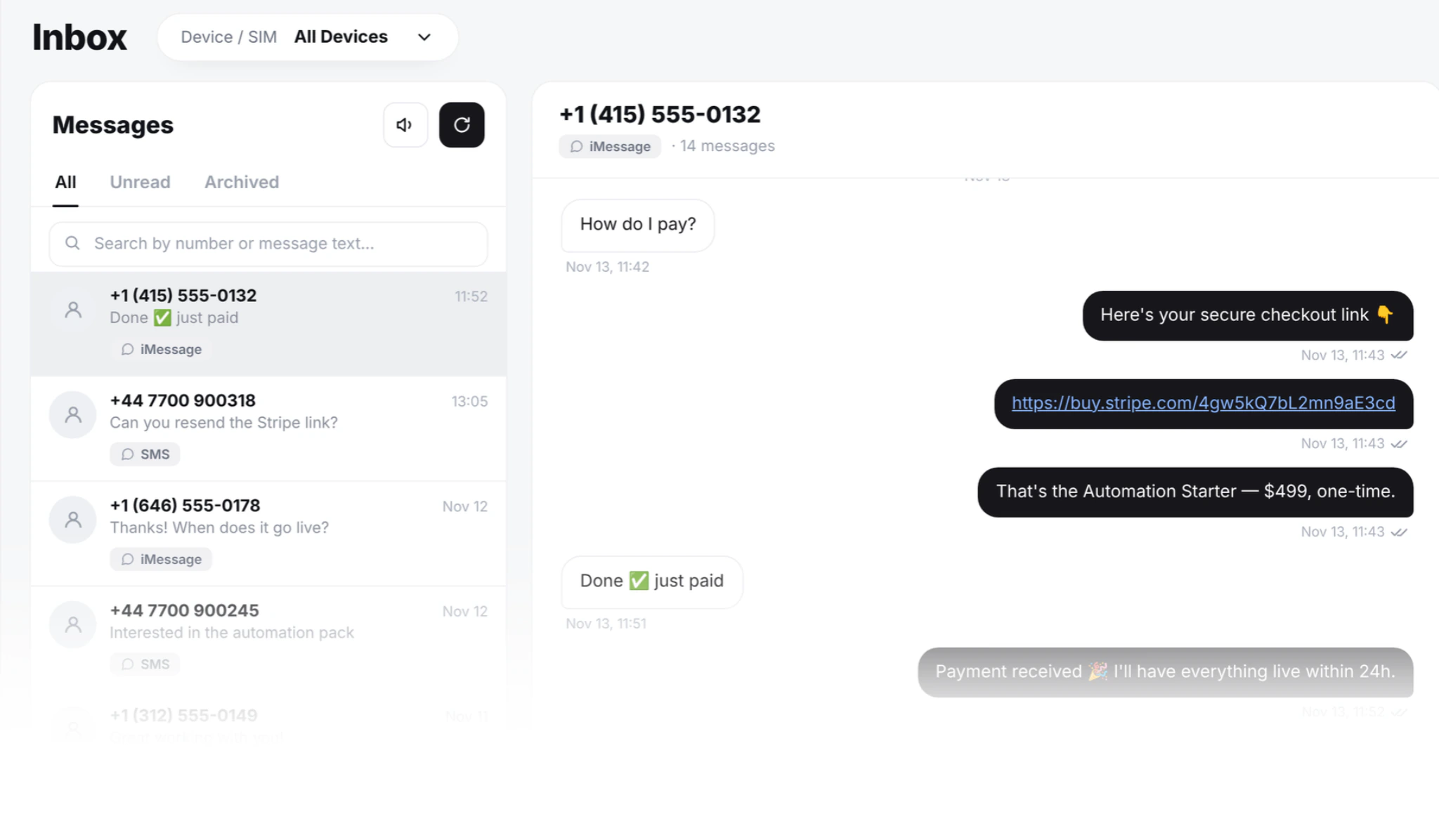
- Texts reach you from GoHighLevel workflows, Zapier, the API or the campaign screen, and every reply lands in one inbox your team answers from a browser.
iMessage for real estate means texting buyers, sellers and open-house visitors in blue bubbles from an Apple ID they can recognise, with replies coming straight back to the agent. SMS8 makes this practical for a business: a Mac you own runs SMS8 Gateway and sends the iMessage, a paired Android phone sends an SMS to anyone not on iMessage, and both feed one shared inbox, one API and your GoHighLevel workflows. You pay a flat monthly plan with no fee per message. For the full product overview, see iMessage for business with SMS8.
Why does iMessage matter for real estate agents?
An agent's pipeline runs on quick, personal replies. A buyer who sees a listing at nine in the evening expects an answer before they message the next agent. A text is usually the fastest channel, and the way it looks decides whether it gets read.
- Blue bubbles feel personal. On an iPhone, an iMessage shows as a blue bubble, with typing indicators, like a message from a friend. A green text from a rented number looks like every other marketing text.
- Photos and links travel well. iMessage sends text, links and attachments, so a listing link or a photo of the kitchen arrives in the thread.
- Unknown numbers get ignored. Leads screen texts from numbers they do not know. Our guide on customers who do not answer your texts covers why.
- Agents text from personal phones. When the agent leaves, the conversations leave with them, and the brokerage has no record of what was promised.
SMS8 fixes these together: a business Apple ID on a Mac the brokerage owns, SMS fallback from a business SIM, and every thread kept in one account.
How does iMessage for real estate work with SMS8?
Apple has no server API for iMessage. Every iMessage, from any service, is sent by a Mac signed into an Apple ID. With SMS8, that Mac is yours.
- A Mac runs SMS8 Gateway. It is signed into Messages with the Apple ID you want to send from and shows up on your Devices page as one more device.
- An Android phone covers SMS. Pair an Android phone with Android 7 or newer and a business SIM, or a paired iPhone. Leads not on iMessage get the same message as an SMS from that SIM.
- Your tools send through SMS8. A GoHighLevel workflow, a Zapier Zap, an API call or a campaign hands the message to SMS8.
- SMS8 picks the channel. Apple contacts get an iMessage from the Mac. Everyone else gets an SMS. You do not have to check first.
- Replies come back to one inbox. iMessage and SMS conversations sit side by side, threaded by contact, and go to your webhook and your GHL Conversations too.
Many brokerages sign the Mac into a separate Apple ID used only for work, so client messages stay apart from personal ones and stay with the business when people change.
What do you need to set it up?
- A Mac on macOS 14 Sonoma or newer. Any Mac that runs SMS8 Gateway will do. A small second-hand Mac mini left on a shelf at the office is the usual choice, since it is quiet, cheap to run and easy to leave on.
- Messages signed in. Sign the Mac into Messages with the Apple ID you will send from, and send one message by hand to check iMessage is active.
- Always on. The Mac sends only while it is awake and connected. Set it to stay awake on power. SMS8 Gateway starts by itself after a restart.
- Permissions. Allow the two macOS permissions SMS8 Gateway asks for during setup. To bring replies into SMS8, also allow Full Disk Access in System Settings. Without it the Mac still sends, but replies stay on the Mac.
- A phone for SMS fallback. An Android phone with a business SIM, kept on a charger and Wi-Fi, with battery optimisation turned off for the SMS8 app.
Setup takes a few minutes: create your account at app.sms8.io, download SMS8 Gateway from your Devices page, type the 6 character pairing code, allow the permissions and send a test. Then pair the Android phone by scanning its code.
Which real estate texts work best on iMessage?
iMessage shines in conversations people expect. These are the moments where an agent's text matters most:
| Moment | Text to send | How to run it in SMS8 |
|---|---|---|
| New portal or website lead | A first reply within a minute, asking what they are looking for | GoHighLevel workflow, Zapier or the API on form submit |
| Open-house sign-up | A thank you the same day and a follow-up with similar listings | Campaign to the sign-up list, scheduled for the evening |
| Viewing booked | A confirmation now and a reminder the morning of the viewing | GHL calendar reminder or a scheduled send |
| New listing that fits | A short note with the link to buyers who asked for that area | Campaign to a list of buyers who asked for that area |
| Offer and closing updates | One-to-one updates on what happens next | Typed by the agent from the inbox |
| Past clients | A home anniversary note or a market update once in a while | Recurring or scheduled campaign |
Keep each message short, signed with the agent's name and specific to the person. A text like "Hi Sarah, it was good to meet you at the Oak Street open house. Want me to send two similar homes in the same school zone?" invites a reply. For more ready-to-use wording, see SMS templates by industry, which includes real estate.
How do you send iMessage from GoHighLevel or your CRM?
Many real estate teams run their pipeline in GoHighLevel. SMS8 is a GoHighLevel SMS provider through its marketplace app, so when the paired device is a Mac running SMS8 Gateway, workflow steps, drips, Conversations and manual sends can go out as iMessage. A lead's answer lands in their GHL thread, next to the earlier history, and the customer replied trigger still fires. Our guide to iMessage in GoHighLevel shows the setup.
Teams on other CRMs connect through the SMS8 app in Zapier, which has a Send SMS action and a New Incoming SMS trigger, or through the SMS8 app in Make. A new lead in your CRM sends a first iMessage through the Mac, and an incoming reply can start a Zap that logs it on the contact. Developers can call the same send request used for SMS and pick the Mac as the device; replies reach your webhook when it is subscribed to the received and messages events.
How many leads can one Mac reach a day?
SMS8 paces iMessage to 50 new contacts a day per Mac. This keeps your Apple ID looking like a person, not a broadcast tool, because Apple can slow down an Apple ID that sends like spam. People you already have a thread with are not counted, so follow-ups, viewing reminders and closing updates to existing leads go out normally. If a campaign has more than 50 new contacts, the rest continue the next day.
For most agents, 50 new conversations a day is more than a busy weekend of open houses produces. A team that works more new leads per day can add a Mac per agent or per team, each with its own Apple ID and its own 50 a day. For broad lists, such as a whole past-client database, send SMS from your Android phones in the same account, at one message every 10 to 30 seconds per SIM. The bulk iMessage sender guide explains the pacing in depth.
How do teams and brokerages share iMessage?
- One inbox for the team. Agents and assistants answer iMessage and SMS from a browser with their own login, not from the Mac.
- A record of who said what. Every outgoing message is stamped with the person who sent it, and the whole history stays on the contact, owned by the business.
- Phone access per person. You choose which devices each teammate can use, so an agent sends from their own Mac and phone and every buyer keeps talking to the same person.
- Seats included. One Device includes 1 team seat, Five Devices 10 and Twenty Devices 40.
Treat iMessage like any messaging channel for compliance: get consent on your forms and sign-in sheets, say who is texting, honour STOP and respect quiet hours. When someone replies STOP, SMS8 adds the number to your blacklist and skips it in every later campaign.
What does iMessage for real estate cost?
A Mac counts as one device on your plan, the same as an Android phone. iMessage itself travels over the internet, and SMS8 adds no fee per message.
| Setup | Devices | Plan | Monthly | Billed yearly (per month) |
|---|---|---|---|---|
| Solo agent: one Mac and one Android phone for SMS fallback | 2 | Five Devices | USD 89 | USD 44.50 |
| Small team: two Macs and two Android phones | 4 | Five Devices | USD 89 | USD 44.50 |
| Brokerage: up to 20 Macs and phones across agents or offices | Up to 20 | Twenty Devices | USD 229 | USD 114.50 |
The One Device plan at USD 29 a month covers a single Mac, but then leads without iMessage have no SMS path, which is why a real estate setup with fallback starts at Five Devices. Every plan includes unlimited SMS and MMS, Zapier, Make, the API, webhooks and the GoHighLevel app. SMS fallback texts ride on the mobile plan of the SIM in the phone. The iMessage API pricing guide breaks down the costs, and every plan is on the SMS8 pricing page.
Why choose SMS8
- A Mac you own, an Apple ID you control. Your iMessage threads belong to your business, not to a rented line.
- Every lead gets the message. Apple contacts get a blue bubble, everyone else an SMS from your own SIM, written once.
- A flat price with unlimited messages. USD 89 a month for a Mac plus a phone, with no fee per iMessage or SMS and yearly billing at half.
- No A2P 10DLC wait. SMS goes person to person from your own SIM, so there is no brand or campaign filing before you text leads.
- Works with your pipeline. GoHighLevel, Zapier, Make, the API and webhooks, all on one account.
- One inbox for the team. iMessage and SMS threads side by side, with seats and per-device access.
Text your next lead in blue
Buyers and sellers answer people they recognise. SMS8 lets your team reach them on iMessage from a Mac you own, with SMS for everyone else and every reply in one place. Start the 3-day trial with 30 messages, no card needed. Pair your Mac and an Android phone, send yourself a test, then text your next open-house visitor in blue.