
Part of the guide Send iMessage via API: iMessage for GoHighLevel, Zapier, API and Webhooks
On this page
- Key takeaways
- What makes an iMessage campaign work?
- 12 iMessage marketing ideas with example messages
- How do you run an iMessage campaign with SMS8?
- How many people can an iMessage campaign reach per day?
- How do you stay compliant with iMessage marketing?
- What does iMessage marketing cost with SMS8?
- Why choose SMS8
- Send your first iMessage campaign this week
Key takeaways
- The iMessage campaigns that work read like one-to-one texts: short, expected, personal and easy to answer. Think conversation starters, not blasts.
- The 12 ideas below cover welcome, booking, VIP, restock, event, review, win-back and referral messages, each with an example you can adapt.
- With SMS8 you run them from a Mac you own with the SMS8 Gateway app, on the same campaign screen used for SMS, with merge tags, scheduling, quiet hours and automatic STOP handling.
- SMS8 paces iMessage to 50 new contacts a day per Mac. People you already talk to do not count, so campaigns to existing customers go out normally.
- Contacts not on iMessage get the same message as an SMS through a paired phone. A Mac plus a phone is two devices, which fits the Five Devices plan at USD 89 a month.
The best iMessage marketing ideas are messages people are glad to get from someone they know: a welcome from the owner, a booking reminder, early access for regulars, a restock alert for someone who asked, a thank you with a review link. iMessage rewards that tone, because a blue bubble sits among a person's private conversations. With SMS8 you send these campaigns from a Mac you own, Apple contacts get them as iMessage, everyone else gets an SMS, and every reply lands in one shared inbox. For the product overview, see iMessage for business with SMS8.
What makes an iMessage campaign work?
iMessage is a personal channel. People read their iMessages, and they also notice quickly when a business uses the channel like a billboard. Four rules decide whether a campaign gets replies:
- It is expected. The person opted in, bought from you or asked for something. Never send to a bought list.
- It is personal. Their first name, the thing they bought, the appointment they booked. Merge tags make this easy.
- It asks for a reply. A question works better than a link alone. Replies are what iMessage is for.
- It is rare. Send when something happens, not every week. Two messages a month per person is plenty for most lists.
These rules also protect your Apple ID. Apple can slow down an Apple ID that sends like spam, so short, expected messages to people who know you are the safest way to use iMessage for business. Our guide to iMessage marketing and blue bubble texting covers the channel in depth.
The video shows how to send a bulk campaign with SMS8 to contacts on iPhone and Android.
12 iMessage marketing ideas with example messages
Each idea comes with a short example. Swap in your own details and keep the tone of a person writing to a customer.
1. A welcome from a real person
When someone joins your list or buys for the first time, send a short note from the owner or the person who will look after them.
Hi {first_name}, this is Maya from Northside Studio. Thanks for joining us. If you ever have a question about your plan, just reply here.
2. Booking confirmation and reminder
A confirmation when the slot is booked and a reminder the day before. People reply to confirm or move it, which saves a phone call.
Hi {first_name}, see you tomorrow at 3pm for your cut with Leo. Reply 1 to confirm or tell us if you need another time.
3. Early access for regulars
Give your best customers first look at a sale, a drop or a new menu. It rewards loyalty and gets replies because it feels personal.
Hi {first_name}, you are one of our regulars, so you get first pick: the winter range goes live for you tonight, a day before everyone else.
4. Back in stock for people who asked
Someone asked about a product that was sold out. Text them when it returns. This is the most expected message you can send.
Good news {first_name}, the size 9 trail shoes you asked about are back. Want me to hold a pair for you until Saturday?
5. Event and class invitations
Tastings, workshops, open evenings, new classes. Ask for a reply instead of sending a form link, and count the yes answers.
Hi {first_name}, we are hosting a small wine tasting on Thursday at 7pm, 12 seats. Reply YES and I will save you one.
6. A personal follow-up after a purchase
A few days after delivery or a visit, check in. Problems come out early, and happy customers say so.
Hi {first_name}, how is the new espresso machine working out? If anything is unclear, reply and I will walk you through it.
7. Review requests
Ask for a review once, with a single link, after a good experience. A blue bubble from someone they just dealt with gets more attention than an email. Add a review_link column to your list and it becomes a merge tag.
Thanks again for choosing us, {first_name}. If you have a minute, a short review would help us a lot: {review_link}
8. A quiet win-back note
Customers who have not been back in a while get a short, honest note, at most once a quarter. No hard sell.
Hi {first_name}, it has been a while since your last visit and we miss you. Your usual table is free on Friday if you fancy it.
9. Referral asks
Satisfied customers are glad to pass on a name when you ask simply and make it worth their while.
Hi {first_name}, glad the move went smoothly. If a friend needs movers, send them our way and you both get 10% off the next booking.
10. Renewal and membership reminders
A gym membership, a service plan or a subscription box coming up for renewal. A text a week before avoids surprise and churn.
Hi {first_name}, your membership renews on the 1st. Reply if you want to switch to the yearly plan or pause for a month.
11. Seasonal check-ins for service businesses
Boiler service before winter, a car check before a road trip, a dental check-up at six months. Timely and useful, so it reads as service, not marketing.
Hi {first_name}, winter is coming. Want us to book your annual boiler check before the cold weekend? We have slots next Tuesday.
12. A thank you with nothing to sell
Once a year, thank your customers and ask nothing. It is the message people remember, and it often gets the warmest replies of the year.
Hi {first_name}, just wanted to say thank you for being with us this year. It means a lot to a small team like ours.
Need more wording? SMS templates by industry has ready-to-copy texts that work just as well over iMessage.
How do you run an iMessage campaign with SMS8?
Every idea above runs from the same campaign screen you use for SMS.
- Pair a Mac. Install SMS8 Gateway on a Mac with macOS 14 Sonoma or newer, signed into Messages with the Apple ID you want to send from. Enter the 6 character pairing code from your Devices page and allow the two permissions it asks for. Allow Full Disk Access too, so replies come into SMS8.
- Pair a phone for SMS. Add an Android phone with Android 7 or newer, or a paired iPhone, so contacts not on iMessage still get the message as an SMS.
- Import your list. Upload a CSV or Excel file with a phone column. Extra columns such as first_name become merge tags. Numbers are checked on import, duplicates are sent once and blacklisted numbers are skipped.
- Pick iMessage as the channel. Write the message once with merge tags. Say who you are and how to opt out.
- Test, then schedule. Send to yourself first. Then pick a time, or a recurring send, inside your quiet hours.
- Work the replies. Answers land in the shared inbox, threaded by contact. Your team replies from a browser, not from the Mac.
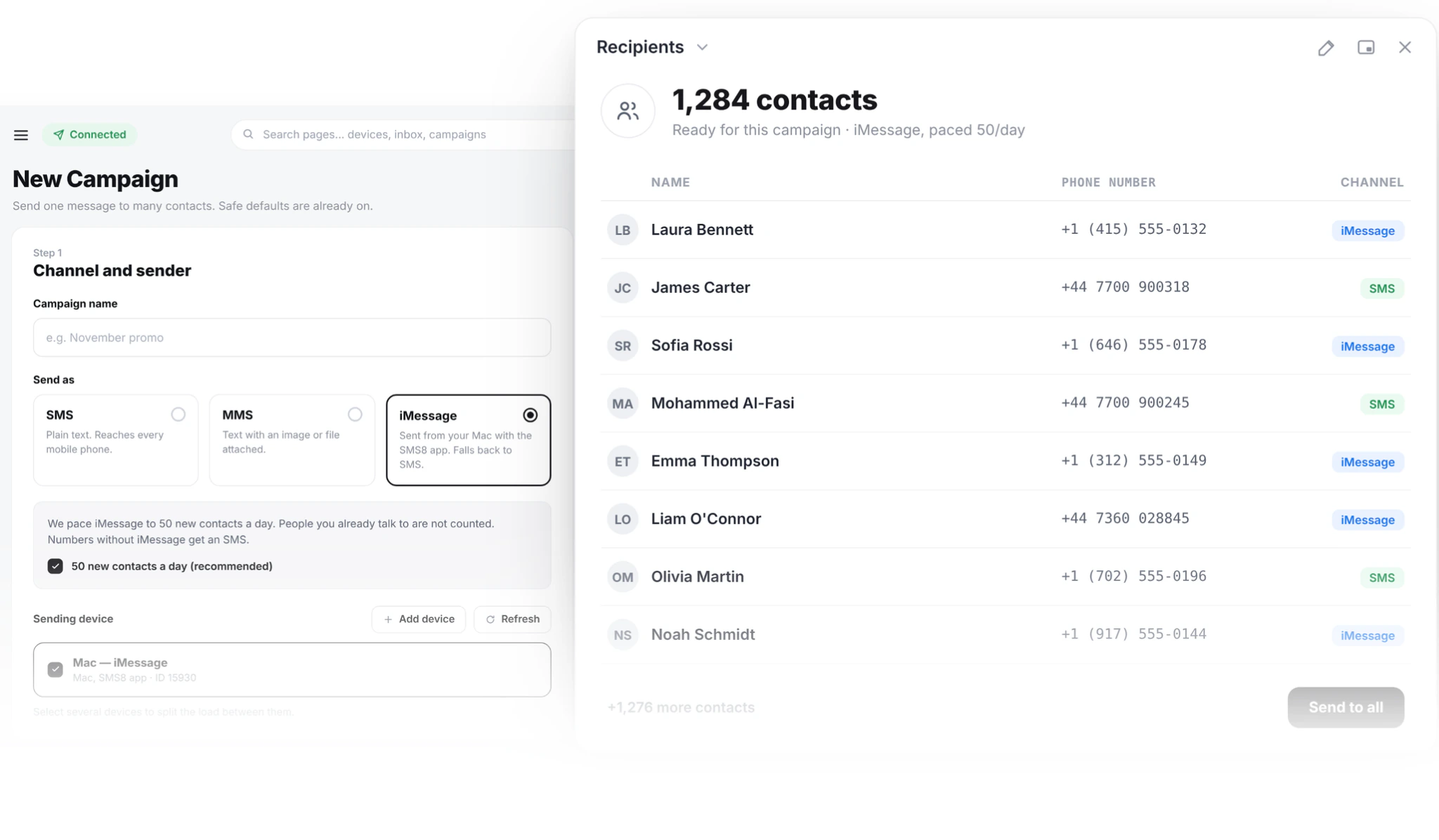
Prefer automation? The same messages can be triggered from GoHighLevel workflows, Zapier, Make or the API, with the Mac as the sending device. Our guide to SMS marketing automation shows the common triggers, and they work for iMessage the same way.
How many people can an iMessage campaign reach per day?
SMS8 paces iMessage to 50 new contacts a day per Mac. People you already have a thread with are not counted, so ideas like booking reminders, renewal notes and follow-ups to existing customers go out normally. If a campaign has more than 50 new contacts, the rest continue the next day automatically.
Plan around it:
- Start with existing customers. Most ideas above go to people you already talk to, so the daily limit rarely matters.
- Add Macs for new contacts. Each Mac is a separate sender with its own 50 new contacts a day.
- Split by channel. Send iMessage to your warm segment and the broad list as SMS from your Android phones, at one message every 10 to 30 seconds per SIM.
The bulk iMessage sender guide explains the pacing and Apple ID care in detail. If you work in property, the iMessage for real estate guide applies these ideas to leads and open houses.
How do you stay compliant with iMessage marketing?
Treat iMessage like any messaging channel. Get consent before you send and keep a record of it. Say who you are in the message. Honour opt-outs right away and respect quiet hours in the contact's time zone. When someone replies STOP, SMS8 adds the number to your blacklist and skips it in every later campaign on your account. The glossary explains opt-out rules and what they mean for business texting.
What does iMessage marketing cost with SMS8?
A Mac counts as one device on your plan, the same as an Android phone, and SMS8 adds no fee per message.
| Plan | Monthly | Billed yearly (per month) | Devices | Typical iMessage setup |
|---|---|---|---|---|
| One Device | USD 29 | USD 14.50 | 1 | One Mac, no SMS fallback |
| Five Devices | USD 89 | USD 44.50 | 5 | One or two Macs plus Android phones for SMS fallback |
| Twenty Devices | USD 229 | USD 114.50 | 20 | Several Macs and phones across teams or locations |
Because SMS fallback needs a paired phone as well as the Mac, the usual setup is two devices on Five Devices. Every plan includes unlimited SMS and MMS, campaigns, the shared inbox, the API and every integration. The 3-day trial includes 30 messages and needs no card. See the SMS8 pricing page for every plan detail.
Why choose SMS8
- Your Mac, your Apple ID. Campaigns go out from a Mac you own and an Apple ID you control.
- Everyone gets the message. iMessage for Apple contacts, SMS for everyone else, written once.
- A flat price with unlimited messages. USD 29, 89 or 229 a month for 1, 5 or 20 devices, with no fee per message and yearly billing at half.
- Campaign tools built in. Merge tags, scheduling, recurring sends, quiet hours, clean lists and automatic STOP handling.
- One inbox for every reply. iMessage and SMS conversations side by side, answered by your team from a browser.
- Connects to your stack. GoHighLevel, Zapier, Make, the API and webhooks on every plan.
Send your first iMessage campaign this week
Pick one idea from the list, the welcome note or the booking reminder is a good start, and send it to customers who already know you. Start the 3-day trial with 30 messages, no card needed, pair your Mac and a phone, and watch the replies come back in blue.