
Part of the guide SMS Marketing Campaigns From Your Own Phone
On this page
- Key takeaways
- Why do clients miss appointments?
- Why do SMS reminders work better than email or calls?
- What should an appointment reminder text say?
- When should you send appointment reminders?
- How do you send automatic reminders with SMS8?
- How do you handle confirm and reschedule replies?
- How do you fill a slot when someone cancels?
- How do you keep reminder texts compliant and welcome?
- What does an SMS reminder system cost with SMS8?
- Why choose SMS8
- Start cutting no-shows this week
Key takeaways
- Most no-shows are not bad intent. People forget, mix up the time or cannot reach you to cancel. A timely text with an easy way to answer fixes all three.
- The reminder that works best is short, comes from a number the client recognises, and asks for a one-letter reply: C to confirm, R to reschedule.
- SMS8 sends those reminders from your own Android phone and SIM, or as iMessage from a Mac you own, so replies come straight back to you and land in a shared inbox.
- You can schedule reminders from your booking tool through GoHighLevel, Zapier, Make, n8n, WordPress, Google Sheets or the REST API, and answer common replies automatically with the auto-responder.
- Plans are flat at USD 29, 89 or 229 a month with unlimited SMS and MMS and no fee per message, so a second reminder costs nothing extra. The 3-day trial has 30 messages and needs no card.
The fastest way to reduce no-shows is to text every client before their appointment, from a number they know, with a reply they can send in one tap. With SMS8, the reminder leaves the SIM in your own phone, the client answers C to confirm or R to reschedule, and the answer comes back to your shared inbox where your team can act on it. Because SMS8 charges a flat monthly price with unlimited messages, you can send a reminder two days before, another on the morning of the visit, and a follow-up to anyone who did not answer, without counting the cost of each text. For the wider set of campaign tools, see SMS marketing with SMS8.
Why do clients miss appointments?
Ask any clinic, salon, garage, tutor or consultant and the reasons are the same. Very few no-shows are people who never meant to come. Most fall into a handful of patterns you can fix:
- They forgot. The booking was made two weeks ago, on a busy day, and nothing reminded them.
- They got the time wrong. They remember Thursday, but think it was the afternoon.
- Plans changed and cancelling was hard. Calling during opening hours, waiting on hold or finding the right email is enough friction that they simply do not come.
- Your reminder never reached them. An email sat unread, or a text from an unknown short code was ignored as spam.
Each of those ends the same way: a slot you staffed and prepared for, and nobody in it. You cannot resell that hour, and in many trades you also lose the follow-up visit that would have come after it.
The video shows how GoHighLevel texts, including calendar reminders, can be sent from your actual phone number with SMS8.
Why do SMS reminders work better than email or calls?
Text messages are read on the device people carry all day, and answering one takes a second. That matters more than any wording trick. An email reminder competes with a crowded inbox. A phone call needs someone on your side to dial and someone on theirs to pick up. A text simply arrives, gets read, and gets answered.
But not every text works equally well. A reminder from a random short code or an unfamiliar rented number looks like the automated messages people have learned to ignore. A reminder from the number they booked with, the one already saved in their phone as your business, gets read. That is the core idea behind SMS8: your reminders come from your own SIM, so they look like a message from you, because they are.
If you are curious why that sender matters so much, our guide to SMS marketing automation from your own number explains how rented numbers, per-message billing and A2P 10DLC registration get in the way of the texts that matter most.
What should an appointment reminder text say?
Keep it short enough to read on a lock screen. Every good reminder answers four questions: who is this from, when is the appointment, where is it, and what should I do now.
- Your business name first, so the client knows who it is before opening the message.
- The day and time in plain words, such as "tomorrow, Thursday, at 10:00".
- One clear action, with single-letter replies: C to confirm, R to reschedule.
- The client's first name from your list, so the message reads as personal.
Three examples you can adapt:
Hi Ana, this is Bright Smile Dental. See you tomorrow, Thursday, at 10:00. Reply C to confirm or R to reschedule.
Hi Sam, Northside Auto here. Your car is booked in for Monday at 8:30. Reply C to confirm, R if you need another day.
Hi Lea, reminder from Studio Nine: your cut and colour is today at 15:00. Running late? Just reply and let us know.
For ready-made wording by trade, see our SMS templates by industry.
When should you send appointment reminders?
There is no single right moment for every business, so think in terms of what the client needs to do. A reminder has two jobs: jog the memory, and leave enough time to rebook the slot if they cannot come.
| Message | When | Job |
|---|---|---|
| Booking confirmation | Right after the booking is made | Confirms the date and time and saves your number in their thread. |
| Main reminder | One or two days before | Asks for C or R, and leaves you time to fill the slot if they cancel. |
| Same-day nudge | A few hours before | Catches people who forgot on the day, with directions or parking notes. |
| No-reply follow-up | Later the same day as the main reminder | Gives anyone who did not answer a second chance to confirm. |
| Missed visit | Shortly after a no-show | Offers a new time while the client still feels like coming. |
Respect quiet hours so nobody gets a reminder late at night. In SMS8 campaigns, messages scheduled outside your sending window wait until the morning.
How do you send automatic reminders with SMS8?
Pick the route that matches where your bookings live. All of them send from the phone you pair with SMS8.
Step 1: pair your phone
Install the SMS8 app on an Android phone (Android 7 or later) with the SIM you want to text from, sign in and pair it with your account. If your clients mostly use iPhones and you want blue bubbles, add the SMS8 Gateway app on a Mac you own to send iMessage, with SMS for anyone not on iMessage.
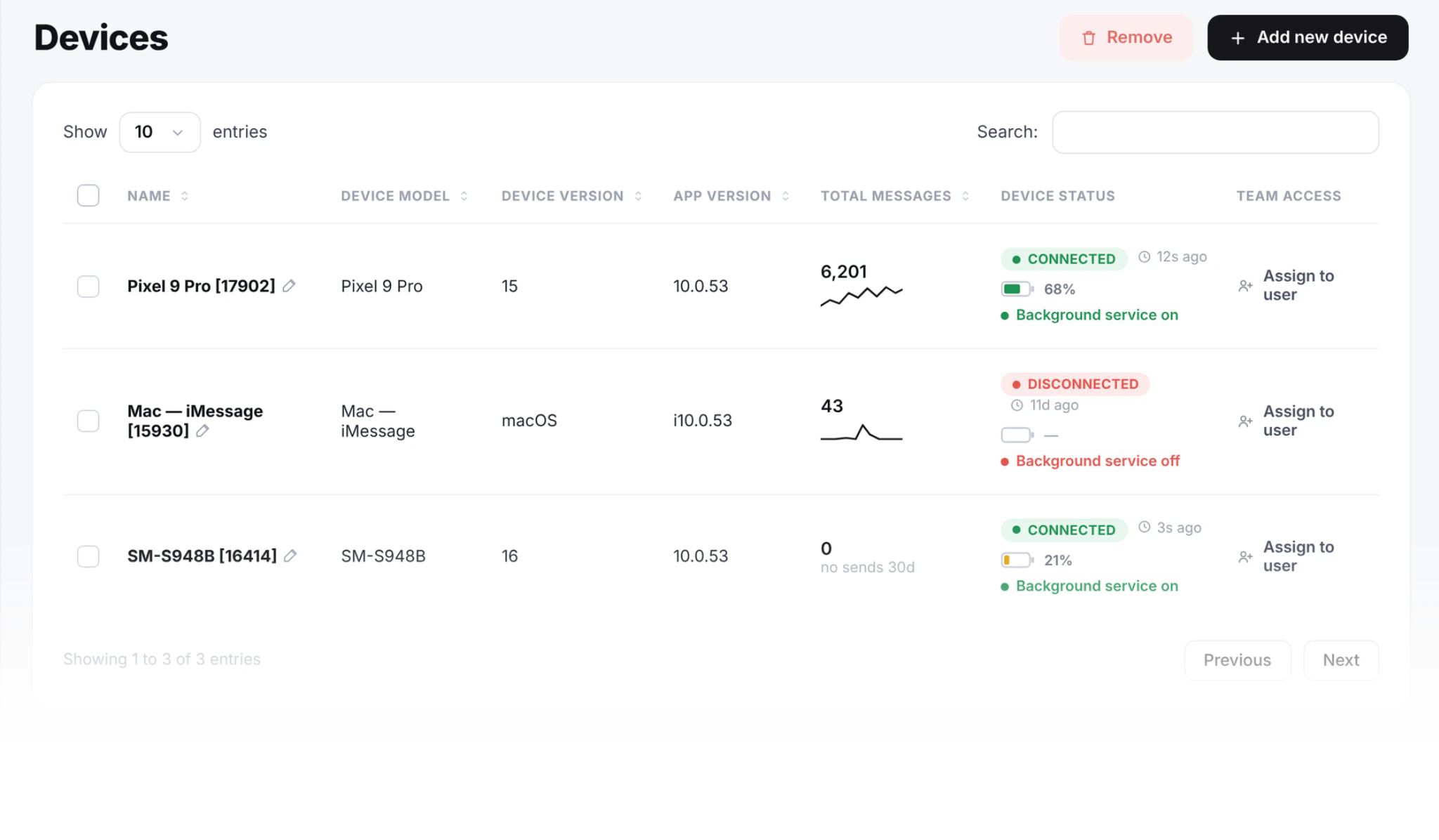
Step 2: connect your booking tool
- GoHighLevel: install the SMS8 app from the GoHighLevel marketplace. Your existing calendar reminders, workflows and Conversations replies then send through your paired phone, without editing a single workflow. See the GoHighLevel SMS integration.
- Zapier: use your booking app's "new appointment" trigger, add a Delay step, then the SMS8.io Send SMS action. The New Incoming SMS trigger can pass replies back into your other tools. See the Zapier SMS integration.
- Make or n8n: build the same flow with the SMS8 app for Make, or an HTTP Request node in n8n that calls the SMS8 API.
- WordPress and WooCommerce: the SMS8 plugin sends texts from your site without a middle tool.
- Google Sheets: if your bookings live in a sheet, the add-on texts each row and uses the other columns, such as name and time, in the message.
Step 3: or schedule reminders from your own code
If your booking system is your own software, call the REST API when the booking is made and pass schedule as a Unix timestamp, so the reminder is queued for the right moment straight away:
import os
import requests
API = "https://app.sms8.io/api/v1"
HEADERS = {"X-Api-Key": os.environ["SMS8_API_KEY"]}
appointment = 1795003200   # booking start, Unix time
r = requests.post(f"{API}/messages", headers=HEADERS, data={
    "number": "+14155550100",
    "message": "Hi Ana, see you tomorrow at 10:00. Reply C to confirm or R to reschedule.",
    "schedule": appointment - 86400,            # one day before
    "idempotencyKey": "booking-5521-reminder",
}, timeout=30)
print(r.json())
The idempotencyKey keeps a retried job from sending the same reminder twice. Every parameter is in the SMS8 API documentation.
Step 4: reminders for a whole day's list
No booking tool at all? Export tomorrow's appointments to Excel or CSV and upload them as a campaign. Extra columns, like the appointment time, become merge tags, the send can be scheduled for the evening before, and messages go out paced on your SIM. You can also use spintax such as {Hi|Hello} so the texts in a batch do not all read the same.
How do you handle confirm and reschedule replies?
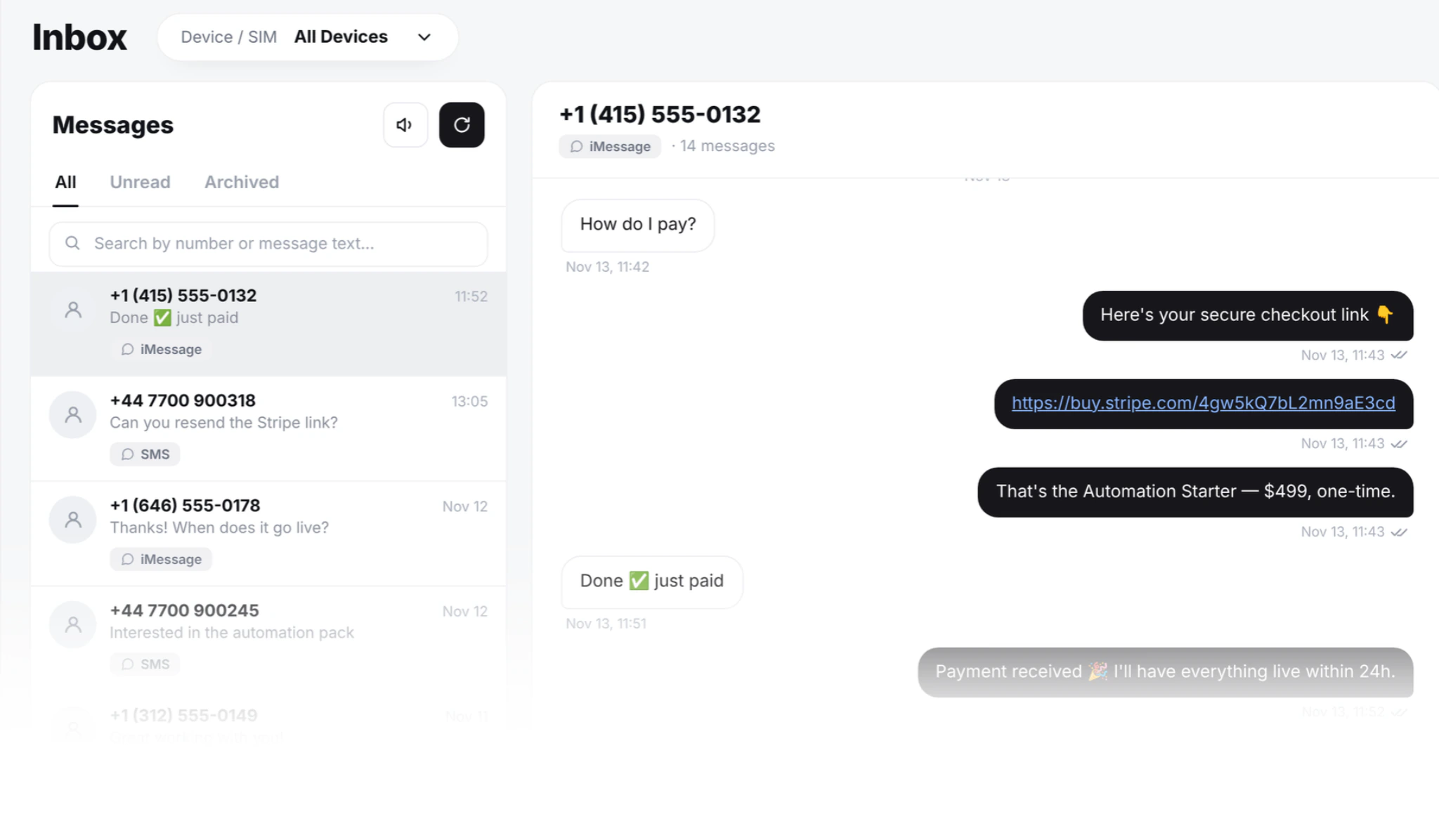
A reminder only reduces no-shows if the reply gets acted on. SMS8 gives you three ways to catch it.
- Auto-responder. Set keyword replies on the device. An exact match on C can answer "Thanks, you are confirmed. See you then." An exact match on R can answer "No problem, reply with a day and time that suits you, or book here: link." Rules can match an exact word, text that contains a word, a regular expression, or any message at all.
- Shared inbox. Every reply lands in the two-way inbox, threaded by contact, so the person at the front desk sees who confirmed, who wants a new time, and who wrote something only a human can answer.
- Webhooks. If your own system should mark the booking as confirmed, register a webhook and read each incoming text. Signed webhooks are retried for up to 30 days if your server is down, so no answer is lost.
Clinics and service teams that share one front-desk number will find more on that setup in our guide to team texting for clinics and dispatch.
How do you fill a slot when someone cancels?
A cancellation that arrives a day early is a slot you can still sell. Keep a short list of clients who asked to come in sooner, and when an R reply comes in, send them a quick message from your inbox: "A 10:00 slot opened tomorrow. Reply YES and it is yours." Because the text comes from your usual number, people recognise it and answer quickly. With unlimited messages on every plan, there is no reason to hold back on these offers.
After a no-show, send one friendly message offering a new time rather than a warning. People who missed by accident usually rebook, and the conversation stays on good terms.
How do you keep reminder texts compliant and welcome?
- Text people who gave you their number for bookings, and keep reminders about their appointment. Marketing messages need their own opt-out consent.
- Say who you are at the start of every message.
- Honour STOP at once. In SMS8 campaigns, anyone who replies STOP is added to your blacklist and skipped in later campaigns.
- Respect quiet hours and keep the number of reminders per booking reasonable.
- Keep private details out. A reminder needs a time and a place, not a diagnosis or a treatment name.
What does an SMS reminder system cost with SMS8?
| Plan | Monthly | Billed yearly (per month) | Connected phones or Macs |
|---|---|---|---|
| One Device | USD 29 | USD 14.50 | 1 |
| Five Devices | USD 89 | USD 44.50 | 5 |
| Twenty Devices | USD 229 | USD 114.50 | 20 |
Every plan includes unlimited SMS and MMS, scheduled messages, campaigns, the auto-responder, the shared inbox, the API, webhooks and every integration. SMS8 charges no fee per message, no number rental and no A2P registration fee, because texts go person to person from your own SIM. Your mobile plan covers the texts themselves. Zapier and Make bill their own plans if you use them.
That flat price changes how you plan reminders. On a per-message service, every extra reminder and every follow-up is a line on the bill, so businesses often send one reminder and hope. With SMS8 you can send the confirmation, the main reminder, the same-day nudge and the follow-up for the same monthly price. Compare your current volume with the SMS cost calculator.
Why choose SMS8
- Reminders from your own number. Clients see the business they booked with, not a stranger, so reminders get read and answered.
- Unlimited messages at a flat price. From USD 29 a month for one phone or Mac, with no fee per message, so extra reminders and follow-ups cost nothing more.
- No A2P 10DLC wait. Texts go person to person from your SIM, so your reminders can start the day you pair a phone.
- Replies handled for you. Keyword auto-replies for C and R, plus a shared inbox for everything else.
- Works with your booking stack. GoHighLevel, Zapier, Make, n8n, WordPress, WooCommerce, Google Sheets, the REST API and webhooks.
- SMS, MMS and iMessage in one place. Reach Android and iPhone clients, with SMS fallback when iMessage is not available.
Start cutting no-shows this week
Pair a phone, connect your calendar or upload tomorrow's list, write one reminder with a C or R reply, and set two auto-responder rules. That is enough to start. Once confirmations are flowing into your inbox, add the same-day nudge and the missed-visit follow-up. Start the 3-day trial with 30 messages and no card, then choose your plan on the SMS8 pricing page.