
Turn your Mac into an iMessage and SMS gateway.
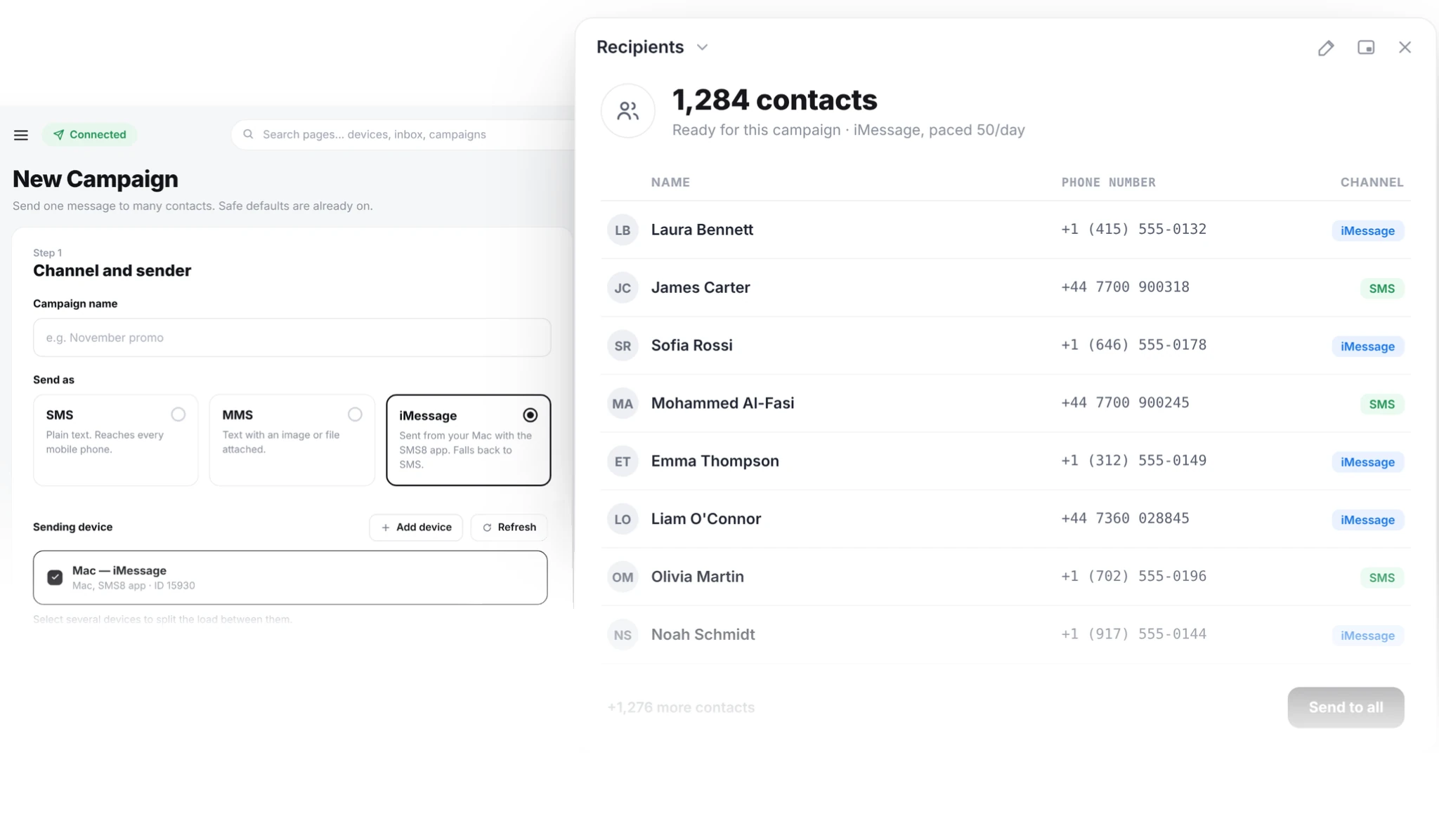
Your iMac, Mac mini or MacBook sends iMessage from your Apple ID and SMS from your iPhone number. Send from your SMS8 dashboard, your CRM or one API call. Every reply comes back to one shared inbox. No per-message fee.
What a Mac gateway does
Apple has no server API for iMessage. A Mac signed into an Apple ID always has to do the sending. With SMS8 that Mac is yours, so you do not rent a line from anyone.
The SMS8 Gateway app runs on the Mac and keeps it connected to SMS8. When you send, the Mac hands the message to Apple's Messages app. Apple contacts get a blue-bubble iMessage. Other numbers get an SMS through your iPhone with Text Message Forwarding.
With receiving on, incoming iMessage and SMS on the Mac flow into your SMS8 inbox and webhooks, threaded by contact.
- iMessage from your own Apple ID
- SMS from your iPhone number for everyone else
- Replies in one inbox and on your webhooks
Three steps to your first iMessage
Set up once, then the Mac sends on its own.
Install SMS8 Gateway
Download the Mac app from your Devices page. It runs on macOS 14 Sonoma and newer.
Enter the code
Type the 6 character pairing code, allow the permissions macOS asks for, and send a test.
Send from anywhere
Send from the dashboard, a campaign, GoHighLevel, Zapier, the API or an AI agent. The Mac does the rest.
Why send from your own Mac
The Mac is yours, so the Apple ID and the cost are too.
Blue bubbles from your Apple ID
Apple contacts see an iMessage from the Apple ID they already know, with pictures and links.
SMS fallback built in
Numbers without iMessage get an SMS from your iPhone number. No need to check first.
No line rental
No per-line or per-message fee. One flat SMS8 plan.
Any Mac will do
iMac, Mac mini or MacBook, on macOS 14 or newer.
Same API as Android
One send request for every device. Pick the Mac and send.
Your data stays yours
Messages go through your Mac, not a shared server pool.
iMac, Mac mini or MacBook?
Any of them works. What matters is that the Mac stays on, awake and online while you send.
A Mac mini is the common choice for a dedicated gateway: small, quiet and cheap to leave running, even second-hand. An iMac on a reception desk works just as well. A MacBook is fine too if it stays open on power.
Many businesses sign the Mac into a separate Apple ID so work messages stay apart from personal ones.
What you need
The full list, up front.
macOS 14 or newer
SMS8 Gateway runs on macOS 14 Sonoma and later.
Signed into Messages
The Mac must be signed into Messages with the Apple ID you want to send from. Send one message by hand first to check iMessage is active.
An iPhone for SMS
To send SMS to non-Apple numbers, turn on Text Message Forwarding for this Mac on an iPhone with the same Apple ID. Without it the Mac sends iMessage only.
Permissions to send
During setup, macOS asks for permissions for SMS8 Gateway. Allow them, then send a test.
Full Disk Access to receive
To bring incoming messages into SMS8, allow Full Disk Access in System Settings. Without it the Mac still sends, but replies stay on the Mac.
Awake and online
Turn off sleep while the Mac is plugged in. A sleeping Mac stops picking up messages until it wakes.
A conversational pace
Apple can slow down an Apple ID that sends like spam. Keep messages expected and personal. Need to reach more people each day? Add another Mac.
What people send from a Mac
Where blue bubbles make the biggest difference.
iMessage campaigns
Send to a list or tag from your Apple ID, paced to stay personal, with SMS for Android contacts.
Booking confirmations
A confirmation and a reminder from the Apple ID your clients already message.
Sales follow-ups
Leads reply faster to a number they know. Send from your CRM.
GoHighLevel iMessage
Send iMessage from GoHighLevel through the SMS8 app.
AI agents
Let an AI agent send and read replies through the SMS8 MCP server.
Team inbox
Every iMessage and SMS reply lands in one inbox your team answers from a browser.
Works with the tools you have
Send from GoHighLevel, Zapier, Make, n8n, WooCommerce, Google Sheets, WordPress, or your own code.


Get SMS8 Gateway for Mac
Download SMS8 Gateway from the download center. Sign in, type the pairing code from your dashboard, and the Mac is ready.
Sending needs an SMS8 account, which starts with a free 3-day trial with 30 messages and no credit card. Plans are USD 29, 89 or 229 a month for one, five or twenty devices, and half that per month when you pay yearly.
Yes. Every iMessage service needs a Mac signed into an Apple ID somewhere. With SMS8 it is a Mac you own, running the SMS8 Gateway app.
Yes, through an iPhone with the same Apple ID and Text Message Forwarding turned on for the Mac. The SMS leaves from that iPhone's number.
Any Mac on macOS 14 Sonoma or newer: iMac, Mac mini, MacBook Air, MacBook Pro or Mac Studio.
iMessage never reaches Android. That is an Apple rule. SMS8 sends a regular SMS instead, through your iPhone or a paired Android phone.
Yes. Use the normal SMS8 send request and choose the paired Mac as the device. Replies reach your webhook the same way.
Yes. Turn on receiving and allow Full Disk Access. Incoming iMessage and SMS appear in your SMS8 inbox and webhooks.
Yes, awake and online while you send. Messages sent while it is off wait and leave when it is back.
Send expected, conversational messages to people who know you, honour opt-outs and keep a steady pace. Apple can slow down an Apple ID that sends like a broadcast tool.
Send iMessage from your own Mac
Install SMS8 Gateway, type the pairing code, and send your first iMessage in minutes.