
Turn your iPhone number into an SMS gateway.
Send SMS and iMessage from the iPhone number your customers already saved. Write from your SMS8 dashboard, your CRM or one API call, and every reply comes back to one shared inbox. No rented number, no fee per message, no A2P paperwork.
What an iPhone SMS gateway is
Your iPhone number becomes a sender that your apps, your CRM and your team can all use. Messages leave from that number, so people see the contact they already know.
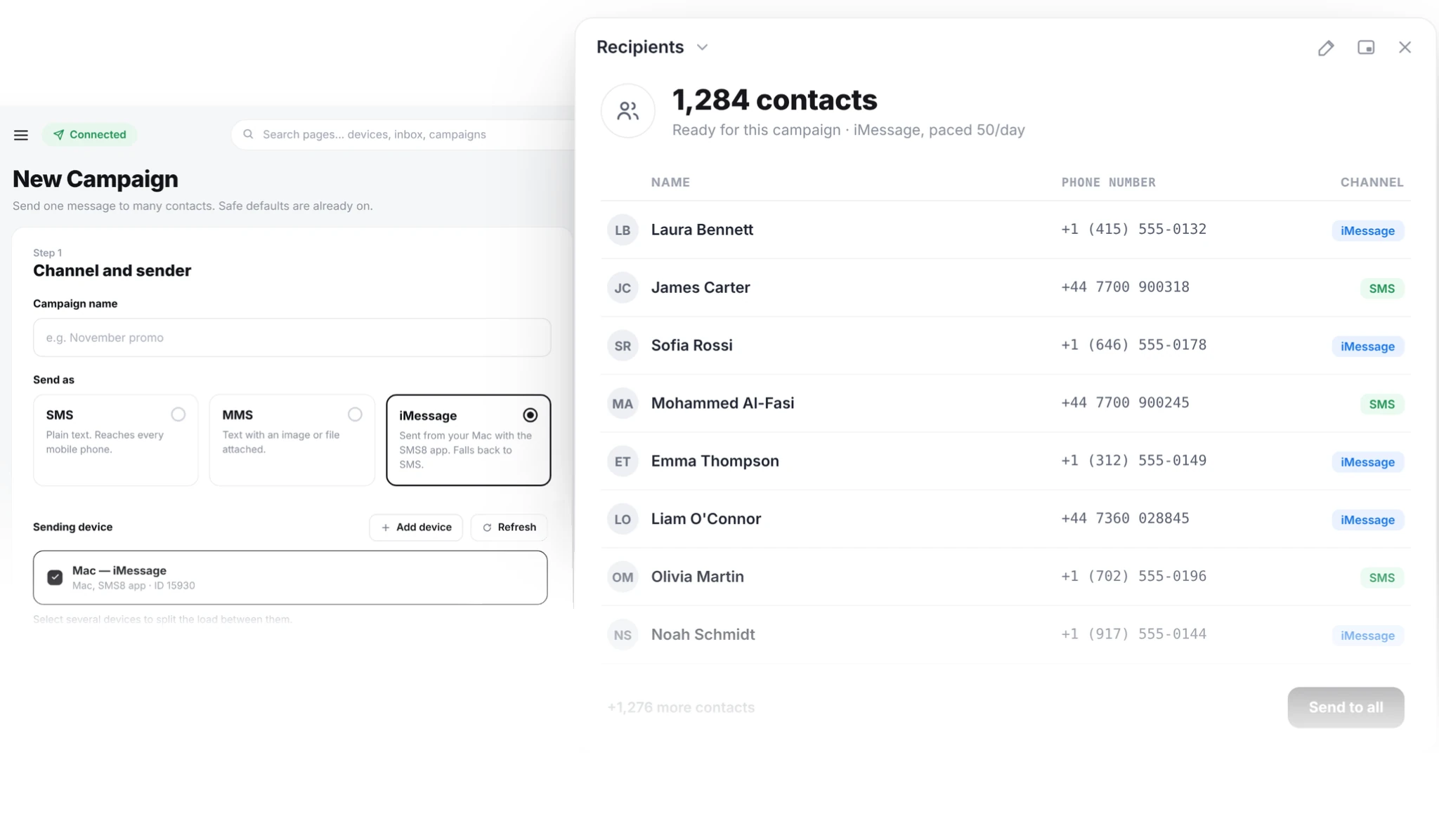
Apple does not let an iPhone app send text messages on its own in the background. That is an iOS rule, not an SMS8 one. So SMS8 sends automatically through a Mac you own: the Mac runs the SMS8 Gateway app, and your iPhone relays the SMS with Apple's built-in Text Message Forwarding.
Apple contacts get an iMessage. Everyone else, Android included, gets a regular SMS from your iPhone number. You do not have to check which one first.
- Send from the iPhone number you already own
- iMessage to Apple users, SMS to everyone else
- Replies come back to one shared inbox
Three steps to your first message
Most people send their first text in a few minutes.
Turn on Text Message Forwarding
On the iPhone, open Settings, then Messages, then Text Message Forwarding, and switch on the Mac. The iPhone and the Mac use the same Apple ID.
Pair the Mac
Install SMS8 Gateway on the Mac, type the 6 character pairing code from your dashboard and allow the permissions macOS asks for.
Send
Send from the dashboard, a campaign, GoHighLevel, Zapier or the API. The Mac hands each text to Messages, and it leaves from your iPhone number.
Why send from your iPhone number
You keep the number, the cost and the control.
People see a number they saved
Texts come from the iPhone number your clients already have in their contacts, not a short code they ignore. Replies land back with you.
No fee per message
One flat SMS8 plan. Texts count against your own mobile plan.
No carrier sign-up, no A2P
You send person to person from your own number, so there is no 10DLC brand or campaign filing and no approval wait.
Blue bubbles when possible
Apple contacts get iMessage, with pictures and links. Others get SMS automatically.
Hardware you already have
An iPhone and any Mac on macOS 14 or newer, from a MacBook to an iMac or a Mac mini.
One inbox for the team
Replies to SMS and iMessage arrive in the same SMS8 inbox, threaded by contact.
Two ways to send from an iPhone
Pick the one that fits how much you send.
Automatic, through a Mac
The Mac runs SMS8 Gateway and sends on its own, day and night: campaigns, CRM messages, API calls and AI agents. The iPhone relays the SMS with Text Message Forwarding. This is the setup for business sending.
With a tap, from the iPhone app
Without a Mac, the SMS8 iPhone app shows each queued message as a notification. Tap it and the message opens ready to send from your number. Good for a few messages a day, not for campaigns, because iOS asks you to confirm each one.
Add Android for volume
Need more SMS volume? Pair an Android phone too. It sends fully in the background from its own SIM, and SMS8 routes each message to the device you pick.
What people send from their iPhone number
The jobs that matter most when people know the number.
Follow-ups and campaigns
Upload a list or a tagged group and send from your number, paced so it stays personal.
Appointment reminders
Fire from your calendar or booking tool. Clients reply to confirm.
CRM texting
Send from GoHighLevel or any CRM through Zapier, Make or the API.
Order and booking updates
Shipped, confirmed, ready for pickup. From your store.
AI agents
Let an AI agent send and read replies over the SMS8 MCP server, from your number.
Two-way support
People reply to any text you sent. Your team answers from a browser, not one person's phone.
Your iPhone number or a rented number
Both send texts. One is the number your customers already know.
| Cloud SMS provider | iPhone number with SMS8 | |
|---|---|---|
| Cost per message | Charged on every text, plus carrier fees | No fee from SMS8, your mobile plan applies |
| Sender number | A rented virtual number or short code | Your own iPhone number |
| iMessage | Not available | Yes, to Apple contacts, with SMS for the rest |
| US registration | A2P 10DLC brand and campaign filing | Not needed, texts are person to person |
| Time to first message | Account checks and approval, often days | Pair a Mac, a few minutes |
| Replies | On the rented number | On your number, in one shared inbox |
What you need
The full list, up front.
An iPhone with a plan that includes texting
The number people see is that iPhone's number. Texts count against its mobile plan, so check your carrier's fair use terms before a big campaign.
A Mac on macOS 14 or newer
Any Mac works: MacBook, iMac or Mac mini. It stays on and online to send, signed into Messages with the same Apple ID as the iPhone.
Text Message Forwarding on
On the iPhone: Settings, Messages, Text Message Forwarding, then switch on the Mac. Without it the Mac can send iMessage but not SMS.
The iPhone on and connected
SMS relayed by the Mac still leave through the iPhone, so keep it charged and online.
Full Disk Access to receive
To bring replies into SMS8, allow Full Disk Access for SMS8 Gateway on the Mac. Without it the Mac still sends, but replies stay on the Mac.
A steady pace
Send at a conversational rhythm. Apple can slow down an Apple ID that sends like a broadcast tool. Need more volume? Add an Android phone or another Mac.
Works with the tools you have
Send from GoHighLevel, Zapier, Make, n8n, WooCommerce, Google Sheets, WordPress, or your own code.


Get the apps
SMS8 Gateway for Mac and the SMS8 iPhone app are both in the download center. The iPhone app is also on the App Store.
Sending needs an SMS8 account, which starts with a free 3-day trial with 30 messages and no credit card. Plans are USD 29, 89 or 229 a month for one, five or twenty devices, and half that per month when you pay yearly.
Not on its own. iOS does not let any app send text messages in the background. SMS8 sends automatically through a Mac you own, and your iPhone relays the SMS with Text Message Forwarding. The iPhone app alone sends with one tap per message.
For automatic sending, yes. Any Mac on macOS 14 or newer works, including an iMac or a second-hand Mac mini. Without a Mac you can still send from the iPhone app with a tap per message.
Yes. SMS go out through your iPhone with Text Message Forwarding, so recipients see your iPhone number. Apple contacts get an iMessage from your Apple ID.
Yes. Numbers without iMessage get a regular SMS from your iPhone number. SMS8 picks the channel for you.
Yes. Apple contacts get pictures and links in iMessage from your Apple ID. For MMS campaigns at volume, pair an Android phone too, which sends MMS from its own SIM.
No. You send person to person from your own number, so there is no brand or campaign filing.
Yes, once you allow Full Disk Access for SMS8 Gateway on the Mac. Replies to SMS and iMessage land in your SMS8 inbox and on your webhooks.
Yes. Use the normal SMS8 send request and choose the paired Mac as the device. Apple contacts get an iMessage, other numbers get an SMS from your iPhone number.
Send from your iPhone number today
Turn on Text Message Forwarding, pair your Mac, and send your first message in minutes.