
Part of the guide SMS API Documentation: Android SMS Gateway, OTP and Webhooks
On this page
- Key takeaways
- Why do online stores need an SMS API?
- Which ecommerce texts should you send?
- How do you send order texts from WooCommerce?
- How do you send order texts from any store through the API?
- How do customer replies come back?
- How much volume can a store send?
- What does an ecommerce SMS API cost on SMS8?
- Why choose SMS8
- Send your first order text today
Key takeaways
- An ecommerce SMS API lets your store send a text when something happens to an order: paid, shipped, held, refunded, failed, or left in the cart.
- SMS8 gives stores two routes: the free WordPress plugin with a switch and template for each of the seven WooCommerce order statuses, and the REST API for any other platform or custom logic.
- Every text leaves an Android phone you own, from its SIM, so customers see your real number and can reply. Replies land in the shared inbox and on your webhook.
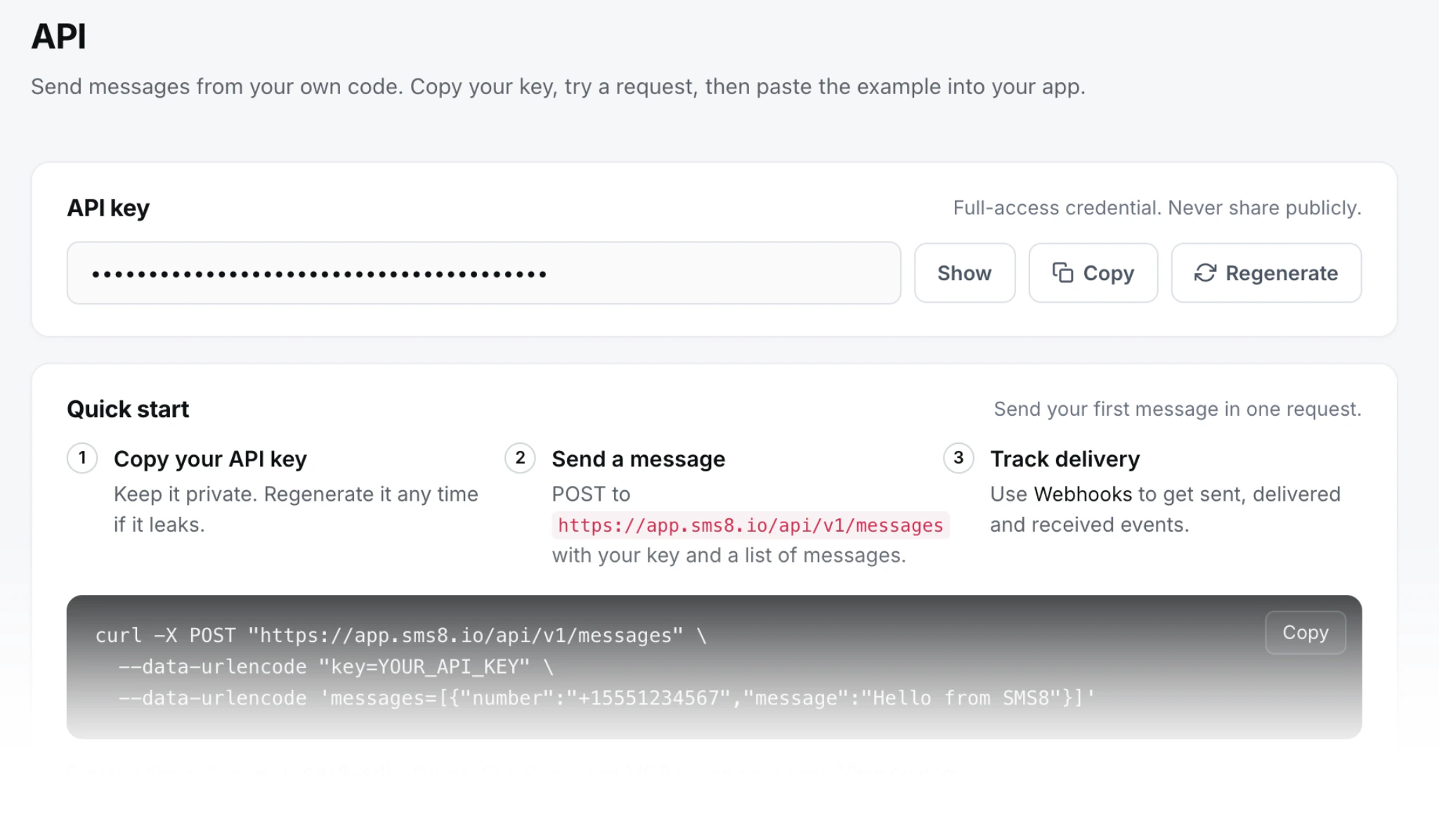
- The API call is one POST to
https://app.sms8.io/api/v1/messageswith your key in theX-Api-Keyheader, plusidempotencyKeyso a retry never texts a customer twice. - Plans are flat at USD 29, 89 or 229 a month for 1, 5 or 20 phones, with unlimited SMS and MMS and no fee per message. The 3-day trial includes 30 messages and needs no card.
The fastest way to add SMS to an online store is an API that sends from your own number on a flat plan. With SMS8, WooCommerce stores install the free plugin and switch on the order statuses they want. Stores on other platforms, or with custom logic such as cart reminders, call the SMS8 REST API from their backend. Either way, the text leaves the SIM in an Android phone you paired, the customer sees a real mobile number, and their reply comes back to your team. There is no fee per message and no A2P 10DLC filing. Every endpoint is in the SMS8 API documentation.
Why do online stores need an SMS API?
Customers want to know three things after they pay: did it work, when will it ship, and where is it now. Email answers those, but order emails often end up in the promotions tab. A text lands on the lock screen. The problems stores hit when they add SMS are usually about the provider, not the idea:
- Per-message bills that grow with sales. Every order sends two or three texts. On a metered provider, a good month means a bigger SMS bill. Our SMS API pricing guide compares per-message and flat models.
- Paperwork before the first text. On rented US numbers, an A2P 10DLC brand and campaign filing comes first.
- No-reply numbers. Many order texts come from numbers that cannot take a reply, so a customer with a question writes an email or a review instead.
SMS8 removes all three: a flat plan with unlimited messages, texts that go person to person from your SIM, and a real number customers can answer.
The video walks through the SMS8 WordPress plugin, from install to the first text.
Which ecommerce texts should you send?
| Store event | Text to the customer | How to send it with SMS8 |
|---|---|---|
| Payment received | Thanks, we got your payment of {order_total} for order {order_id} | Processing status in the plugin, or an API call from your order webhook |
| Order shipped | Order {order_id} is on its way, tracking {tracking_number} | Completed status in the plugin, or the API |
| Bank transfer or cash on delivery | Your order is on hold until the transfer arrives | On hold status in the plugin |
| Payment failed | Payment for order {order_id} failed, you can try again on our site | Failed status in the plugin, or a short sequence through the API |
| Refund or cancellation | We refunded {order_total}, it can take a few days to show | Refunded and Cancelled statuses in the plugin |
| Cart left behind | A reminder an hour later from your number | The API, from your own cart logic after a delay |
| Review request | A few days after delivery, one link | The API with schedule |
| New order alert | To the owner or fulfilment team, not the customer | Admin alert in the plugin |
Start with Processing and Completed. Those two cover most of what customers ask about. Keep each order text inside one SMS segment of 160 characters where you can.
How do you send order texts from WooCommerce?
If your store runs on WooCommerce, you do not need to write code. The SMS8 plugin is free on WordPress.org and adds a WooCommerce tab with a switch and a template for each of the seven standard statuses: Pending payment, Processing, On hold, Completed, Cancelled, Refunded and Failed.
- Create your SMS8 account and start the 3-day trial.
- Pair an Android phone with Android 7 or newer by scanning the code on your dashboard. Keep it on a charger and Wi-Fi, and turn off battery optimisation for the app.
- Install the plugin from Plugins, Add New, search for SMS8 and activate it.
- Click Connect with SMS8. A popup signs you in and fills in your API key.
- Pick the phone and SIM, send a test, then switch on the statuses you want.
Templates use placeholders such as {first_name}, {order_id}, {order_total}, {order_currency}, {payment_method}, {site_url} and {tracking_number}, which works with most shipment tracking plugins. The Logs tab shows the last 100 attempts, the plugin supports HPOS, and each request has a 10-second limit, so checkout never waits on the phone. Abandoned cart recovery is not a listed plugin feature, but a developer can send a text from your own cart logic with do_action('sms8_send_sms', $phone, $message). Every status is covered on the WooCommerce SMS notifications page, and the WordPress SMS plugin page covers OTP login and form alerts.
How do you send order texts from any store through the API?
For Shopify, Magento, a headless store or your own platform, call the SMS8 API from the backend that receives your order events. A minimal Python sender for order updates:
import os
import requests

API = "https://app.sms8.io/api/v1"
HEADERS = {"X-Api-Key": os.environ["SMS8_API_KEY"]}

def order_text(order, kind, text):
    r = requests.post(f"{API}/messages", headers=HEADERS, data={
        "number": order["phone"],                     # international format, +14155550100
        "message": text,
        "idempotencyKey": f"order-{order['id']}-{kind}",
    }, timeout=30)
    body = r.json()
    if body.get("success"):
        return body["data"]["messages"][0]["ID"]       # store it on the order
    raise RuntimeError(body["error"]["message"])

order_text(order, "shipped",
    f"Hi {order['first_name']}, order {order['id']} is on its way. Tracking: {order['tracking']}")
The idempotencyKey, built from the order ID and the message type, makes sure a retried job or a duplicate webhook from your store never sends the same text twice. SMS8 also returns the first answer for an identical request repeated within five minutes. Always read the success flag, because some refusals come back inside a normal response.
Cart reminders and review requests
For a cart reminder, let your own job queue wait an hour, check whether the cart has turned into an order, and only then call order_text, so nobody who already paid gets a reminder. Only text carts where the customer left a phone number and agreed to hear from you.
For messages that should always go out later, such as a review request a few days after delivery, add schedule with a Unix timestamp and SMS8 holds the text until then:
import time

requests.post(f"{API}/messages", headers=HEADERS, data={
    "number": order["phone"],
    "message": f"Hi {order['first_name']}, how was your order? A short review helps us a lot: {order['review_link']}",
    "schedule": int(time.time()) + 4 * 86400,          # four days from now
    "idempotencyKey": f"order-{order['id']}-review",
}, timeout=30)
For one-time codes at checkout, add prioritize=1 so the message jumps ahead of anything waiting on that phone. For a picture receipt or a product photo, set type to mms and put public image links in attachments; the guide on sending MMS through an API has the details. Prefer no code? The official Zapier and Make apps can send from your store platform's new order trigger.
How do customer replies come back?
Customers answer an order text the way they answer anyone: "Can I change the address?" or "Is it still arriving Friday?". The reply arrives on the SIM that sent the text and shows up in the SMS8 shared inbox, threaded by contact, so your support team answers from a browser.
To bring replies into your helpdesk or order system, open Webhooks in the dashboard, add your HTTPS URL and tick both the received and messages events. The payload of an incoming text carries "event": "messages" and a data list where each item has ID, number, message, deviceID and simSlot. Verify the X-Signature header, sha256= followed by the HMAC-SHA256 of the raw body keyed with that webhook's secret, match number to the latest order, and answer with a 2xx within 10 seconds. SMS8 retries failed deliveries for up to 30 days, so dedupe on ID. The two-way SMS API guide shows the full loop.
How much volume can a store send?
Order texts are single messages, and each goes out as soon as the phone picks it up, so a busy checkout does not queue behind a campaign. The API has no artificial rate limit; your SIMs set the real pace. For promotions to your whole customer list, use campaigns in the SMS8 dashboard, which go out at one message every 10 to 30 seconds per SIM, with scheduling, quiet hours and automatic STOP handling. Add a dual-SIM phone or more phones and SMS8 rotates across them. Run several stores? Pair a phone per store and pick it in each store's settings. If a phone drops offline, texts wait in the queue and send when it reconnects. Building texting into a platform rather than one store? See the SMS API for SaaS guide.
What does an ecommerce SMS API cost on SMS8?
| Plan | Monthly | Billed yearly (per month) | Connected phones | Team seats |
|---|---|---|---|---|
| One Device | USD 29 | USD 14.50 | 1 | 1 |
| Five Devices | USD 89 | USD 44.50 | 5 | 10 |
| Twenty Devices | USD 229 | USD 114.50 | 20 | 40 |
Every plan includes unlimited SMS and MMS, the API, webhooks, the WooCommerce plugin, Zapier, Make and the shared inbox. SMS8 adds no fee per message, no number rental and no A2P registration fee, so your SMS cost stays the same in your busiest month. The texts ride on the mobile plan of the SIM in your phone, and many plans include unlimited texting under a fair use policy. A single store usually starts on One Device. See the SMS8 pricing page for every detail.
Why choose SMS8
- Your store's own number. Customers see a real mobile number they can save, call and reply to, not a no-reply line.
- A flat price with unlimited messages. USD 29 a month for one phone, with no fee per text, however many orders you ship.
- No A2P 10DLC wait. Texts go person to person from your own SIM, so your first order text goes out today.
- Plugin or API. A free WooCommerce plugin with a template per status, and a REST API with idempotency, scheduling and MMS for everything else.
- Replies where your team works. A shared inbox and signed webhooks retried for up to 30 days.
- Setup in minutes. Pair a phone, connect the plugin or copy your API key, and send a test.
Send your first order text today
Order texts are the messages customers are most glad to get. SMS8 sends them from your own number, brings the replies back to your team and keeps the bill flat as you grow. Start the 3-day trial with 30 messages, no card needed. Pair a phone, install the WooCommerce plugin or call the API, and your next order sends its first text.