
Part of the guide SMS API Documentation: Android SMS Gateway, OTP and Webhooks
On this page
- Key takeaways
- Why does two-way SMS matter for a business?
- How does a two-way SMS API work with SMS8?
- How do you send the first message?
- How do you receive SMS replies on a webhook?
- How do you reply from your code?
- What should your code do with replies?
- Can you poll instead of using a webhook?
- Where do humans fit in two-way SMS?
- How do you scale two-way SMS?
- What does a two-way SMS API cost on SMS8?
- Why choose SMS8
- Start your two-way flow today
Key takeaways
- A two-way SMS API does two jobs: it sends texts from your code, and it pushes every reply back to your server so you can act on it.
- With SMS8 you send with
POST https://app.sms8.io/api/v1/messagesand receive through a signed webhook. Subscribe the webhook to both thereceivedandmessagesevents for incoming texts. - Texts go out from the SIM in an Android phone you own, so replies come back to a real number your customers recognise, with no A2P 10DLC filing.
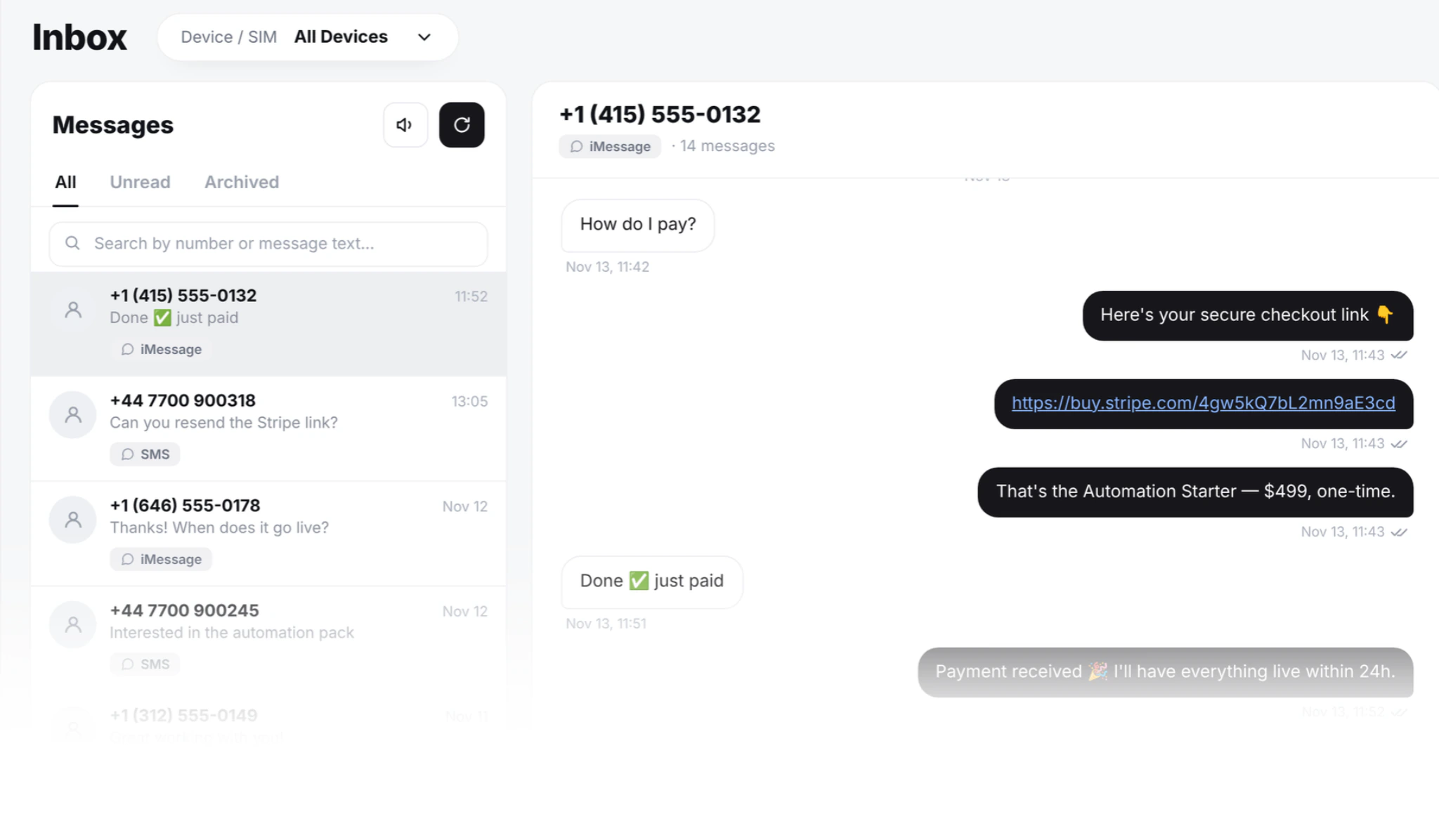
- Every reply also lands in the SMS8 shared inbox, threaded by contact, so a person can step in whenever your code should not answer alone.
- Plans are flat: USD 29, 89 or 229 a month for 1, 5 or 20 connected phones or Macs, with unlimited SMS and MMS and a 3-day trial with 30 messages, no card needed.
A two-way SMS API lets your application send a text and then receive the answer, so a customer can confirm a booking, ask a question or opt out, and your system reacts in seconds. With SMS8, your code posts a message to one endpoint, the text leaves the SIM in your own Android phone, and each reply is posted to your HTTPS webhook, signed with HMAC-SHA256 and retried for up to 30 days. The same replies appear in a shared inbox where your team can answer from a browser. This guide shows the business case, the exact calls, how to route replies and what it costs. For every endpoint and field, see the SMS8 API documentation.
Why does two-way SMS matter for a business?
One-way texts are announcements. Two-way texts are conversations, and conversations are where the money is: a confirmed appointment instead of a no-show, a lead who answers "yes, call me at 4", a customer who sorts out a delivery problem without phoning support.
The problems start when replies have nowhere to go:
- Replies to a number nobody watches. Many setups send from a rented number with no receiver behind it. The customer answers, and the message is lost.
- Unknown senders get ignored. A text from a short code or a random long code looks like a stranger. People reply far more readily to a number they recognise. Our guide on why customers ignore texts from unknown numbers goes into this.
- Code and people in different places. Your automation sees the reply, but your support team does not, or the other way round. Nobody has the full thread.
- Opt-outs that slip through. A STOP that is not recorded means the next campaign texts someone who asked you not to.
SMS8 fixes all four by sending from your own SIM, posting every reply to your code and putting the same thread in a shared inbox.
How does a two-way SMS API work with SMS8?
The flow has four parts:
- Your code sends. A POST to
/api/v1/messageswith a number and a message, authenticated with your key in theX-Api-Keyheader. - Your phone delivers. SMS8 hands the message to an Android phone you paired, which sends it from its SIM. The status moves through queued, sending, sent, delivered or failed.
- The customer replies. The answer arrives on the same SIM, because it is a normal text to a normal mobile number.
- SMS8 posts the reply to you. Your webhook gets a JSON event, and the reply shows in the inbox, threaded by contact.
Add a Mac running SMS8 Gateway and the same flow works for iMessage, with SMS fallback for contacts who are not on iMessage. iMessage and SMS replies reach the same webhook.
How do you send the first message?
A Python send takes a few lines:
import os
import requests
API = "https://app.sms8.io/api/v1"
HEADERS = {"X-Api-Key": os.environ["SMS8_API_KEY"]}
r = requests.post(f"{API}/messages", headers=HEADERS, data={
    "number": "+14155550100",
    "message": "Hi Ana, your appointment is tomorrow at 10:00. Reply YES to confirm or NO to move it.",
    "idempotencyKey": "booking-5521-reminder",
}, timeout=30)
body = r.json()
if body.get("success"):
    print("queued as", body["data"]["messages"][0]["ID"])
else:
    print("refused:", body["error"]["code"], body["error"]["message"])
The idempotencyKey makes sure a retried job never becomes a second text. To send later, add schedule with a Unix timestamp. For codes and urgent alerts, add prioritize=1 so the message jumps ahead of a running batch. In Node.js, the sms8-sdk package from npm does the same with sendSMS. The language guides are on the Python SMS API page and the Node.js SMS API page.
How do you receive SMS replies on a webhook?
Open the Webhooks page of your dashboard, add your HTTPS URL and keep the signing secret. Each webhook has its own secret, separate from your API key. For incoming texts, tick both received and messages: the payload of an incoming message carries "event": "messages". Add delivered and failed if you also want delivery reports. The step-by-step setup, with a full sample payload, is on the forward SMS to a webhook page.
Each event has event, timestamp, userID and a data list. Every item in the list has ID, number, message, deviceID and simSlot. Every request carries an X-Signature header: sha256= followed by the hex HMAC-SHA256 of the raw body, keyed with the webhook secret. A Flask receiver:
import hashlib
import hmac
import os
from flask import Flask, abort, request
app = Flask(__name__)
SECRET = os.environ["SMS8_WEBHOOK_SECRET"].encode()
@app.post("/sms8/webhook")
def sms8_webhook():
    raw = request.get_data()
    expected = "sha256=" + hmac.new(SECRET, raw, hashlib.sha256).hexdigest()
    if not hmac.compare_digest(expected, request.headers.get("X-Signature", "")):
        abort(401)
    event = request.get_json()
    for m in event.get("data", []):
        save_reply(m["ID"], m["number"], m["message"], m["deviceID"], m["simSlot"])  # your code: dedupe on ID
    return "", 200
Answer with a 2xx within 10 seconds and do slow work afterwards in a queue. If your server is down, SMS8 retries on a schedule that grows from a few minutes up to 30 days, and every attempt shows in the deliveries log, where you can also retry a row by hand. Store the message ID with a unique index so a retried event is processed once.
How do you reply from your code?
To answer a customer from the number they wrote to, send back through the same phone and SIM. The webhook tells you both: deviceID and simSlot. In Node.js with the SDK:
import { Sms8 } from 'sms8-sdk';
const sms8 = new Sms8({ apiKey: process.env.SMS8_API_KEY });
async function handleReply(m) {
  const text = m.message.trim().toUpperCase();
  let answer = null;
  if (text === 'YES') answer = 'Thanks, you are confirmed. See you tomorrow.';
  else if (text === 'NO') answer = 'No problem. Reply with a day and time that suits you.';
  if (!answer) return; // leave it for a person in the inbox
  const res = await sms8.sendSMS({
    phone: m.number,
    message: answer,
    deviceId: m.deviceID,
    simSlot: m.simSlot,
  });
  if (!res.success) console.error('reply refused:', res.error);
}
Notice the early return. Good two-way systems answer only what they understand and leave the rest for a human. Because the reply is already in the shared inbox, a teammate can pick it up from a browser without your code doing anything else.
What should your code do with replies?
Most two-way flows use a small set of rules:
- Keywords. YES, NO, C, CONFIRM, a number from a menu. Match them exactly after trimming and uppercasing, and keep the list short.
- Opt-outs. When someone replies STOP, SMS8 adds the number to your blacklist and later campaigns skip it. Mirror that in your own database so your product never texts them either.
- Matching to a record. Look up the number in your users, leads or bookings and attach the reply to the right record.
- Hand-off. Anything that is not a known keyword goes to a person. Notify the owner of the account, open a ticket or let the inbox handle it.
- AI triage. If you run an AI agent, give it the reply and let it draft an answer for approval. The SMS8 MCP server at
https://mcp.sms8.ioexposes sending and reading messages to Claude and other agents. Our guide to an AI SMS agent for sales shows that pattern.
Can you poll instead of using a webhook?
Yes. For a script, a nightly report or a quick prototype, read recent messages with POST /api/v1/messages/read:
import time
r = requests.post(f"{API}/messages/read", headers=HEADERS, data={
    "status": "Received",
    "startTimestamp": int(time.time()) - 3600,
    "limit": 100,
}, timeout=30)
body = r.json()
inbox = body["data"]["messages"] if body.get("success") else []
for m in inbox:
    print(m["number"], m["message"])
When nothing matches, the answer is success: false with error code 404, which you treat as an empty list. You can also filter by deviceID, simSlot or endTimestamp, and page with limit and offset. For a live product, webhooks are the better fit because the reply reaches you in seconds. The trade-offs are covered in webhook vs polling for incoming SMS.
Where do humans fit in two-way SMS?
Automation handles the predictable replies. People handle the rest. The SMS8 shared inbox is a web page at app.sms8.io, so teammates answer with a real keyboard from any modern browser, through your SIM, and the customer sees the same number on every reply. Each teammate has their own login, and every outgoing message is stamped with the person who typed it.
You choose who can use which phone and SIM, and you can make a seat read-only. One Device includes 1 seat, Five Devices 10 and Twenty Devices 40. This is what makes two-way SMS work in practice: your code confirms bookings at 3am, and in the morning your team reads the three replies it did not understand.
How do you scale two-way SMS?
The API has no artificial rate limit. Each SIM should send at a natural pace, and bulk sends go out at about one message every 10 to 30 seconds per SIM. To grow:
- Use dual-SIM phones. Two SIMs in one handset, picked with
simSlot, where 0 is SIM 1 and 1 is SIM 2. - Pair more phones and rotate. Set
option=1to rotate across phones, oroption=2to rotate across every SIM. - Keep replies on their SIM. Rotation is for first messages. For replies, send back through the
deviceIDandsimSlotthe customer wrote to, so the thread stays on one number. - Watch your phones.
GET /api/v1/deviceslists battery, signal, SIMs and last seen time for your monitoring.
If you are building this into a product, our guide to an SMS API for SaaS covers notifications, OTP codes and per-customer traffic in more depth.
What does a two-way SMS API cost on SMS8?
| Plan | Monthly | Billed yearly (per month) | Connected phones or Macs | Team seats |
|---|---|---|---|---|
| One Device | USD 29 | USD 14.50 | 1 | 1 |
| Five Devices | USD 89 | USD 44.50 | 5 | 10 |
| Twenty Devices | USD 229 | USD 114.50 | 20 | 40 |
Sending and receiving are both included, with unlimited SMS and MMS, the API, webhooks, the shared inbox and the MCP server on every plan. SMS8 adds no fee per message, no number rental and no A2P registration fee. The only other cost is the mobile plan on your SIMs, and many plans include unlimited texting under a fair use policy. With a flat plan, a chatty customer who replies ten times costs you nothing extra, which is exactly what you want from a conversational channel.
Why choose SMS8
- Your own number on both sides. Customers get texts from a real mobile number and reply to it, so the conversation feels like one with a person.
- Replies you can rely on. Signed webhooks, retried for up to 30 days, with a deliveries log you can replay.
- Code and people on one thread. Every reply goes to your webhook and to the shared inbox, with team seats on every plan.
- A flat price with unlimited messages. USD 29 a month for one phone or Mac, no fee per message, inbound or outbound.
- No A2P 10DLC wait. Texts go person to person from your own SIM, so you can launch the same day.
- SMS, MMS and iMessage in one API. Android phones for SMS and MMS, a Mac for iMessage, one webhook for every reply.
Start your two-way flow today
Two-way SMS is the difference between sending messages and running conversations. With SMS8 you send from your own number, receive every reply on a signed webhook, answer from code or from a browser, and pay one flat price. Start the 3-day trial, pair a phone, register a webhook with the received and messages events, and send your first message. Then pick the plan that fits on the SMS8 pricing page.