
Part of the guide SMS8 MCP Server: Send SMS From Claude Code, Cursor and AI Agents
On this page
- Key takeaways
- Why does lead follow-up break down?
- What is an AI SMS agent, exactly?
- Which tools does the agent get?
- How do you set up an AI SMS agent with SMS8?
- What sales workflows can the agent run?
- How do you keep an AI sales agent safe?
- When should you use campaigns instead of the agent?
- How much does an AI SMS agent cost on SMS8?
- Why choose SMS8
- Give your sales agent a phone number
Key takeaways
- An AI SMS agent for sales is an AI model connected to a texting tool, so it can read lead replies, draft follow-ups and send them when you approve.
- The SMS8 MCP server at
https://mcp.sms8.iogives Claude, Claude Code, Cursor and other MCP clients nine tools, includingsend_sms,get_messagesandcreate_webhook. - Every text leaves from your own Android phone and SIM, or as iMessage from a Mac you own, so leads see a number they can save and reply to.
- Keep approval on for
send_sms, pace sends at one message every 10 to 30 seconds per SIM, and only text leads who agreed to hear from you. - The agent uses your normal SMS8 plan: USD 29 a month for one phone or Mac, unlimited SMS and MMS, no per-message fee. The 3-day trial has 30 messages and needs no card.
An AI SMS agent for sales reads your leads' text replies, works out who needs an answer, drafts the follow-up and sends it from your number once you approve. With SMS8 you build one in minutes: pair an Android phone, add the SMS8 MCP server to Claude or another AI tool, and ask in plain words. The agent calls tools like get_messages to read replies and send_sms to send, and every message goes out through your own SIM. This guide shows the setup, the sales workflows that work, and the guardrails that keep the agent from texting the wrong person at the wrong time. For the full tool list, see the SMS8 MCP server page.
Why does lead follow-up break down?
Sales teams know text works for follow-up. Leads read texts, and a short message right after a form or a call often gets an answer when an email does not. The problem is doing it consistently:
- Speed slips. A lead fills a form at 6pm and nobody texts until the next morning, when they have already talked to someone else.
- Follow-ups are forgotten. The first text goes out. The second and third, a day and a week later, depend on someone remembering.
- Replies pile up. A busy rep comes back to 40 unread threads and has to work out which ones are hot, which are questions and which are "not interested".
- Texts come from the wrong place. Reps text from personal phones, so the history leaves when they do, or from a rented number leads do not recognise and ignore.
An AI agent fixes the reading and drafting part. It never forgets a thread, it can summarise 40 replies in seconds, and it writes a first draft in your tone. What it needs is a safe way to text from your real number. That is what the SMS8 MCP server provides.
What is an AI SMS agent, exactly?
It has three parts:
- A model such as Claude, which reads, reasons and writes.
- Tools it can call to act in the world. For texting, that means sending a message, reading messages and listing the phones it can send from.
- A human in the loop, who decides what the agent may do on its own and what needs approval.
MCP, the Model Context Protocol, is the standard way AI tools connect to outside services. You add an MCP server once and the agent sees named tools with clear arguments, so it does not have to guess how to build an API request. Your AI client also sees each tool call before it runs, which is where approval prompts come from. The glossary has a short entry on MCP if you are new to it.
The video shows Claude sending SMS through SMS8 from a plain-language request.
Which tools does the agent get?
The SMS8 MCP server exposes nine tools, named the way your agent sees them:
| Tool | What it does | Sales use |
|---|---|---|
setup_sms8 | Checks your API key and returns your phones, plan and setup | First call in a new session |
send_sms | Sends one message through a paired phone, with a choice of phone and SIM | Send an approved follow-up |
get_messages | Reads recent sent or received messages, filtered by direction or number | Read replies, check a lead's history |
list_devices | Lists your paired phones so the agent can pick the sender | Send from the right rep's line |
get_balance | Returns the messages left and the days until renewal | Check before a batch |
create_webhook | Registers an HTTPS address that receives incoming messages, signed | Route replies to your CRM |
send_otp, verify_otp, wait_for_otp | Send, check and read verification codes | Phone checks on a demo sign-up |
Each tool runs through the same sending path as your dashboard. Retries, phone routing and signed webhooks behave exactly like a direct API call.
How do you set up an AI SMS agent with SMS8?
- Create your SMS8 account at app.sms8.io and start the 3-day trial. No card is needed.
- Pair a phone. Install the SMS8 app on an Android 7 or newer phone with the SIM your leads should see, and scan the code from your dashboard. Turn off battery optimisation for the app so it keeps running. Add a Mac with SMS8 Gateway if you also want iMessage.
- Copy your API key from the API page of the dashboard. The MCP server takes it as a Bearer token, and the setup tool only ever shows its last four characters. More on handling an API key safely in the glossary.
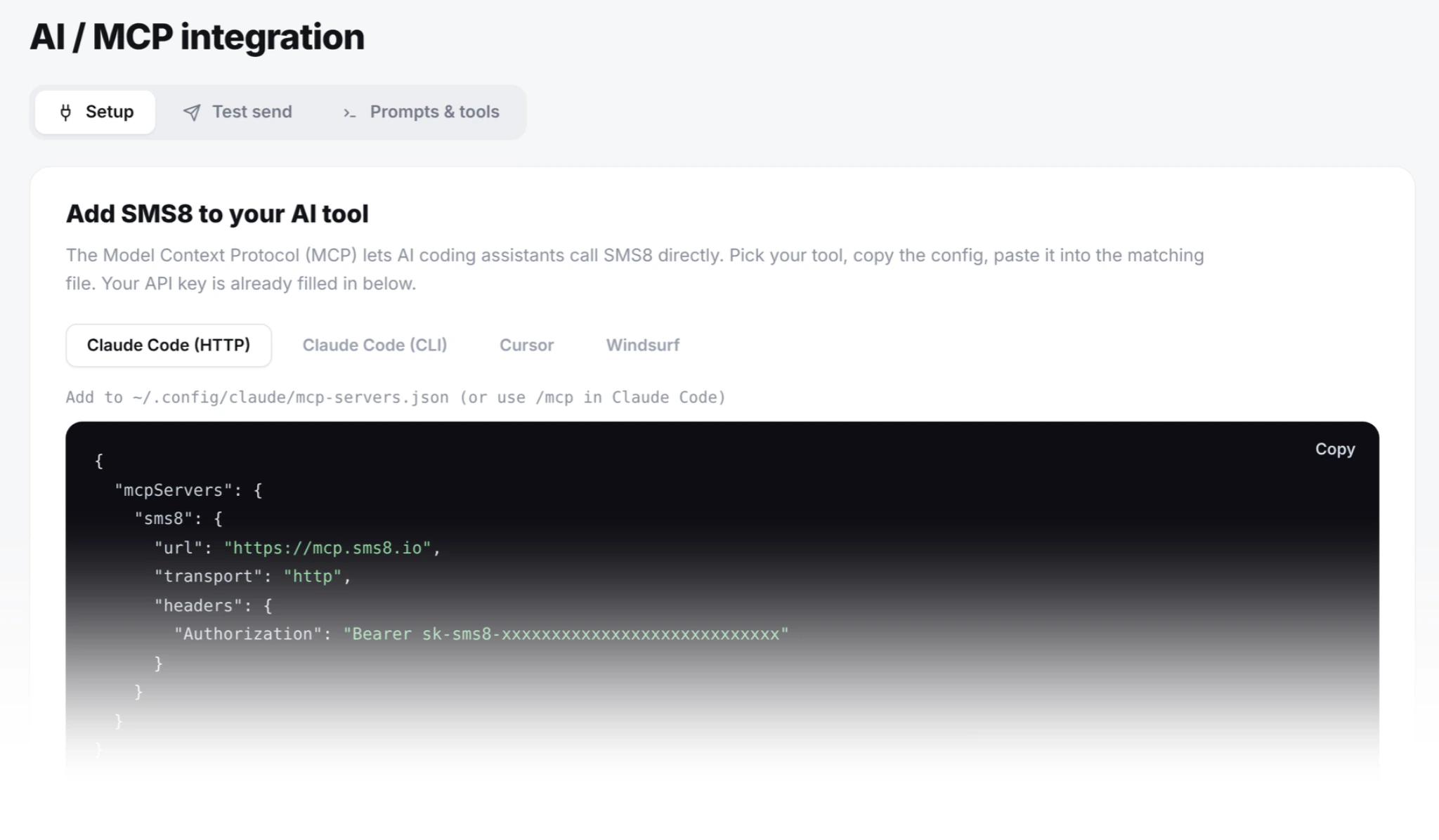
- Add the server to your AI tool. In Claude Code, one command:
In Claude on the web or desktop, open Settings, then Connectors, add a custom connector and enterclaude mcp add --transport http sms8 https://mcp.sms8.iohttps://mcp.sms8.io. Local tools can run the stdio bridge instead:SMS8_API_KEY=your_key npx -y sms8-sdk mcp - Check the connection. Ask the agent to run
setup_sms8. It confirms the key and lists your phones.
Step-by-step guides for each client are in our complete guide to sending SMS with Claude and the Claude Code SMS MCP tutorial.
What sales workflows can the agent run?
These are requests a rep or a sales manager can type today. Each one uses only the tools above.
Morning reply triage
"Read our recent incoming texts. Group them into ready to buy, has a question, wants a call, and not interested. For each, draft a short reply." The agent calls get_messages for received messages, sorts them and gives you drafts. You edit, approve, and it sends each one with send_sms.
Speed-to-lead first touch
"Here are the five leads from today's webinar form. Text each one: thank them by name, mention the topic they picked and ask if a 15 minute call this week works." The agent writes five personal texts, shows them, and sends after your approval.
Second and third follow-up
"Check these ten numbers. For anyone who has not replied since our first text on Monday, draft a short nudge. Skip anyone who replied." The agent reads each thread with get_messages filtered by number, so it never chases a lead who already answered.
Lead history before a call
"Before my 2pm call, show me every text with +14155550100 and summarise what they asked." Useful when a rep picks up a lead someone else worked.
Route replies into your stack
"Create a webhook to our CRM endpoint and write the handler that checks the signature and attaches each reply to the matching contact." In Claude Code, the agent can call create_webhook and write the receiver in your codebase. Each webhook request carries an HMAC-SHA256 signature, and only HTTPS addresses on the public internet are accepted.
For broader, non-sales examples of agents with SMS, read how to let an AI agent send SMS.
How do you keep an AI sales agent safe?
An agent with access to your number can send real texts to real people. Set guardrails before you let it loose.
- Keep approval on for
send_sms. Claude Code and Claude Desktop ask before calling a tool unless you have chosen to always allow it. Let read-only tools likeget_messagesandlist_devicesrun freely, and approve sends one by one until you trust the workflow. - Draft first, send second. Ask the agent to show every message before sending. A wrong name or a made-up discount is caught at the draft, not after it lands.
- Pace sends. A SIM should send at about one message every 10 to 30 seconds so the carrier does not treat it as spam. For more volume, add a dual-SIM phone or more phones. If the agent sends from a Mac as iMessage, SMS8 paces it to 50 new contacts a day per Mac.
- Only text leads who opted in. Consent rules apply whether a person or an agent presses send. Say who you are and honour STOP. In SMS8 campaigns, anyone who replies STOP is opted out of every later campaign on your account.
- Check before resending. If a send looks slow, ask the agent to check
get_messagesbefore trying again, so a lead never gets the same text twice. - Know what the code does. The SMS8 MCP server is open source under the MIT license, so your team can read exactly what each tool does.
When should you use campaigns instead of the agent?
The agent shines at reading, sorting and writing personal messages to a handful of leads at a time. For sending the same message to a long list, the SMS8 campaign screen is the better tool: upload a CSV or Excel file, use merge tags like {first_name}, schedule the send, set quiet hours, and let SMS8 pace it across your SIMs. Many teams do both: a campaign for the first touch to a list, and the agent for the replies. If iPhone leads matter most to you, our guide to the bulk iMessage sender shows how to run that first touch as blue bubbles.
How much does an AI SMS agent cost on SMS8?
The MCP server costs nothing extra. It uses your normal SMS8 plan and API key, and there is no fee per message.
| Plan | Monthly | Billed yearly (per month) | Connected phones or Macs | Team seats |
|---|---|---|---|---|
| One Device | USD 29 | USD 14.50 | 1 | 1 |
| Five Devices | USD 89 | USD 44.50 | 5 | 10 |
| Twenty Devices | USD 229 | USD 114.50 | 20 | 40 |
A sales team with one line per rep usually fits Five Devices: five phones or Macs and ten seats in the shared inbox, where people can also answer by hand. Your AI tool's own subscription is separate. See SMS8 pricing for every plan.
Why choose SMS8
- Your agent texts from your own number. Leads see the SIM your business uses, can save it and reply to it. No rented number and no short code.
- A flat price with unlimited messages. USD 29 a month for one phone or Mac, with unlimited SMS and MMS and no fee per message. The MCP server is included.
- Built for agents. Nine named MCP tools, one server address for Claude, Claude Code, Cursor and Windsurf, and an open source server you can read.
- No A2P 10DLC paperwork. Texts go person to person from your SIM, so there is no brand or campaign registration before your agent can send.
- SMS and iMessage in one inbox. Android phones for SMS and MMS, a Mac for iMessage, and one shared inbox where your team can step in at any time.
- Set up in minutes, try before you pay. Pair a phone, add the server and send a first text. The 3-day trial has 30 messages, no card needed.
Give your sales agent a phone number
An AI agent is only as useful as the tools it can use. Connected to SMS8, it reads every lead reply, drafts the follow-up in your tone and sends it from your own number when you say so. Start the 3-day trial, pair a phone, add https://mcp.sms8.io to Claude and ask it to triage today's replies.