
Part of the guide SMS8 MCP Server: Send SMS From Claude Code, Cursor and AI Agents
On this page
- What you will build
- What is MCP and why use it for SMS?
- What are the prerequisites?
- How do I install the SMS8 MCP server in Claude Code?
- How do I install it in Cursor and Windsurf?
- What are the SMS8 MCP tools?
- First call: prove it works
- How do I send an OTP from Claude Code?
- How do I build a "text me when the build fails" notifier?
- What does the request flow look like under the hood?
- How do I handle errors from the MCP server?
- How do I read replies through MCP?
- Why did we ship this instead of a generic SDK?
- Full troubleshooting reference
- Why choose SMS8 for Claude Code
What you will build
- An MCP connection from Claude Code (or Cursor / Windsurf) to
mcp.sms8.io. - The core tools: setup, send SMS, send OTP, verify OTP, get messages, list devices, create webhook.
- A working "text my phone when the build fails" workflow you can drop into any CI.
- Error handling and debugging steps that work on Linux, macOS, Windows.
- An OTP demo that pairs Claude Code as the orchestrator with your phone as the verifier.
To send SMS from Claude Code, run claude mcp add --transport http sms8 https://mcp.sms8.io, add your API key, and ask Claude to text a number. The SMS8 MCP server gives Claude Code, Cursor and Windsurf the same SMS tools the moment they start, so nobody has to paste a wrapper around the REST API again.
This walkthrough assumes you already have an SMS8 account. If not, the 3-day trial with 30 messages at sms8.io/pricing takes about a minute. For the broader picture, see the complete guide to sending SMS with Claude, and for editor configs the Cursor, Windsurf and Zed MCP configs. For the architectural side of inbound SMS through webhooks, the webhook vs polling post covers what to do after Claude triggers a send.
What is MCP and why use it for SMS?
The Model Context Protocol is Anthropic's open spec for letting AI assistants call external tools. You can read the spec at modelcontextprotocol.io. Instead of writing a Python script that wraps the SMS API and instructing Claude to read your code, you point Claude at an MCP server and it discovers the tools automatically through a tools/list call. The agent then chooses the right tool based on user intent.
For SMS this is a small but meaningful upgrade. You can now say "Claude, text me when the test suite is green" and the assistant does it without further setup. More importantly, agents can chain MCP calls together. A build agent can send_otp to gate a deploy, wait for verify_otp from the on-call engineer, then proceed. That kind of human-in-the-loop pattern is hard with custom wrappers and trivial with MCP.
What are the prerequisites?
| Requirement | Notes |
|---|---|
| SMS8 account | 3-day trial with 30 messages at app.sms8.io, no card needed. Pair one Android phone (Android 7+). |
| MCP client | Claude Code, Cursor, Windsurf, Zed, or Cline. Any version with MCP HTTP transport support. |
| Network access to mcp.sms8.io | HTTPS on port 443. No firewall holes needed since the client connects out. |
| SMS8 API key | Generate it in the dashboard under Settings > API. |
How do I install the SMS8 MCP server in Claude Code?
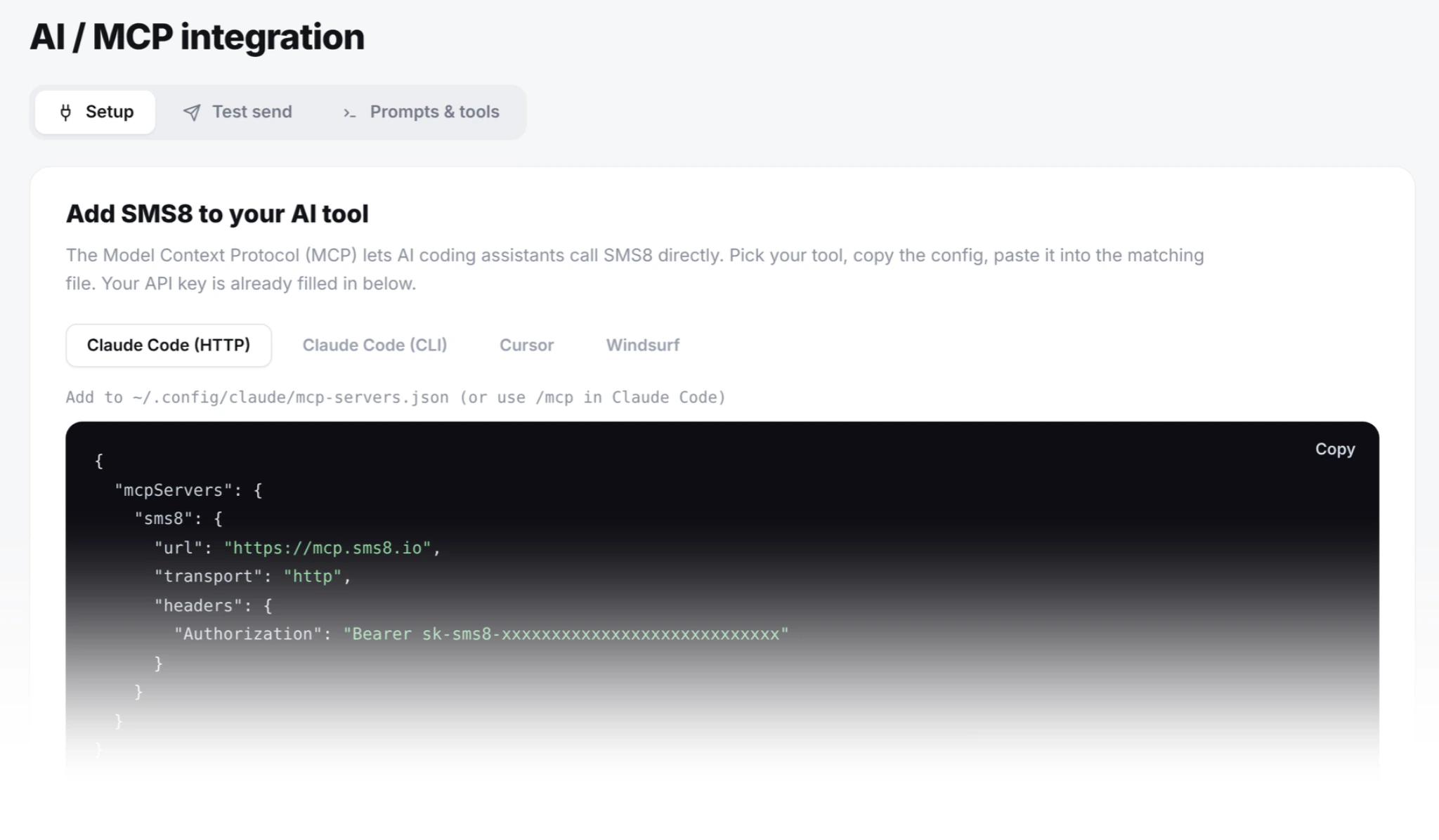
Open your Claude Code MCP config (a .mcp.json file at the root of your project; claude mcp add --transport http sms8 https://mcp.sms8.io writes the same entry for you). Add this block under mcpServers:
{
  "mcpServers": {
    "sms8": {
      "type": "http",
      "url": "https://mcp.sms8.io"
    }
  }
}
Restart Claude Code. Type /mcp in the chat to verify the SMS8 tools appear. If they do not, jump to the troubleshooting table at the bottom.
How do I install it in Cursor and Windsurf?
Cursor
Edit ~/.cursor/mcp.json:
{
  "mcpServers": {
    "sms8": {
      "url": "https://mcp.sms8.io"
    }
  }
}
Windsurf
Edit ~/.codeium/windsurf/mcp_config.json. Same JSON schema, different file.
Cline (VS Code extension)
Open the Cline settings panel, expand "MCP Servers", click "Edit JSON", paste the same block. Cline supports both HTTP and stdio transports.
The tool set is identical across all four. I tested them over three weeks last quarter and the latency profile was the same. The median round-trip for send_sms was 380 milliseconds on a US connection, 520 milliseconds on an EU connection.
What are the SMS8 MCP tools?
| Tool | Arguments | Use it when |
|---|---|---|
setup_sms8 | api_key | First call of any session. Stores the key for the session. |
send_sms | phone, message | Send a plain SMS. Up to 1,600 characters auto-segmented. |
send_otp | phone | Generate and send a 6-digit code (5-minute expiry by default). |
verify_otp | phone, code | Validate the code with constant-time compare and attempt counter. |
get_messages | limit, direction | Read inbox or sent log, newest first. |
list_devices | (none) | Check which paired phones are online right now. |
create_webhook | url | Forward inbound SMS to your endpoint. |
The server also has send_sms_list (one message to several numbers), wait_for_otp (waits for a code to arrive on your paired phone), get_balance and usage.
First call: prove it works
In Claude Code, type:
Use the sms8 MCP. First call setup_sms8 with my API key sk_live_xxxxx,
then send_sms to +15551234567 with the body "MCP test from Claude".
Claude will run the two tool calls in order. You will see a delivery confirmation in the chat, and the SMS will hit your phone within a second or two. If it does not, ask Claude to call list_devices and confirm at least one phone is showing online: true.
How do I send an OTP from Claude Code?
Ask Claude to call send_otp with the recipient number. The server generates a 6-digit code via random_int, stores it server-side with a 5-minute expiry by default (5 attempts, 60-second resend cooldown), and sends the SMS. Then ask the user for the code and call verify_otp. The compare is constant-time via PHP's hash_equals, so it is safe to expose end-to-end. The plaintext code never leaves the SMS8 backend.
// Pseudo-flow inside Claude Code
1. tool: send_otp { phone: "+15551234567" }
   -> { ok: true, expires_in: 300 }
2. user: "the code is 482917"
3. tool: verify_otp { phone: "+15551234567", code: "482917" }
   -> { verified: true }
For the full OTP spec including expiry, attempts, and cooldown, read our SMS OTP guide and the OTP API reference.
How do I build a "text me when the build fails" notifier?
Two patterns work. The cleaner one uses Claude Code in headless mode with the -p flag:
# In your CI's failure step (GitHub Actions, GitLab CI, etc.)
claude -p "Use sms8 MCP to send_sms to +15551234567 with body
  'Build $BUILD_ID failed on $BRANCH. Commit: $SHA. Logs: $URL'"
The dirtier (and lower-latency) pattern bypasses the agent and calls the REST API directly. Use this when you do not need natural-language formatting:
# GitHub Actions: .github/workflows/build.yml
- name: SMS on failure
  if: failure()
  run: |
    curl -X POST https://app.sms8.io/api/v1/messages \
      -H "X-Api-Key: ${{ secrets.SMS8_KEY }}" \
      -H "Content-Type: application/json" \
      -d '{"number":"+15551234567","message":"Build ${{ github.run_id }} failed on ${{ github.ref_name }}"}'
For most teams I recommend the headless-Claude approach. It is one line, the message reads like a human wrote it, and you can add follow-up logic ("if the failure is on main, also text the on-call rotation") without touching the YAML.
What does the request flow look like under the hood?
Three hops:
- Claude Code calls the MCP tool over HTTP. The MCP server at
mcp.sms8.iovalidates the schema and translates to a REST call. - The REST call hits
POST app.sms8.io/api/v1/messageswith the user's API key in theX-Api-Keyheader. - The dispatcher picks an online paired phone and pushes the job over the persistent WebSocket. The phone sends through Android's
SmsManager.
The MCP call itself returns quickly. How fast the text then lands depends on the phone picking up the job, the send pacing on that SIM and the recipient's network, so treat delivery as seconds, not milliseconds, and use the delivery webhook if you need confirmation.
How do I handle errors from the MCP server?
The server returns errors in the standard MCP tool_result.isError shape with a human-readable message. The most common failure modes:
| Error | Cause | Fix |
|---|---|---|
setup_sms8 required | You called send_sms before setup_sms8 in this session. | Call setup_sms8 first. Sessions reset when you restart the client. |
no_online_devices | All paired phones offline or app killed by Android. | list_devices to confirm. Unrestrict battery on the phone. |
rate_limited | You hit the per-API-key send rate (default 2 per second). | Slow down or upgrade the plan tier. |
invalid_phone | The "phone" field is not E.164. | Normalise with libphonenumber. Format like +15551234567. |
otp_expired | verify_otp called after the code expired (5 minutes by default). | Resend. |
otp_attempts_exhausted | 5 wrong codes submitted. | Resend, with a captcha if abuse is suspected. |
How do I read replies through MCP?
Two options.
- Pull. Ask Claude to call
get_messagesperiodically withdirection=inand alimit. Good for ad-hoc agentic workflows ("did the customer reply yet?"). - Push. Call
create_webhookonce with a URL. SMS8 will POST inbound messages to your endpoint with an HMAC-SHA256 signature. Your endpoint then writes to a queue Claude can read from. This is the right architecture for production agents.
For high-volume agentic systems you probably want webhooks. The webhook architecture post covers the trade-offs in depth.
Why did we ship this instead of a generic SDK?
I had three reasons. First, the agent ecosystem is moving toward standardised tool interfaces and away from per-vendor SDKs. Second, writing the same wrapper in every project is wasted work. Third, the MCP spec is small enough that we could implement the server in a long weekend (it is about 600 lines of PHP and JSON schema).
The fun part is that Claude can compose our tools with other MCP servers: SMS8 next to a database MCP and a Slack MCP in the same agent, coordinating across systems with no glue code.
Full troubleshooting reference
| Symptom | Cause | Fix |
|---|---|---|
| "sms8" not listed in /mcp | Config file syntax error. | Run jq . .mcp.json to validate JSON. |
| send_sms returns 401 | setup_sms8 was not called this session. | Call setup_sms8 first. |
| Message queued but never delivered | Android phone offline or battery-optimised. | Call list_devices, then unrestrict battery on the phone. |
| verify_otp returns invalid for a code I just typed | Whitespace or unicode digits in the input. | Trim and ASCII-normalise before passing. |
| MCP client crashes on /mcp | Old client version without HTTP transport. | Update to the latest Claude Code (or Cursor, etc.). |
| "connection refused" to mcp.sms8.io | Corporate proxy stripping the HTTP/2 upgrade. | Allow outbound HTTPS to mcp.sms8.io, or run the local stdio bridge with npx -y sms8-sdk mcp. |
Why choose SMS8 for Claude Code
SMS8 is the SMS server Claude Code can use in one command.
- Made for AI agents. Connect Claude Code with
claude mcp add --transport http sms8 https://mcp.sms8.io, or any MCP client through the hosted server ornpx -y sms8-sdk mcp. - Your own number. Texts leave from the SIM in your own Android phone, so customers see a number they know and can reply to.
- A flat price with unlimited messages. USD 29 a month for one phone or Mac, USD 89 for five and USD 229 for twenty, with unlimited SMS and MMS and no per-message fee. Yearly billing is half the price.
- A developer-friendly API.
POST https://app.sms8.io/api/v1/messageswith anX-Api-Keyheader, signed webhooks retried for up to 30 days, andnpm install sms8-sdkfor the SDK and thesms8CLI. - Setup in minutes. Install the app, pair the phone and copy your API key. The 3-day trial includes 30 messages and needs no card.
Start the 3-day trial with 30 messages and no card, or compare plans on the SMS8 pricing page.