
Part of the guide SMS8 MCP Server: Send SMS From Claude Code, Cursor and AI Agents
On this page
From "add MCP" to production SMS features
The editor you already use gets a new set of tools. Ask it to build the SMS flow, review the code, ship.
Pair a phone
Start a 3-day SMS8 trial (no card), install the SMS8 app on any Android with a SIM, scan the pairing QR. Grab your API key from Profile > API.
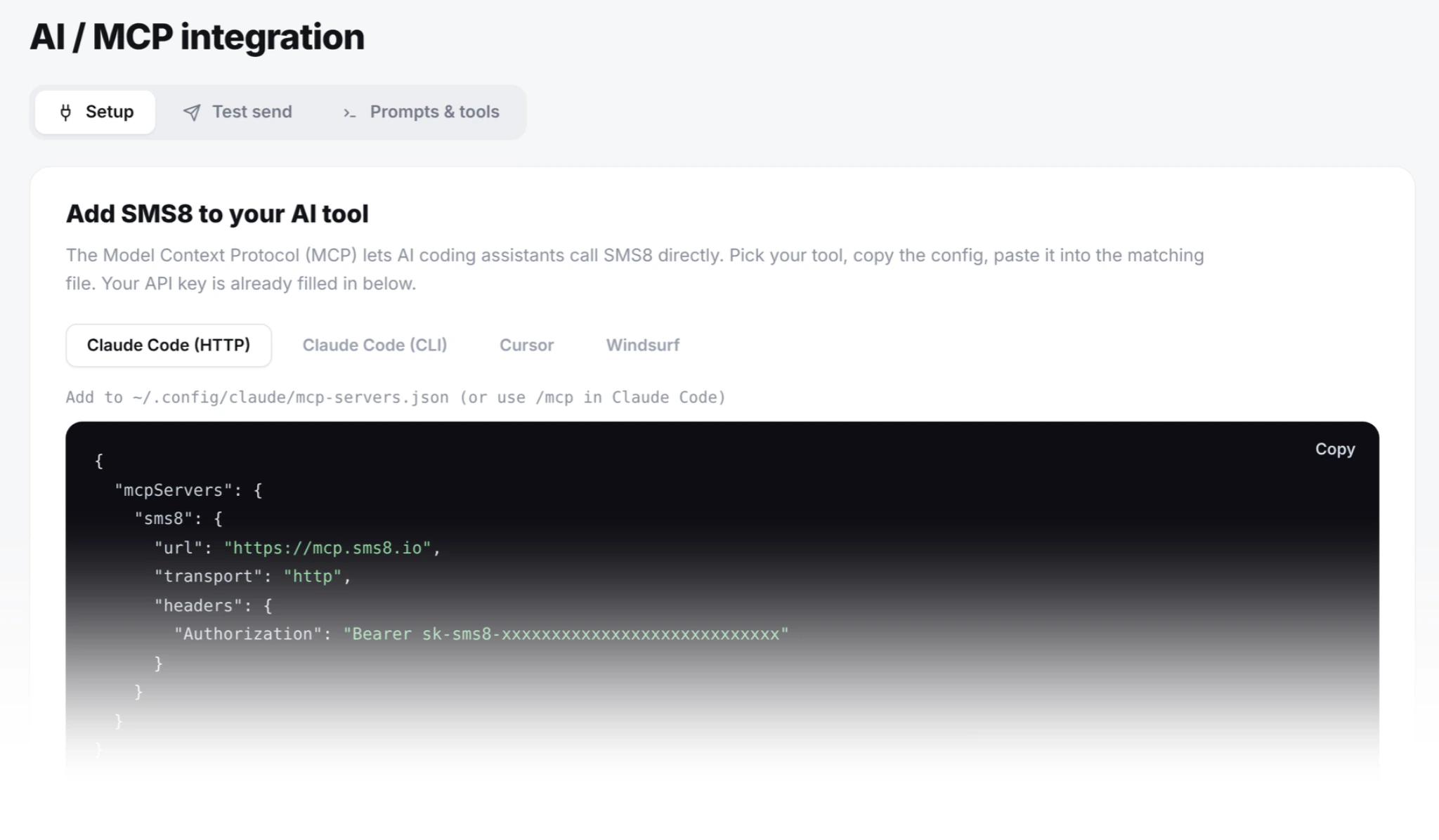
Add MCP to your editor
Paste the mcp.sms8.io URL and API key into Cursor Settings > MCP, Windsurf Cascade > MCP, or Zed extensions. Restart once.
Ask it to build
"Add SMS OTP sign-in to my app." The assistant writes the route, the component, the verify handler, and calls the SMS8 tools during development.
Who this is for
Developers who use Cursor, Windsurf, Zed or Cline to build product code, and who need SMS features (OTP, transactional confirmations, reminders, notifications) inside the app they are shipping. The MCP config below turns your editor into a place where SMS becomes a first-class tool the assistant can wire up correctly the first time. The five integration recipes at the end are production-shaped: none of them are toys. All of it runs on the SMS8 MCP server for AI agents; if you use Claude Code instead, follow the Claude Code SMS tutorial or the broader guide to sending SMS with Claude.
Editor configs, one per section
The seven SMS8 tools (send_sms, send_sms_list, send_otp, verify_otp, get_messages, list_devices, create_webhook) load identically into every MCP client. The config path differs by editor. Copy the block that matches yours.
Cursor
Cursor Settings > MCP > Add new global MCP server
{
  "mcpServers": {
    "sms8": {
      "url": "https://mcp.sms8.io/mcp",
      "transport": "http",
      "headers": {
        "Authorization": "Bearer sk_live_YOUR_KEY"
      }
    }
  }
}
Restart Cursor. Open a composer thread, type "list your tools", confirm send_sms appears. If it does not, the API key or the config path is the usual culprit.
Windsurf (Codeium Cascade)
Settings > Cascade > MCP Servers > Add server
{
  "sms8": {
    "url": "https://mcp.sms8.io/mcp",
    "transport": "http",
    "headers": {
      "Authorization": "Bearer sk_live_YOUR_KEY"
    }
  }
}
Windsurf reloads MCP servers on Cascade restart, not full editor restart. Trigger via the command palette: "Cascade: Restart MCP Servers".
Zed
Extensions > Model Context Protocol > Servers
{
  "context_servers": {
    "sms8": {
      "command": {
        "path": "npx",
        "args": ["-y", "sms8-sdk", "mcp"],
        "env": {
          "SMS8_API_KEY": "sk_live_YOUR_KEY"
        }
      }
    }
  }
}
Zed's MCP extension currently expects a stdio server, so we use the SMS8 stdio bridge from the sms8-sdk npm package. Node 18+ required.
Cline (VS Code)
Cline settings > MCP Servers > Edit config
{
  "mcpServers": {
    "sms8": {
      "url": "https://mcp.sms8.io/mcp",
      "transport": "http",
      "headers": {
        "Authorization": "Bearer sk_live_YOUR_KEY"
      }
    }
  }
}
Cline picks up MCP servers on the next task run. No editor restart needed.
Five app integrations worth shipping this week
Below are integration recipes the assistant can build for you in your own codebase. Each includes the stack it assumes, what the assistant writes, and where the SMS8 tools slot in. Ask your editor for the pattern by name; it has enough context from the MCP tool descriptions to produce production-shaped code.
1. SMS OTP sign-in for your web app
Next.js · Auth flow · 45 lines
The most common ask. A phone-number sign-in that texts a six-digit code, verifies it, and hands off to your session store. Ask Cursor: "Add SMS OTP sign-in to my Next.js app using SMS8. Route at /api/auth/otp/send calls SMS8's otp-send.php, /api/auth/otp/verify calls otp-verify.php, then creates a session." The send_otp and verify_otp MCP tools let the assistant test the same flow from the editor.
What the assistant writes: two API routes, a phone-input page, a six-digit code page. The code never enters your server or logs because SMS8 generates, stores and checks it. Total code lives under 45 lines including the input components.
// /api/auth/otp/send
export async function POST(req) {
  const { phone } = await req.json();
  const res = await fetch('https://app.sms8.io/ajax/otp-send.php', {
    method: 'POST',
    headers: { 'Authorization': `Bearer ${process.env.SMS8_API_KEY}` },
    body: new URLSearchParams({ phone })
  });
  const { otp_id } = await res.json();
  return Response.json({ otp_id });
}

// /api/auth/otp/verify
export async function POST(req) {
  const { phone, code } = await req.json();
  const res = await fetch('https://app.sms8.io/ajax/otp-verify.php', {
    method: 'POST',
    headers: { 'Authorization': `Bearer ${process.env.SMS8_API_KEY}` },
    body: new URLSearchParams({ phone, code })
  });
  const { verified } = await res.json();
  if (!verified) return Response.json({ error: 'invalid' }, { status: 401 });
  await createSession(phone);
  return Response.json({ ok: true });
}
2. Order-confirmation SMS on successful checkout
Stripe or Shopify · Webhook · 30 lines
A shipping text is read almost immediately; a confirmation email often waits in a promotions tab. The gap is worth closing. Ask Cursor: "Add a Stripe webhook that listens for checkout.session.completed, pulls the customer phone from the session metadata, and sends an order-confirmation SMS via SMS8's send_sms tool."
What the assistant writes: one webhook route, a signature-verification block, one send_sms call with a template that references {first_name}, {order_id}, and {tracking_link}. Ship it behind a feature flag and A/B test against email-only for two weeks.
3. Appointment reminder 24 hours before
Calendar app · Cron · 25 lines
One of the highest-value SMS integrations for services businesses, because a reminder the day before is the simplest fix for no-shows. Ask Cursor: "Add a daily cron at 10am that finds appointments scheduled for the next day, filters by consent, and sends a reminder SMS via SMS8's send_sms tool with the time, address, and cancel link."
What the assistant writes: a scheduled task (Vercel Cron, GitHub Actions, or your existing scheduler), a query for tomorrow's appointments, a send_sms call per row. Keep the copy under 160 characters so it stays one SMS segment. STOP handling is automatic on SMS8's side.
4. Delivery-status updates (in transit, out for delivery, delivered)
Shopify or ShipStation · Webhook · 30 lines
Three SMS across the delivery lifecycle cut "where is my order" support tickets by half. Ask Cursor: "Add three webhook handlers for Shopify's fulfillment/create, fulfillment/update, and delivery events. Each one calls SMS8's send_sms with a different template."
What the assistant writes: three routes with different message templates, all authenticated via Shopify's HMAC header, all deduped by fulfillment ID so a duplicate webhook does not trigger a duplicate SMS. The dedupe is the part junior developers miss and Cursor gets right if you mention it in the prompt.
5. Inbound support-reply triage into Slack or a CRM
Any backend · Webhook + polling · 60 lines
Customers text your business number. In 2026 the highest-leverage automation is not the reply itself; it is the routing. Ask Cursor: "When a new SMS arrives at my SMS8 inbox (via webhook from create_webhook), classify it into support, billing, or sales using a simple keyword rule, then post to the right Slack channel with the phone number and message body."
What the assistant writes: one webhook route that receives SMS8's inbound event, a simple classifier (keywords first, ML later if you want), a Slack Web API call. Optional: add the customer's history from your DB using their phone number as the join key so the responder sees context.
The MCP tools your assistant sees
Once the config lands, the assistant has these to work with. Names are the exact tool names it uses when it decides to call them.
| Tool | Use for |
|---|---|
send_sms | Single message to one recipient. Order confirms, reminders, transactional notifications. |
send_sms_list | Batch to a list. Automatically paced at one message every 10 to 30 seconds per SIM. |
send_otp | Six-digit code generation and SMS send. Plaintext code never leaves SMS8. |
verify_otp | Constant-time verify of a user-supplied code against the stored hash. |
get_messages | Read inbound SMS from the paired phone. For support triage or agent-driven replies. |
list_devices | Paired phones with battery, connectivity, and current SIM state. Use as a health check before a broadcast. |
create_webhook | Register a callback URL so inbound SMS pushes into your own system. |
Prompt-writing patterns that produce good SMS code
Three patterns that work across all four editors, based on watching real developer sessions.
Name the exact tool. "Use SMS8's send_otp tool" beats "add OTP" because it forces the assistant to check the tool schema before writing code. It gets the parameter names right on the first pass.
Constrain the copy. "Keep the SMS under 160 characters so it stays one segment" prevents the assistant from writing 400-character marketing prose that costs three segments to send.
Name the failure mode you want handled. "Dedupe by fulfillment ID so a duplicate webhook does not send a duplicate SMS" produces the dedupe layer. Without the ask, most assistants skip it.
Cost and rate expectations
SMS8 is USD 29 per month for one paired phone (USD 89 for five, USD 229 for twenty; see pricing) with no per-message fee. Campaign sends go out at a safe one message every 10 to 30 seconds per SIM. One-to-one transactional sends are enough for any single-product OTP flow, most order-confirmation volumes below 30k orders per month, and any small-team appointment reminder use case.
For higher-volume ecommerce SMS marketing (broadcasts to lists over 50,000), most teams pair a second phone. Each extra SIM or phone sends in parallel, and up to twenty paired phones on one account covers all but the very largest use cases.
Why choose SMS8 for your editor
SMS8 is one MCP config away in every editor.
- Made for AI agents. Connect Claude Code with
claude mcp add --transport http sms8 https://mcp.sms8.io, or any MCP client through the hosted server ornpx -y sms8-sdk mcp. - Your own number. Texts leave from the SIM in your own Android phone, so customers see a number they know and can reply to.
- A flat price with unlimited messages. USD 29 a month for one phone or Mac, USD 89 for five and USD 229 for twenty, with unlimited SMS and MMS and no per-message fee. Yearly billing is half the price.
- A developer-friendly API.
POST https://app.sms8.io/api/v1/messageswith anX-Api-Keyheader, signed webhooks retried for up to 30 days, andnpm install sms8-sdkfor the SDK and thesms8CLI. - Setup in minutes. Install the app, pair the phone and copy your API key. The 3-day trial includes 30 messages and needs no card.
Start the 3-day trial with 30 messages and no card, or compare plans on the SMS8 pricing page.