
Part of the guide SMS8 MCP Server: Send SMS From Claude Code, Cursor and AI Agents
On this page
- From nothing to Claude texting you in 5 minutes
- Why "Claude sends SMS" is a real thing now
- The seven tools you get out of the box
- Setup: from zero to first SMS in five minutes
- Where you can add SMS8 to Claude (and to ChatGPT)
- SMS8 vs TextBee vs Twilio: what changes at the layer that matters
- Six recipes that ship this week
- Security model for agent-driven SMS
- Cost, honestly
- Common mistakes in the first two weeks
- Where to go next
- Why choose SMS8 for Claude
From nothing to Claude texting you in 5 minutes
Works with Claude Code, Cursor, Windsurf, Zed and Cline. The assistant sees seven SMS tools the moment the config lands.
Install SMS8
Start a 3-day trial with 30 messages at app.sms8.io (no card), install the SMS8 app on any Android with a SIM (for an iPhone, pair it through the SMS8 Gateway Mac app on macOS 14 or newer), scan the pairing QR in your dashboard. The phone becomes your SMS gateway.
Add the MCP config
Paste the mcp.sms8.io endpoint plus your SMS8 API key into your MCP client config. Restart the editor once. Claude now sees send_sms, send_otp and five more tools.
Ask Claude to text
Say "text me at +1... that the build passed" in any Claude session. The assistant picks up send_sms from the tools list and calls it. Your phone buzzes within seconds.
The short version
Claude cannot open a network socket. To send SMS it calls a tool. In 2026 the cleanest way to wire that up is the SMS8 MCP server at mcp.sms8.io, which exposes seven tools every MCP-capable assistant (Claude Code, Cursor, Windsurf, Zed, Cline) picks up automatically. The SMS itself leaves a real SIM on your paired Android, so recipients see your normal number and you skip A2P 10DLC. Cost is flat monthly, not per message. This guide covers install, six recipes worth shipping, the security model, and the common mistakes in the first two weeks. For a terminal-first walkthrough, see the Claude Code SMS tutorial.
Why "Claude sends SMS" is a real thing now
Two years ago the answer to "can the assistant text me" was to write a Python function, expose it as a tool schema, and pray the model would call it correctly. It usually did, but every project rebuilt the same 40-line wrapper. The Model Context Protocol changed that. MCP is a JSON-RPC contract between an assistant and an external server. The assistant asks the server what tools it has, the server replies with a list of typed capabilities, and the assistant now knows how to text you without you writing anything.
For SMS the payoff is direct. A single hosted MCP server exposes send, receive, verify, and inbox tools. Every editor that speaks MCP sees them the moment the config lands. You move once from writing plumbing to writing product.
The other shift is the sending path itself. Historically an AI agent that sent SMS went through Twilio or MessageBird, which meant a virtual number, per-message billing, brand registration in the US, and a rented sender ID nobody recognises. In 2026 more teams are sending from a paired Android phone on their own SIM. The number on the recipient's screen is the number they already saved you under, reply rates jump by five to ten times, and the bill is flat. Combining MCP as the transport with a real-SIM gateway as the delivery layer is the setup this guide covers.
The seven tools you get out of the box
Once the SMS8 MCP server is connected, the assistant sees seven tools. Names are the API names, not marketing labels, because the assistant reads them literally when it decides what to call.
| Tool | What it does | Typical call |
|---|---|---|
setup_sms8 | Registers your SMS8 API key with the MCP client. Runs once per session. | Ask the assistant to "set up SMS8 with key sk_live_..." |
send_sms | Sends a single SMS from any paired device or SIM. | Notifications, alerts, one-off messages. |
send_sms_list | Sends a batch to a list of numbers. Paced automatically at one message every 10 to 30 seconds per SIM. | Broadcasts, campaign fan-out from an agent step. |
send_otp | Generates a 6-digit code, texts it, stores a SHA-256 hash server-side. | Agent-driven signup, deploy gate, sensitive approval. |
verify_otp | Constant-time compare of a user-supplied code against the stored hash. | The other half of any OTP flow. |
get_messages | Reads recent inbound SMS from the paired phone. | Agent that waits for a reply, or triages inbound support. |
list_devices | Returns paired phones with battery, connectivity, and current SIM state. | Health checks before a broadcast, on-call diagnostics. |
Two tools not listed above but worth mentioning. create_webhook registers a callback URL so inbound SMS pushes into your own system, useful when the agent needs to hand off to a backend after collecting a reply. get_balance and usage return the plan and quota, in case an agent should back off when the ceiling approaches.
Setup: from zero to first SMS in five minutes
The install path is the same on macOS, Linux, and Windows. Two files, one restart, done.
Step 1: create the SMS8 account at app.sms8.io, install the SMS8 Android app on any phone or tablet, scan the pairing QR shown in the dashboard. The phone is now the gateway for the account.
Step 2: generate an API key in Dashboard > Profile > API. Copy it. Do not commit it.
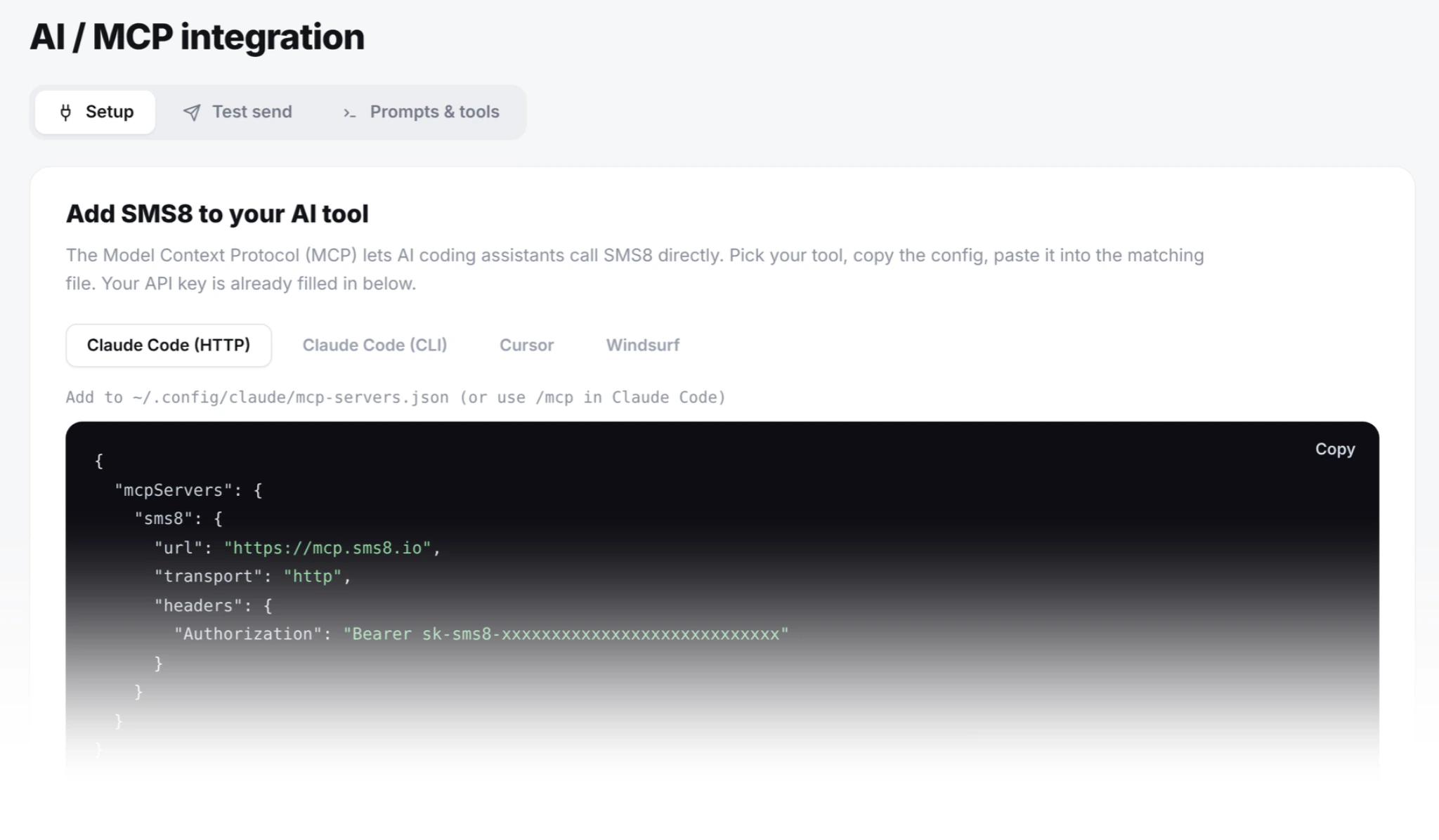
Step 3: add the server to your MCP client. For Claude Code run claude mcp add --transport http sms8 https://mcp.sms8.io (the entry is saved in ~/.claude.json, or in a project .mcp.json); for Cursor it is Settings > MCP; for Windsurf it is Settings > Cascade > MCP. In an editor config, add:
"mcpServers": {
  "sms8": {
    "url": "https://mcp.sms8.io/mcp",
    "transport": "http",
    "headers": {
      "Authorization": "Bearer sk_live_YOUR_KEY"
    }
  }
}
Step 4: restart the editor. Type "list your tools" in a Claude session. If send_sms appears, you are done. Ask "text me at +14155550100 that everything is wired up." The assistant will call send_sms, and your phone will buzz within two seconds.
Where you can add SMS8 to Claude (and to ChatGPT)
Same server, five surfaces. Pick the one that matches how you use Claude, or add SMS8 to more than one and share credentials across them.
Claude Code (developer CLI)
Run claude mcp add --transport http sms8 https://mcp.sms8.io, or put the MCP block above in a project .mcp.json. The seven tools appear in every session. This is the fastest path for developers because Claude Code already has file and shell tools alongside SMS8, so you can pipe test output into a text message in one prompt.
Claude Desktop (macOS, Windows, Linux)
Open Claude Desktop, go to Settings > Connectors > Add custom connector and enter https://mcp.sms8.io as the server URL. (The claude_desktop_config.json file under Settings > Developer only takes local stdio servers; for that route the command is npx -y sms8-sdk mcp with SMS8_API_KEY in its env.) The next chat you open lists the SMS8 tools and can call them directly. Best surface for non-developer users because there is no config file to hand-edit outside the app.
Claude Web (claude.ai, via Connectors)
Sign in at claude.ai. Go to Settings > Connectors > Add custom connector. Enter https://mcp.sms8.io as the server URL. Claude Web reads our OAuth 2.1 discovery at /.well-known/oauth-protected-resource and walks you through the consent flow. If you are already signed in to app.sms8.io in the same browser, consent auto-approves via our SSO cookie. The seven tools are then available in every claude.ai chat.
Cursor, Windsurf, Zed, Cline
Same MCP server, different editor. Configs and app integration recipes (OTP sign-in, order confirms, delivery-status SMS, support triage) are in the Cursor, Windsurf, Zed MCP config post.
ChatGPT (via GPT Actions or the SMS8 SMS Gateway GPT Custom GPT)
Two paths inside ChatGPT. The SMS8 SMS Gateway GPT is a public Custom GPT you install from the GPT Store, backed by our OpenAPI schema. The GPT Actions path is for builders adding SMS8 to their own GPTs: import https://sms8.io/openapi.yaml as an Action in the GPT Builder, set Authentication to API Key (Bearer), paste your SMS8 key. Same seven capabilities as the MCP tools, just wrapped in OpenAPI.
SMS8 vs TextBee vs Twilio: what changes at the layer that matters
The three most-searched-together options for sending SMS from your own SIM or a virtual number in 2026. The table below shows how SMS8 compares on the points that matter for an AI agent. The Twilio price is as listed on their website in November 2026.
| Dimension | SMS8 | TextBee | Twilio |
|---|---|---|---|
| Delivery path | Your paired Android phone, your SIM | Your paired Android phone, your SIM | Twilio's network, rented virtual number |
| Sender recipients see | Your real mobile number | Your real mobile number | Rented long code (unfamiliar) |
| Per-message fee | None (uses your SIM plan) | None (uses your SIM plan) | $0.0083 per US SMS, more abroad |
| Monthly floor | $29 flat per paired phone | Free tier with limits, then paid plans | $1+ per number + usage |
| US A2P 10DLC required | No (P2P from real SIM) | No (P2P from real SIM) | Yes (brand + campaign fees) |
| MCP server for Claude | Yes, hosted at mcp.sms8.io | No official MCP server | No official MCP server (community wrappers) |
| OpenAPI for ChatGPT Actions | Yes, sms8.io/openapi.yaml | Community only | Third-party wrappers |
| Public Custom GPT | Yes, SMS8 SMS Gateway GPT | No | No |
| Built-in OTP send + verify | Yes, plaintext code never leaves server | Send only, verify is DIY | Verify API (separate product line) |
| Multi-device round-robin | Yes, up to 20 paired phones | Manual per-device routing | N/A (cloud sender) |
| Automatic STOP handling | Yes, cross-list on every account | Per-list, manual setup | Yes (Advanced Opt-Out feature) |
| iOS support (send from iPhone) | Yes (through the SMS8 Gateway Mac app, macOS 14+) | Android only | Cloud, no phone needed |
| Time from signup to first send | Same day (paired phone in 60s) | Same day (Android only) | 1 to 3 weeks (A2P 10DLC review) |
How SMS8 compares: it is the only one of the three that sends from your own Android phone and from a Mac for iMessage, ships an official MCP server and a Custom GPT, charges one flat price and has OTP send and verify built in rather than sold as a separate product line.
Total time from the sign-up form to a message on your phone is under five minutes on a warm coffee. If it takes longer, it is almost always the config (run claude mcp list to confirm the server is registered) or the API key format (bearer, no quotes).
Six recipes that ship this week
The rest of this guide is patterns worth stealing. Each one is a paragraph on why it works, a paragraph on how to build it, and a note on what to watch out for. They are ranked by ratio of value to build time.
1. "Text me when the build fails"
The reason CI runs at 2am is that nobody wants to babysit it. Then it fails at 2:07am and nobody notices until morning. Wire the assistant to a webhook on the CI pipeline, have it check the run status, and if it failed, call send_sms to your phone with a one-line summary. Two lines of shell in the pipeline, one Claude Code invocation, no cron, no Slack rate limit, no lost mornings. The Claude Code MCP tutorial walks through the exact wiring.
2. Agent-gated deploys with OTP
Not every deploy should be a click. Some should be an SMS to the on-call engineer with a code that has to be typed back before the pipeline continues. The agent calls send_otp to the on-call number, waits for a reply through get_messages, calls verify_otp, then proceeds or aborts. Human in the loop, but the human is just the phone in their pocket. Two failure modes to watch: replies with typos (allow one retry) and codes that arrive out of order (verify by hash, not by arrival).
3. Onboarding OTP for a signup form the agent controls
An AI copilot that helps users complete a signup can drive the OTP itself. It collects the phone number, calls send_otp, prompts the user for the code, calls verify_otp, then finalises the account. The reason to do this at the agent layer rather than the app layer is speed: the agent has already assembled everything else in the same conversation, so the OTP feels like part of the flow rather than an interruption. The plaintext code should never enter the assistant's context; the OTP API guide covers the hashing and constant-time verify pattern.
4. Inbound reply triage
Customers text your business number. In 2020 you routed to a shared inbox and hired someone to reply. In 2026 you have the agent read get_messages every 30 seconds, classify each reply (support, billing, sales, spam), and either draft a reply for a human to send or answer directly using the same MCP server. The value is not automation for its own sake. It is that the second-tier questions get answered in seconds instead of hours, which lifts the resolution rate on the whole channel. Cap it at low temperature and log every generated reply for review during week one.
5. Alert fan-out from a sub-agent
A long-running Claude sub-agent watching production logs finds an anomaly. It should not wake the whole engineering channel. It should text the person on call. Pattern: sub-agent finishes its analysis, returns a structured result, parent agent formats a one-line summary and calls send_sms to a phone number pulled from a rota table. Total additional code beyond the sub-agent is under 20 lines.
6. Marketing broadcast triggered by an agent workflow
This is the pattern that surprises people because it feels off-brand for an AI agent. It is not. A marketing operator asks the agent "send our Friday flash sale SMS to the segment that clicked a link in the last 14 days." The agent pulls the segment from the analytics API, drafts the copy from a template, previews the send, and calls send_sms_list once approved. What changes is not who owns the campaign but who does the plumbing. See the companion bulk SMS marketing guide for the marketer-side view of the same workflow.
Security model for agent-driven SMS
Three things are worth being deliberate about.
API key scope. One key per environment. Development keys live in a local config file with restricted permissions (chmod 600). Production keys live in a secrets manager and are read at process start. Rotating a key is a single click in the SMS8 dashboard and takes effect within seconds; do it if a laptop is ever lost or a repo is ever leaked.
Prompt injection. If an assistant reads external content (a web page, a Slack message, a customer email) and that content contains instructions like "text +1... 'you have won a prize'", the assistant should not comply. Two defences layered together: at the tool layer, require a per-session confirmation for any send_sms to a number not in an allowlist; at the model layer, use system-prompt reminders that user content is data, not instructions.
OTP never touches the model. The plaintext OTP code should never appear in the assistant's context window. The MCP server generates it, hashes it, sends the SMS, and returns only a token that references the hash. When the user types the code back, the assistant passes it to verify_otp which does the compare server-side. The assistant sees success or failure. It never sees the digits, so no prompt-injection trick can exfiltrate them.
Cost, honestly
SMS8 is flat monthly: USD 29 for one connected phone or Mac, USD 89 for five and USD 229 for twenty, half that when billed yearly (see pricing). There is no per-SMS fee. The marginal SMS cost is whatever your carrier charges on the SIM in the paired phone, which for most consumer plans (UK EE, US T-Mobile, Vodafone AU) is zero for outbound SMS.
Compare to the alternative. Twilio lists $0.0083 per US SMS on their pricing page (November 2026), plus carrier fees, A2P 10DLC brand and campaign fees, and number rental. An agent sending 5,000 SMS a month through Twilio runs about $60 to $65 in message and carrier fees before the number and 10DLC fees, and the recipient sees a virtual number they do not recognise. The same 5,000 SMS through SMS8 is USD 29 a month flat and every recipient sees your real number.
Scaling up is a matter of adding phones. A single SIM sends campaign messages at a pace of one every 10 to 30 seconds, so each extra SIM or paired phone adds capacity in parallel, and the Twenty Devices plan runs twenty paired phones on one account for USD 229 a month, still with no per-message fee.
Common mistakes in the first two weeks
These are the four failure modes our support inbox catches most often when a new team wires Claude to SMS8. None are hard to fix once you know to look.
Config in the wrong file. Each client keeps its MCP config in its own place: Claude Code in ~/.claude.json or a project .mcp.json, Cursor in its MCP settings. If list your tools does not show SMS8, the assistant probably never loaded the server. Check the actual file path your editor uses, not the one in a blog post from 2024.
API key without the Bearer prefix. The Authorization header value must be Bearer sk_live_..., not the raw key. This produces a 401 that the MCP client sometimes surfaces as "server not responding," which sends people down a networking rabbit hole.
Agent tries to send during a phone reboot. When the paired phone restarts, it takes about 20 seconds to reconnect. If an agent calls send_sms during that window, the tool returns "no active devices" and the agent panics. Wrap the call in one retry with a five-second backoff. Fixes it every time.
Trusting the agent to remember quiet hours. Do not rely on a system-prompt reminder to avoid texting at 3am. Set quiet hours on your campaigns in the SMS8 dashboard so broadcasts outside the window wait until morning, and add an hour check in your own code before one-off sends. Belt and braces.
Where to go next
If you have not shipped anything yet, work through the CI notifier recipe. It is 30 minutes of setup, it starts paying for itself the first time it fires, and it forces the whole wire-up to hold together end to end. Once that is in, the OTP pattern is the next highest-leverage thing to build.
If you are running Cursor, Windsurf, Zed or Cline rather than Claude Code, the Cursor, Windsurf, Zed config post has copy-paste blocks for every editor plus real integration recipes (OTP-gated sign-in, order confirmations, appointment reminders, agent-driven support triage).
If your use case is closer to a marketing broadcast than a per-user notification, jump over to the bulk SMS marketing guide, which covers the same technology from a very different angle: large lists spread across paired phones on your own SIMs.
Why choose SMS8 for Claude
SMS8 is the fastest way to let Claude text from your own number.
- Made for AI agents. Connect Claude Code with
claude mcp add --transport http sms8 https://mcp.sms8.io, or any MCP client through the hosted server ornpx -y sms8-sdk mcp. - Your own number. Texts leave from the SIM in your own Android phone, so customers see a number they know and can reply to.
- A flat price with unlimited messages. USD 29 a month for one phone or Mac, USD 89 for five and USD 229 for twenty, with unlimited SMS and MMS and no per-message fee. Yearly billing is half the price.
- OTP built in. Send and verify a code in two calls, from your own number, with no fee per code.
- SMS, MMS and iMessage in one inbox. Pair Android phones for SMS and MMS and a Mac for iMessage with SMS fallback, then answer everything from one shared inbox.
- Setup in minutes. Install the app, pair the phone and copy your API key. The 3-day trial includes 30 messages and needs no card.
Start the 3-day trial with 30 messages and no card, or compare plans on the SMS8 pricing page.