
Part of the guide SMS API Documentation: Android SMS Gateway, OTP and Webhooks
On this page
- Key takeaways
- Why do SaaS teams struggle with SMS?
- What does a SaaS product actually send by SMS?
- How does the SMS8 API work for a SaaS backend?
- How do you send notifications without double texts?
- How do you receive replies in your app?
- How does a SaaS scale SMS on SMS8?
- How much does SMS cost a SaaS on SMS8?
- What should you build first?
- Why choose SMS8
- Add SMS to your product this week
Key takeaways
- A SaaS product usually needs three kinds of texts: notifications (alerts, reminders, status changes), one-time codes for login and sign-up, and two-way conversations where users reply.
- SMS8 covers all three with one REST call,
POST https://app.sms8.io/api/v1/messages, one API key in theX-Api-Keyheader, and signed webhooks for replies and delivery reports. - Texts leave the SIM in an Android phone you own, so there is no per-message fee from SMS8 and no A2P 10DLC filing.
- Plans are flat: USD 29, 89 or 229 a month for 1, 5 or 20 connected phones or Macs, with unlimited SMS and MMS. Yearly billing costs half.
- You can ship a working integration in an afternoon and test it on the 3-day trial with 30 messages, no card needed.
The best SMS API for a SaaS product is one whose cost does not grow every time you sign a new customer. With SMS8, your backend posts a number and a message to one endpoint, and the text goes out from the SIM in an Android phone you paired with your account. Replies and delivery reports come back to your server through signed webhooks. You pay one flat monthly price for the phones you connect, and the messages are unlimited. This guide covers what a SaaS needs from texting, how to wire it up with real code, how to scale it, and what it costs. For the full endpoint reference, see the SMS8 API documentation.
Why do SaaS teams struggle with SMS?
Adding SMS looks like a one-day task. In practice, most SaaS teams run into the same four problems once the feature is live.
- The bill scales with your success. On a per-message API, every new customer adds reminders, alerts and login codes, and every one of them is billed. A product with healthy growth sees its SMS line climb month after month, and it often grows faster than revenue because active users trigger more texts.
- Registration before the first send. Business texting from rented US numbers usually means filing an A2P 10DLC brand and campaign first, then waiting for vetting. A launch date can slip while the campaign sits in review. Our guide on what to do when a 10DLC campaign is rejected covers that wait in detail.
- Pricing you cannot put in a plan. If your own SaaS charges a flat monthly fee but your SMS provider charges per text, one heavy customer can eat the margin on their account. You end up adding SMS credits, caps or overage fees to your own pricing just to protect yourself.
- Replies that go nowhere. Many setups send from a number nobody watches. Users reply "yes", "can we move it to 3pm?" or "STOP", and the answer disappears unless you build a receiver, a thread view and an opt-out list.
Each of these is a cost in money or engineering time. A flat plan that sends from your own SIMs and pushes replies to your code removes most of them at once.
What does a SaaS product actually send by SMS?
Before you choose an API, list the messages your product needs. For most SaaS products they fall into three groups.
Notifications
Short, expected texts triggered by an event in your app: an appointment reminder, a payment failed, a job finished, a ticket was answered, a delivery is on its way, a threshold was crossed. These are the bulk of SaaS traffic. They must arrive quickly and they must not cost so much that you hesitate to send the second reminder.
One-time codes
Login codes, sign-up checks, password resets and confirmations for sensitive actions. These must jump ahead of anything else in the queue. SMS8 has a dedicated OTP flow that sends a code and checks what the user typed, with a limit per phone number per day to protect recipients. See the SMS OTP verification API for how it works, and the glossary entry for OTP if you need the basics.
Two-way conversations
Confirm-or-reschedule flows, support threads, lead follow-up and surveys. Here the reply matters as much as the send. You need every reply on your server, linked to the user, and you want your team to be able to answer by hand when a bot cannot.
How does the SMS8 API work for a SaaS backend?
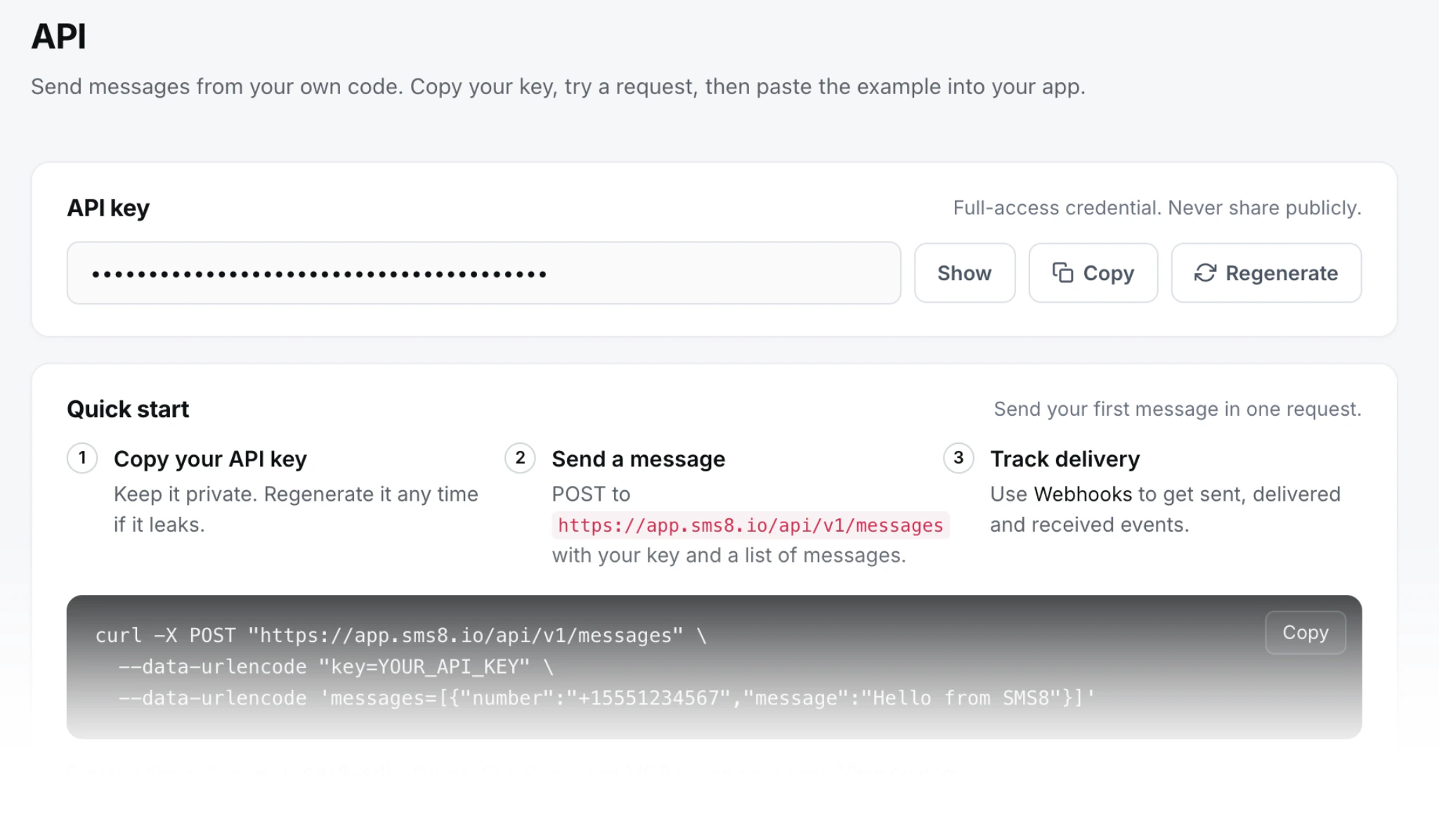
Every request goes to app.sms8.io with your key in the X-Api-Key header. You send a normal form post and get JSON back with a success flag, a data object and an error object. Behind the API, the message is handed to an Android phone you paired, and that phone sends it from its SIM. The status then moves through queued, sending, sent, delivered or failed.
A first send from Python takes a dozen lines:
import os
import requests
API = "https://app.sms8.io/api/v1"
HEADERS = {"X-Api-Key": os.environ["SMS8_API_KEY"]}
r = requests.post(f"{API}/messages", headers=HEADERS, data={
    "number": "+14155550100",
    "message": "Your report is ready. Open the dashboard to view it.",
}, timeout=30)
body = r.json()
if body.get("success"):
    print("queued as", body["data"]["messages"][0]["ID"])
else:
    print("refused:", body["error"]["code"], body["error"]["message"])
In Node.js, the sms8-sdk package from npm does the same with one call:
import { Sms8 } from 'sms8-sdk';
const sms8 = new Sms8({ apiKey: process.env.SMS8_API_KEY });
const res = await sms8.sendSMS({
  phone: '+14155550100',
  message: 'Your report is ready. Open the dashboard to view it.',
});
if (res.success) console.log('queued as', res.messageId);
else console.error('refused:', res.error);
Keep the key on your server, in an environment variable or your secrets manager, and never in a browser bundle. Call SMS8 from an API route, a background worker or a queue consumer. The full language guides are on the Python SMS API page and the Node.js SMS API page.
How do you send notifications without double texts?
SaaS notifications are triggered by events, and events get retried. A worker times out, a job runs twice, a deploy restarts a queue. Without care, a user gets the same reminder three times. Two fields help:
idempotencyKey: pass a stable key such as the order ID plus the message type. A retry with the same key never becomes a second text. SMS8 also returns the first answer for an identical request repeated within five minutes.prioritize=1: marks the message to jump ahead of others waiting on that phone. Use it for login codes and urgent alerts so they never wait behind a batch.
Retry only on timeouts and server errors. A 401 means a bad key and a 400 means bad fields, so retrying will not help. Some refusals, such as no credits left, come back inside a normal response, which is why your code should always read the success flag. If a phone later reports a message as failed, for example because it had no signal, put the original back in the queue with POST /api/v1/messages/resend and its id instead of sending a new copy.
To send later, add schedule with a Unix timestamp. A reminder for tomorrow's 9am meeting can be queued the moment the meeting is booked.
How do you receive replies in your app?
Register an HTTPS URL on the Webhooks page of your dashboard and subscribe it to the events you need: received, sent, delivered, failed, USSD reply and phone paired. Each webhook has its own signing secret, separate from your API key. Every request carries an X-Signature header: sha256= followed by the hex HMAC-SHA256 of the raw body, keyed with that secret.
A received message arrives with event, timestamp, userID and a data list where each item has ID, number, message, deviceID and simSlot. A short Flask receiver looks like this:
import hashlib
import hmac
import os
from flask import Flask, abort, request
app = Flask(__name__)
SECRET = os.environ["SMS8_WEBHOOK_SECRET"].encode()
@app.post("/sms8/webhook")
def sms8_webhook():
    raw = request.get_data()
    expected = "sha256=" + hmac.new(SECRET, raw, hashlib.sha256).hexdigest()
    if not hmac.compare_digest(expected, request.headers.get("X-Signature", "")):
        abort(401)
    event = request.get_json()
    for m in event.get("data", []):
        save_reply(m["ID"], m["number"], m["message"])   # your code: dedupe on ID
    return "", 200
Answer with a 2xx within 10 seconds and do slow work afterwards, like matching the number to a user, classifying the reply or updating a booking. If your server is down, SMS8 retries on a schedule that grows from a few minutes up to 30 days, and every attempt shows in the deliveries log. Store the message ID with a unique index so a retried event is never processed twice. More on the webhook pattern and when polling is enough in webhook vs polling for incoming SMS.
Replies also land in the SMS8 shared inbox, threaded by contact. When a user writes something your code cannot handle, a person on your team can answer from a browser with their own login. Team seats come with the plan: 1 on One Device, 10 on Five Devices and 40 on Twenty Devices.
How does a SaaS scale SMS on SMS8?
The API has no artificial rate limit. Real throughput depends on your SIMs, because each SIM should send at a natural pace so the carrier does not treat it as spam. Bulk sends go out at about one message every 10 to 30 seconds per SIM. Single transactional sends, like a code or an alert, do not wait for a campaign to finish, and you can mark them as priority.
To send more, add SIMs rather than pushing one number harder:
- Use a dual-SIM phone. Two SIMs in one handset double what that phone can carry. Pick the slot with
simSlot, where 0 is SIM 1 and 1 is SIM 2. - Pair more phones. Set
option=1to rotate across every phone you paired, oroption=2to rotate across every SIM on every phone, including both slots of a dual-SIM phone. - Separate traffic by phone. Name a device ID for login codes and another for reminders, so a big reminder batch never slows down a code.
- Add a Mac for iMessage. A Mac running the SMS8 Gateway app sends iMessage to Apple users from the same API, with SMS fallback for everyone else.
Adding phones means moving up a plan, and every plan is still a flat price. You can check your phones and their status at any time with GET /api/v1/devices, which lists battery, signal, SIMs and last seen time, so your monitoring can alert you before a phone goes offline.
How much does SMS cost a SaaS on SMS8?
SMS8 pricing is flat. You choose how many phones or Macs you connect, and every plan has the same features:
| Plan | Monthly | Billed yearly (per month) | Connected phones or Macs | Team seats |
|---|---|---|---|---|
| One Device | USD 29 | USD 14.50 | 1 | 1 |
| Five Devices | USD 89 | USD 44.50 | 5 | 10 |
| Twenty Devices | USD 229 | USD 114.50 | 20 | 40 |
Every plan includes unlimited SMS and MMS, the API, webhooks, the MCP server and every integration. There is no number rental from SMS8, no A2P registration fee and no carrier pass-through charge. The only other cost is the mobile plan on your SIMs, and many plans include unlimited texting under a fair use policy, so check what yours allows for business sending.
For a SaaS this changes the maths. Your SMS cost is the same whether your customers trigger 500 texts this month or 50,000, so you can include texting in every plan of your own product without credits or overage fees. For a side by side on how metered APIs bill, read our guide to SMS API pricing in 2026, and see why many teams stop paying per SMS once they grow.
What should you build first?
A practical order for a SaaS team adding SMS:
- Pair one phone and send a test. Sign up, install the SMS8 app on an Android 7 or newer phone, scan the code and copy your API key.
- Ship one notification. Pick the event your users care about most, such as an appointment reminder or a failed payment, and send it with an
idempotencyKey. - Add the webhook. Receive replies, verify the signature, store them against the user, and honour STOP.
- Add login codes. Use the OTP flow with priority so codes never wait.
- Scale out. Add a dual-SIM phone or more phones and turn on rotation when volume grows.
Remember the basics of business texting: only text users who agreed to hear from you, say who you are, and honour opt-outs right away.
Why choose SMS8
- A flat price with unlimited messages. USD 29 a month for one phone or Mac, with unlimited SMS and MMS and no fee per message from SMS8. Your SMS cost stays fixed as your user base grows.
- No A2P 10DLC wait. Texts go person to person from your own SIM, so there is no brand or campaign registration between you and launch.
- One API for every job. Send SMS and MMS, run OTP codes, read messages, resend failures and list devices, all with one key. Import the OpenAPI file into Postman or your code generator.
- Replies you can trust. Signed webhooks for received, sent, delivered and failed events, retried for up to 30 days, plus a shared inbox for your team.
- SMS, MMS and iMessage together. Android phones for SMS and MMS, a Mac for iMessage, all behind the same send request.
- Set up in minutes, try before you pay. Pair a phone, copy the key, send. The 3-day trial has 30 messages and needs no card.
Add SMS to your product this week
Texting should be a feature you put in every plan of your SaaS, not a meter you watch. With SMS8 you send notifications, codes and replies through one API, from phones you own, on one flat price. Start the 3-day trial, pair a phone and send your first API call today, then pick the plan on the SMS8 pricing page that matches how many phones you want to connect.