
Part of the guide SMS API Documentation: Android SMS Gateway, OTP and Webhooks
On this page
- Key takeaways
- How is MMS different from SMS?
- What file size and format should an MMS be?
- How do I send an MMS with the SMS8 API?
- What comes back, and how do I know it arrived?
- Can I send MMS in bulk?
- What does MMS cost through a cloud API compared with your own phone?
- When is MMS better than an SMS with a link?
- Does MMS work internationally from my own phone?
- A checklist before your first MMS send
- Why choose SMS8 for MMS
Key takeaways
- To send an MMS with SMS8, POST to
https://app.sms8.io/api/v1/messageswithtype=mmsandattachmentsset to one or more public image links. - SMS8 resizes each image to 1,280 pixels before sending. Aim for files of about 600 KB or less.
- MMS limits are set by carriers and handsets, not by one global standard. Small JPEGs are the format that arrives everywhere.
- Cloud APIs charge per MMS plus carrier fees. Twilio lists USD 0.022 per outbound US MMS before carrier fees, as listed on their site in November 2026. SMS8 has no per-message fee.
- MMS from your own SIM uses the phone's MMS service, so the phone needs mobile data and an MMS-capable plan.
To send an MMS through an API from your own phone, pair an Android phone with SMS8, then call the send endpoint with the recipient number, your text, type=mms and a public HTTPS link to the image. SMS8 fetches the image, resizes it, and hands it to the phone, which sends it as a normal MMS from its SIM. The recipient sees a picture message from your number, not from a short code or a rented line. This guide covers how MMS differs from SMS, the size and format limits worth respecting, the exact request in curl, Node and Python, and an honest cost comparison with per-MMS cloud pricing.
For the full list of endpoints and fields, see the SMS8 API documentation. For plain text, the SMS API guide for developers is the better starting point.
How is MMS different from SMS?
They look similar on the recipient's phone, but they travel differently.
| SMS | MMS | |
|---|---|---|
| Content | Text only | Text plus images, and on many phones other media |
| Length | 160 GSM characters per segment, longer texts are split and rejoined | A longer text body travels with the media in one message |
| How it travels | Over the carrier signalling network | The phone uploads the media over mobile data to the carrier's MMS service, and the recipient's phone downloads it |
| What the sending phone needs | Signal | Signal plus mobile data and MMS settings from the carrier |
| Typical cloud price | Lower per segment | Several times the SMS price per message |
Two practical results follow. First, an MMS is a bigger message that takes a little longer to send and can fail for reasons an SMS never would, like mobile data being switched off on the sending phone. Second, recipients on phones without MMS, or with mobile data off, may see the picture later or get a download link from their carrier instead. For anything critical, put the key information in the text too.
What file size and format should an MMS be?
There is no single MMS size limit. Each carrier sets its own maximum, and it can differ between sending and receiving, between countries, and between older and newer handsets. Published numbers range widely, and carriers change them without much notice. So the useful question is not "what is the maximum" but "what size arrives everywhere". The answer is: a single JPEG well under 1 MB.
SMS8 helps by normalizing images before they go out. Each attachment is resized to 1,280 pixels and recompressed as JPEG at quality 82, and the API reference recommends keeping each file to about 600 KB. In practice that means:
- Use JPEG or PNG for photos and flyers. The API reference lists JPG, PNG, GIF and WEBP for MMS images.
- Send one image per message when you can. Several images add up, and the whole message must fit the smallest limit on the path.
- Design for a phone screen. A flyer at 1,080 by 1,350 pixels reads well and stays small. Text inside an image should be large.
- Host the file on HTTPS at a public URL. SMS8 has to download it, so
localhost, private network addresses and links that need a login will not work. - Test other file types first. The CLI accepts media links such as MP4 and PDF, but whether a given carrier and handset shows them is outside anyone's control. Send one to your own phones before a campaign.
How do I send an MMS with the SMS8 API?
The send endpoint is the same for SMS and MMS. You add two fields.
| Field | Required | What it does |
|---|---|---|
number | Yes | Recipient in international format, like +14155550100 |
message | Yes | Text that goes with the image, up to 1,000 characters, with merge tags such as {first_name} |
type | For MMS | sms by default, set it to mms |
attachments | For MMS | Public image URLs, comma-separated |
devices | No | Which paired phone sends it. Empty means your default phone |
option | No | 1 rotates across all phones, 2 across all SIMs |
prioritize | No | 1 puts it ahead of other queued messages |
schedule | No | Unix timestamp to send later |
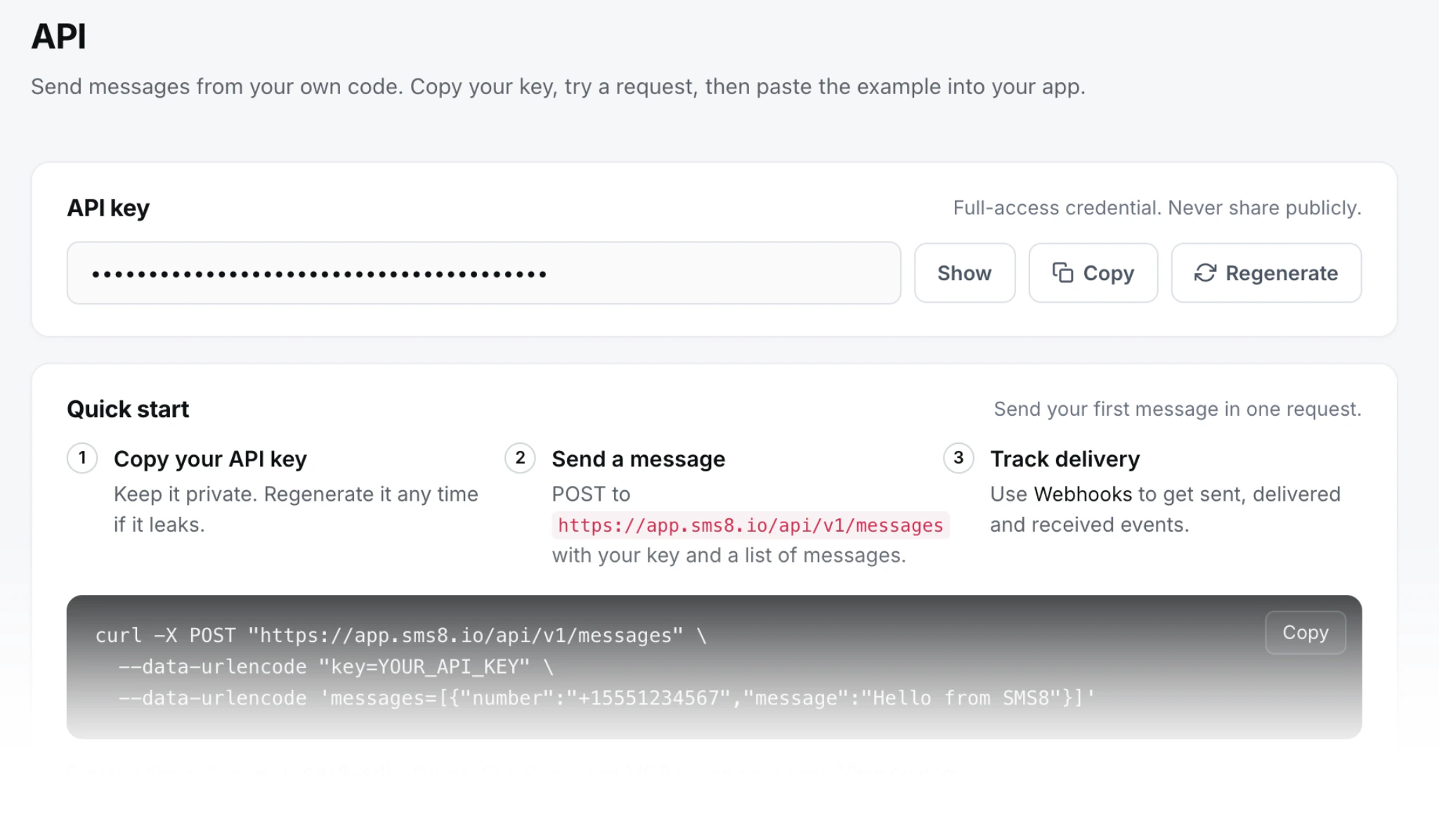
Authentication is your API key in the X-Api-Key header. A bearer token or a form field called key also work.
curl
curl -X POST https://app.sms8.io/api/v1/messages \
  -H "X-Api-Key: $SMS8_API_KEY" \
  --data-urlencode "number=+14155550100" \
  --data-urlencode "message=Hi Sam, here is your receipt. Thanks for visiting." \
  --data-urlencode "type=mms" \
  --data-urlencode "attachments=https://cdn.example.com/receipts/8841.jpg"
Node, with sms8-sdk
import { Sms8 } from 'sms8-sdk';

const sms8 = new Sms8({ apiKey: process.env.SMS8_API_KEY });

const res = await sms8.sendSMS({
  phone: '+14155550100',
  message: 'Here is the floor plan for Saturday',
  attachments: ['https://cdn.example.com/plan.jpg'],
});

if (!res.success) throw new Error(res.error);
console.log('queued', res.messageId);
In the SDK, passing attachments is what makes it an MMS. There is no separate method.
Python, with requests
import os, requests

r = requests.post(
    "https://app.sms8.io/api/v1/messages",
    headers={"X-Api-Key": os.environ["SMS8_API_KEY"]},
    data={
        "number": "+14155550100",
        "message": "Your new menu is here",
        "type": "mms",
        "attachments": "https://cdn.example.com/menu-nov.jpg",
    },
    timeout=30,
)
body = r.json()
if not body.get("success"):
    raise RuntimeError(body.get("error"))
Command line
sms8 send +14155550100 "Here is the flyer" --attachment=https://cdn.example.com/flyer.jpgThe guide to sending SMS from the terminal covers installing the CLI and using it in scripts.
What comes back, and how do I know it arrived?
A successful call returns JSON with "success": true and the queued message under data.messages, including its ID. The status then moves from queued through sending and sent to delivered or failed. Two ways to follow it:
- Webhooks. Subscribe to the sent, delivered and failed events and SMS8 posts each change to your server, signed with an
X-Signatureheader. This is the right choice for anything automated. The setup, payload and signature code are in webhook vs polling for incoming SMS. - Lookup by ID.
POST /api/v1/messages/readwith the ID returns the current status. Fine for a one-off check.
If an MMS fails, the usual causes are boring: the image URL was not reachable, the sending phone had mobile data off, or the recipient's carrier rejected the size. Fix the cause and put the message back in the queue with POST /api/v1/messages/resend.
Can I send MMS in bulk?
Yes, with care. You can send one call per recipient, or send to a saved contact list in one call. Each message still leaves through a real SIM, and MMS takes longer per message than SMS because the phone uploads the image each time. Plan on the same bulk pace as SMS, one message every 10 to 30 seconds per SIM, and expect MMS to sit at the slower end. To send more, pair more phones and set option=1 so SMS8 rotates across them, or option=2 to use both SIMs on dual-SIM phones.
For promotions with a picture, the campaign screen in the dashboard does the pacing, scheduling and opt-out handling for you. The API is the better fit for transactional pictures: receipts, delivery photos, tickets, maps and QR codes sent one at a time when something happens.
What does MMS cost through a cloud API compared with your own phone?
Cloud messaging providers price MMS per message, and it costs noticeably more than SMS. As listed on their sites in November 2026:
| Provider | US outbound MMS base price | Carrier fees on top | Source |
|---|---|---|---|
| Twilio | USD 0.022 per message (long code, toll-free and short code) | Yes, for example USD 0.009 for AT&T and USD 0.01 for T-Mobile | Twilio US pricing |
| Telnyx | USD 0.015 per message part (local numbers, including 10DLC) | Yes, for example USD 0.009 for AT&T, USD 0.007 for Verizon and USD 0.01 for T-Mobile | Telnyx messaging pricing |
| SMS8 | No per-message fee | None from SMS8. Your own SIM plan applies | SMS8 pricing |
Twilio also lists inbound MMS at USD 0.0165 per message on long codes, so replies with pictures are billed too. And sending business MMS on US long codes through a cloud provider means A2P 10DLC registration, which carries its own fees and review time.
A rough worked example using only those listed numbers: 5,000 outbound MMS a month to US numbers on Twilio is USD 110 in base fees, plus roughly USD 45 to 50 in carrier fees if your list is spread across the large carriers, before 10DLC costs. On Telnyx the base would be USD 75 plus similar carrier fees. On SMS8 the same 5,000 MMS fall under the flat plan: USD 29 a month for one phone, USD 89 for five, USD 229 for twenty, with unlimited SMS and MMS and yearly billing at half the monthly price. What you pay on top is your mobile plan, so pick one that includes MMS.
That is why teams switch their MMS to SMS8: picture messages from a real number customers know, no per-message meter, and no A2P 10DLC filing. To send more, pair more phones.
When is MMS better than an SMS with a link?
A text with a link is cheaper on cloud providers and lighter on the phone, so it is worth asking whether you need MMS at all. MMS wins when the picture is the message: a photo of a delivered parcel at the door, a QR code that must open at a gate with no signal, a flyer people will glance at without tapping anything, or a receipt they want to keep in the thread. A link wins when the content is long, changes after sending, or needs tracking, like a PDF contract or a booking page.
Many links in business texts also look like spam to recipients, and some carriers filter shortened links. A picture sent from a number the person already knows avoids both problems. Since SMS8 does not charge more for MMS than for SMS, the choice comes down to what serves the reader, not what saves a fraction of a cent.
Does MMS work internationally from my own phone?
MMS is mostly a domestic service. Many carriers handle MMS to foreign numbers poorly or charge extra for it, and support varies a lot by country. The reliable setup is a phone with a local SIM in the country you are texting, sending to numbers on local networks. If you serve several countries, pair one phone per country and choose the sender with the devices field. For international picture messages that must arrive, test first, and keep a text-only fallback that includes a link to the image.
A checklist before your first MMS send
- Send a test MMS from your SMS8 phone manually, in its normal messaging app, to confirm MMS works on that SIM.
- Make sure mobile data is on and battery optimization is off for the SMS8 app.
- Host the image on public HTTPS and open the link in a private browser window to confirm it loads without a login.
- Keep the image under about 600 KB. A JPEG export at around 80 percent quality usually does it.
- Put the essential information in the text as well as the image.
- Send to your own phones on two different carriers before sending to customers.
- Register a webhook for delivered and failed events so you see problems as they happen.
Why choose SMS8 for MMS
SMS8 sends picture messages from your own number with no per-message meter.
- Your own number. Texts leave from the SIM in your own Android phone, so customers see a number they know and can reply to.
- A flat price with unlimited messages. USD 29 a month for one phone or Mac, USD 89 for five and USD 229 for twenty, with unlimited SMS and MMS and no per-message fee. Yearly billing is half the price.
- No A2P 10DLC filing. Texts go person-to-person from your SIM, so there is no brand, campaign or monthly campaign fee to manage.
- A developer-friendly API.
POST https://app.sms8.io/api/v1/messageswith anX-Api-Keyheader, signed webhooks retried for up to 30 days, andnpm install sms8-sdkfor the SDK and thesms8CLI. - Setup in minutes. Install the app, pair the phone and copy your API key. The 3-day trial includes 30 messages and needs no card.
Start the 3-day trial with 30 messages and no card, or compare plans on the SMS8 pricing page.