
Part of the guide Android SMS Gateway App and APK: Unlimited SMS
On this page
- Key takeaways
- Why use two SIMs on one gateway phone?
- Does eSIM work for an SMS gateway?
- How do I pick the SIM for each message?
- How do I route a campaign across SIMs and phones?
- Which routing setup fits which business?
- What should I check with my carriers?
- Does Android's default SMS SIM matter?
- How do replies work with two SIMs?
- Troubleshooting two-SIM setups
- What does a two-SIM setup cost?
- Why choose SMS8 for dual-SIM sending
Key takeaways
- A dual-SIM Android phone paired with SMS8 is two senders in one device: two numbers, or twice the sending.
- An eSIM works the same way as a physical card. It shows up as one of the phone's SIM slots.
- Pick the SIM per message with
simSlot:0is SIM 1 and1is SIM 2. Pick the phone withdevices. - Spread a campaign with
option:1rotates across every paired phone,2across every SIM on every phone. - Each SIM follows its own carrier's plan and fair use terms, so check both lines, not just one.
To send SMS from two SIMs on one phone, pair a dual-SIM or eSIM Android phone with SMS8. Both SIMs appear under that device, and you choose which one sends each message, either in the dashboard and integrations, or with the simSlot field in the API, where 0 is SIM 1 and 1 is SIM 2. If you do not care which line sends, let SMS8 rotate across every SIM so a long list is shared evenly. This guide covers both setups, how routing works across several phones, and the carrier details that decide whether two lines really double your capacity. For the product overview, see the SMS8 Android SMS gateway page.
Why use two SIMs on one gateway phone?
There are two common reasons, and they lead to different setups.
- Two numbers. Each SIM is a separate business line. One branch, client, brand or country uses SIM 1, another uses SIM 2. Customers see the number they know, and replies come back to the line the message was sent from.
- More sending. Both SIMs carry the same kind of traffic. A campaign that would take a long time on one number is split across both, so each SIM carries only half of the list.
There is also a quieter reason: keeping traffic apart. Some teams send login codes and alerts from one SIM and campaigns from the other, so a broadcast never sits in front of a code. SMS8 can also handle this on a single SIM with priority sending, which we cover below.
If you are still picking a handset, our guide to turning an old Android phone into an SMS gateway covers the phone, the SIM plan and the battery settings. A recent dual-SIM handset is a sensible standard gateway phone.
Does eSIM work for an SMS gateway?
Yes. To SMS8, an eSIM is a SIM like any other. On a phone with one physical slot and one eSIM, or with two eSIM profiles active, Android reports two SIMs, and SMS8 lists both under the device. You choose between them the same way.
A few practical points about eSIM:
- Only active profiles send. A phone can store several eSIM profiles but usually keeps one or two active at a time. Only an active profile shows up as a sending SIM.
- Check the slot order after changes. If you swap an eSIM profile or move a physical card, open the Devices page and confirm which number now sits in SIM 1 and SIM 2 before you send.
- Keep the activation details. If the phone is reset or replaced, you will need the carrier's eSIM activation again. Store it with the phone's records.
- Test texting on the new line. Send one message by hand from the phone's own messaging app on that SIM before relying on it.
How do I pick the SIM for each message?
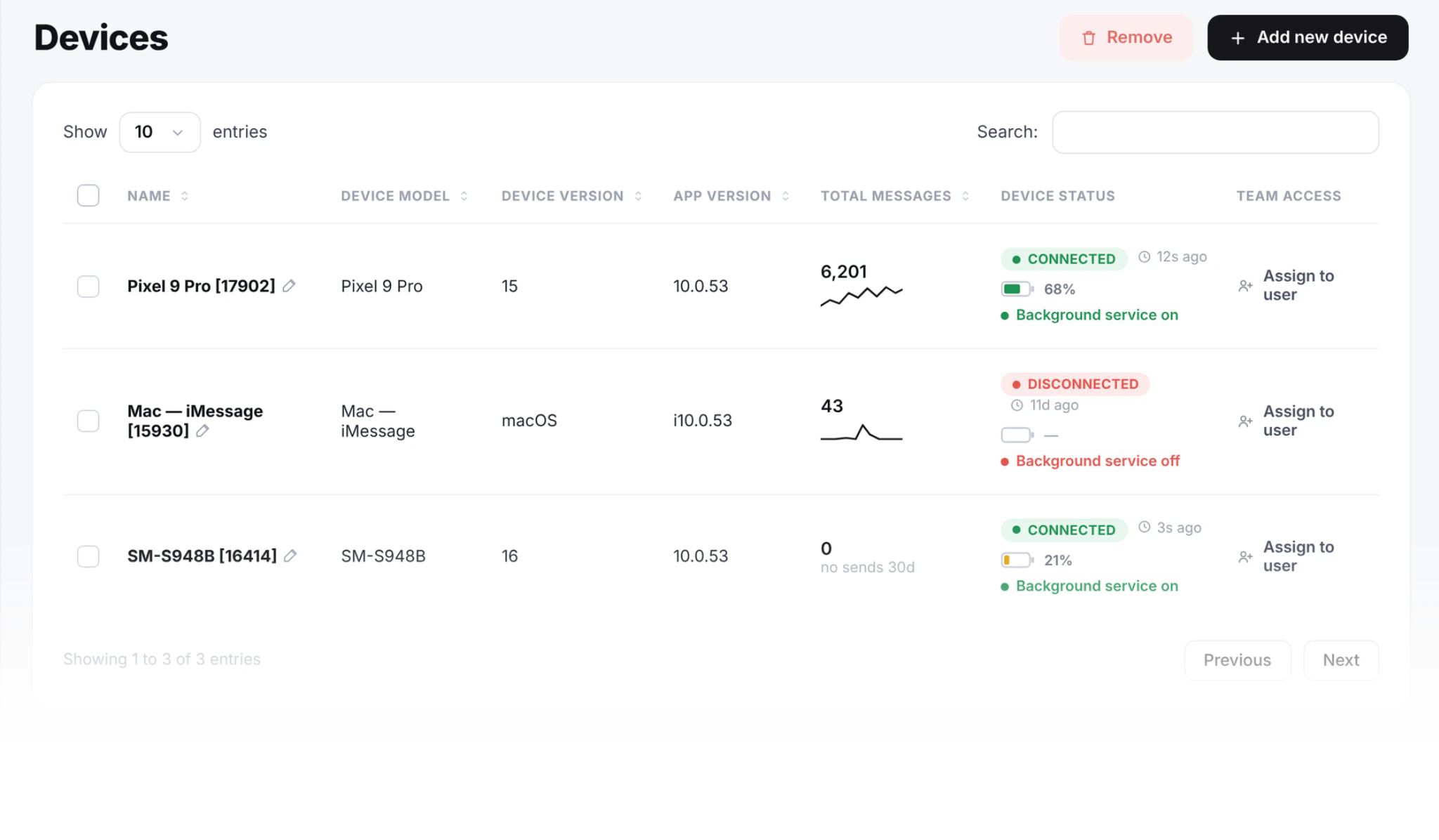
Every paired phone shows its SIMs on the Devices page. From there you can choose the sender in three places.
In the dashboard and campaigns
When you send a message or start a campaign, choose the device and the SIM. Replies return on the SIM that received them and appear in your shared inbox, where both lines show in the same feed and stay separate in each thread.
In integrations
- GoHighLevel: choose which SIM a sub-account uses, or let SMS8 alternate between both. Two locations can each have their own number from the same handset.
- WooCommerce: the device picker lists every SIM slot, so store texts can leave one SIM while the other stays for calls or other sends.
- Google Sheets: pin a sheet to a given SIM, useful for regional senders.
- Make: choose the SIM per scenario, or let SMS8 alternate.
- Zapier: the Send SMS action picks the phone. For a choice of SIM, call the SMS8 API from a Webhooks by Zapier step.
In the API
The send endpoint is POST https://app.sms8.io/api/v1/messages with your key in the X-Api-Key header. Three fields decide the sender:
| Field | Values | What it does |
|---|---|---|
devices | Device IDs, comma separated | Which phone sends. Empty means your default phone |
simSlot | 0 or 1 | 0 is SIM 1, 1 is SIM 2. Empty means the device default, usually SIM 1 |
option | 0, 1 or 2 | 0 uses the listed devices, 1 rotates across every paired phone, 2 rotates across every SIM on every phone |
Send from SIM 2 on device 42:
curl -X POST https://app.sms8.io/api/v1/messages \
  -H "X-Api-Key: $SMS8_API_KEY" \
  --data-urlencode "number=+14155550100" \
  --data-urlencode "message=Hi, this is the Downtown branch. Your table is ready." \
  --data-urlencode "devices=42" \
  --data-urlencode "simSlot=1"
The same with the Node SDK (npm install sms8-sdk):
import { Sms8 } from 'sms8-sdk';

const sms8 = new Sms8({ apiKey: process.env.SMS8_API_KEY });

await sms8.sendSMS({
  phone: '+14155550100',
  message: 'Hi, this is the Downtown branch. Your table is ready.',
  deviceId: 42,
  simSlot: 1,
});
The response tells you which phone and SIM took the message, along with a message ID and the time it was queued. To find device IDs and see the SIMs on each phone, call GET /api/v1/devices. It also returns battery, signal and last seen time for every phone. The SMS8 API documentation lists every field, and our SMS API guide for developers shows the same calls in Python and PHP.
How do I route a campaign across SIMs and phones?
When the goal is capacity rather than a specific number, let SMS8 share the work.
Rotate across every SIM
Set option=2 and SMS8 uses every SIM on every paired phone in turn, including both slots of dual-SIM phones. A long list is split evenly, so each number carries only its share. This is the setting most teams want for broadcasts.
Rotate across phones
Set option=1 to rotate across every paired phone, each sending from its default SIM. Useful when your phones are single-SIM, or when you want to keep the second SIM of each phone out of campaign traffic.
One random phone per send
For small, steady traffic spread over several phones, a random device per request is another option: useRandomDevice=1 in the REST API, or randomDevice in the SDK.
What rotation does to your pace
SMS8 paces bulk sending at one message every 10 to 30 seconds per SIM. That pace applies to each SIM separately, so every SIM you add increases how much the whole setup can send in an hour. Two SIMs in one phone roughly double one phone's campaign throughput, and two dual-SIM phones give you four senders. If a list takes too long, add a SIM or a phone rather than pushing one number harder.
Codes and alerts during a campaign
You do not need a separate SIM to keep login codes fast. Mark a message with prioritize=1 and it goes ahead of campaign traffic waiting on the same phone. Many teams still prefer a dedicated SIM for codes, because it keeps their sign-up number separate from their marketing number. The SMS OTP verification API lets you pass the phone or SIM to send codes from on each request.
Which routing setup fits which business?
| Setup | Routing | Why |
|---|---|---|
| Two branches, one phone | Fixed SIM per branch | Each branch keeps its own number and its own replies |
| Agency with two clients on one handset | Fixed SIM per client or sub-account | Client texts never leave the other client's number |
| Weekly promotion to a large list | option=2 across all SIMs | The list is shared evenly, so it finishes sooner |
| App sending sign-up codes | Dedicated SIM, or prioritize=1 | Codes arrive first, even during a broadcast |
| Two countries | One SIM or phone per country, fixed | Local SIM for local numbers, local caller ID |
What should I check with my carriers?
Two SIMs are two separate contracts. SMS8 sends whatever you ask, with no cap and no fee per message, so the carrier terms on each line are your real limits.
- Texting on both lines. Each SIM needs a plan that includes SMS. A data-only eSIM cannot send texts.
- Fair use, per line. Many plans include unlimited texting under a fair use policy. Read it for both SIMs, especially about volume and business use. Some prepaid plans include a daily SMS allowance instead of unlimited texting. Know each number.
- Mixing carriers. Putting SIMs from two different carriers in one phone spreads your sending across two networks and gives you a backup if one network has a bad day. It also means two sets of terms to follow.
- Data on one SIM. On most phones only one SIM carries mobile data at a time. Choose a data SIM with a working bundle, and keep Wi-Fi on as the main connection. Both SIMs can still send and receive texts.
- MMS. MMS uses mobile data and an MMS-capable plan. If you send picture messages, send them from the SIM that has data, or test MMS on each line first.
- Local numbers for local contacts. Texts within a country usually cost what your plan charges for any SMS. For international contacts, a local SIM in that country is the reliable setup.
- Prepaid credit. Top up both lines. A SIM without credit fails every send, and rotation will keep handing it work.
Consent and opt-out rules apply to every line you send from. Our guide to sending bulk SMS from your own phone legally covers the basics, and the complete Android SMS gateway guide covers scaling to many phones.
Does Android's default SMS SIM matter?
When you choose a SIM in SMS8, the message leaves that SIM, whatever the phone's own default is for texts typed by hand. If you leave simSlot empty, the device default is used, which is usually SIM 1. Our advice is to be explicit: if a number matters, name the SIM, and if it does not, use rotation. Then a change to the phone's settings never changes who your customers hear from.
How do replies work with two SIMs?
A reply arrives on the SIM that sent the original message. SMS8 shows it in the shared inbox and on your webhook, linked to the conversation. When you answer from the inbox, the reply leaves the same line the message came in on. So a customer who texted the Downtown number keeps talking to the Downtown number, even though both lines live in one handset.
If you rotate a campaign across SIMs, each contact gets the message from one of your numbers, and any reply goes back to that number. Keep that in mind for campaigns where people are likely to save the number: a fixed SIM gives every contact the same sender every time.
Troubleshooting two-SIM setups
| What you see | Likely cause | Fix |
|---|---|---|
| Only one SIM listed | Second SIM or eSIM profile is off, or was added after pairing | Turn the SIM on in Android settings, open SMS8 and let it refresh, then check the Devices page |
| Messages from SIM 2 fail | No texting plan, no credit or no signal on that line | Send a text by hand from SIM 2, top up, check signal |
| Wrong number used | simSlot left empty, or slots swapped after a SIM change | Set simSlot on every send and recheck slot order on the Devices page |
| Campaign slower than expected | Rotation is off, so one SIM carries the whole list | Use option=2, or add another phone |
What does a two-SIM setup cost?
SMS8 counts phones and Macs, not SIMs. A dual-SIM phone is one device on your plan. Plans are USD 29 a month for 1 connected phone or Mac, USD 89 for 5 and USD 229 for 20, with unlimited SMS and MMS and yearly billing at half the monthly price. Your texts are covered by each SIM's own plan. See SMS8 pricing for the plan comparison.
Why choose SMS8 for dual-SIM sending
With SMS8 a dual-SIM phone is one device on your plan, so two lines cost the same as one.
- Your own number. Texts leave from the SIM in your own Android phone, so customers see a number they know and can reply to.
- A flat price with unlimited messages. USD 29 a month for one phone or Mac, USD 89 for five and USD 229 for twenty, with unlimited SMS and MMS and no per-message fee. Yearly billing is half the price.
- No A2P 10DLC filing. Texts go person-to-person from your SIM, so there is no brand, campaign or monthly campaign fee to manage.
- Scale by adding phones. Each SIM sends one message every 10 to 30 seconds, and SMS8 spreads campaigns across every paired phone.
- API, MCP and integrations. A REST API with signed webhooks, an MCP server at mcp.sms8.io, and official apps for GoHighLevel, Zapier, Make, WordPress and Google Sheets.
Start the 3-day trial with 30 messages and no card, or compare plans on the SMS8 pricing page.